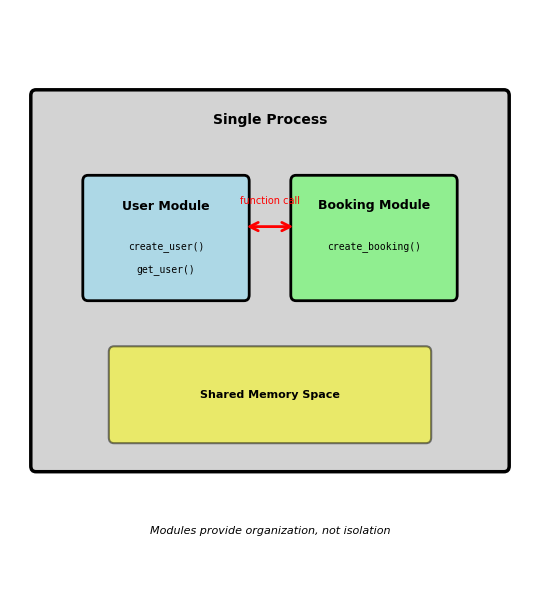
Code Organization - From Functions to Services
Software engineering fundamental: Separating concerns through interfaces
Within a single application:
# User management module
def create_user(email, password):
    user_id = generate_id()
    hash_pwd = hash_password(password)
    store_user(user_id, email, hash_pwd)
    return user_id

# Booking module
def create_booking(user_id, flight_id):
    user = get_user(user_id)  # Function call
    if user.is_active:
        return store_booking(user_id, flight_id)
Module boundaries provide:
- Separation of concerns: User logic isolated from booking logic
- Independent modification: Change password hashing without touching bookings
- Contract-based interface:
get_user(user_id) → Userdefines expectations - Parallel development: Different developers work on different modules
Single process limitation:
- Shared memory space: Module bug can crash entire application
- Shared resources: CPU-intensive user validation blocks booking requests
- Deployment coupling: Update user module requires redeploying bookings
- Technology lock-in: All modules must use same language/framework
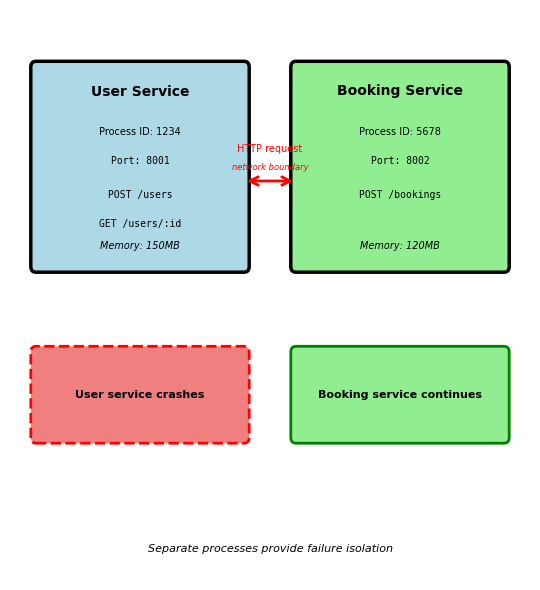
Process Isolation - Separate Failure Domains
Moving from modules to separate processes
Same code, different execution model:
# User service (separate process)
# Listens on port 8001
@app.route('/users', methods=['POST'])
def create_user():
    email = request.json['email']
    password = request.json['password']
    user_id = generate_id()
    hash_pwd = hash_password(password)
    store_user(user_id, email, hash_pwd)
    return {'user_id': user_id}

# Booking service (separate process)
# Listens on port 8002
@app.route('/bookings', methods=['POST'])
def create_booking():
    user_id = request.json['user_id']
    flight_id = request.json['flight_id']

    # HTTP request instead of function call
    response = requests.get(f'http://localhost:8001/users/{user_id}')
    user = response.json()

    if user['is_active']:
        return store_booking(user_id, flight_id)
Why separate processes:
- Failure isolation: User service crash doesn’t terminate booking service
- Resource isolation: CPU-intensive user validation doesn’t block booking requests
- Independent deployment: Update user service without restarting booking service
- Technology flexibility: User service in Python, booking service in Go
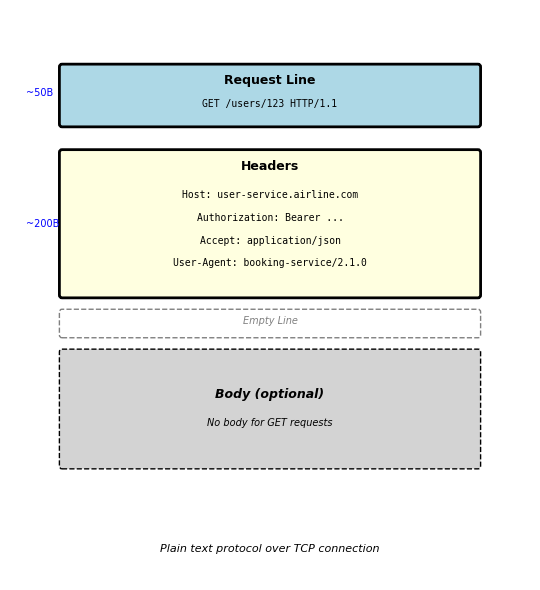
HTTP Request Structure - Client to Server
HTTP request anatomy:
GET /users/123 HTTP/1.1
Host: user-service.airline.com
Authorization: Bearer eyJhbGc...
Accept: application/json
User-Agent: booking-service/2.1.0
Request line components:
- Method:
GET- what operation to perform - Path:
/users/123- which resource to access - Protocol:
HTTP/1.1- version of HTTP
Request headers (metadata):
Host: Which server to route to (required in HTTP/1.1)Authorization: Credentials for authenticationAccept: What response format client understandsUser-Agent: Identifies client making request
Headers are key-value pairs: Header-Name: value
Empty line separates headers from body
Requests without body (GET, DELETE) end after headers
Typical request size:
- Typical GET request: 250-400 bytes
- Headers: 200-350 bytes
- Request line: 50 bytes
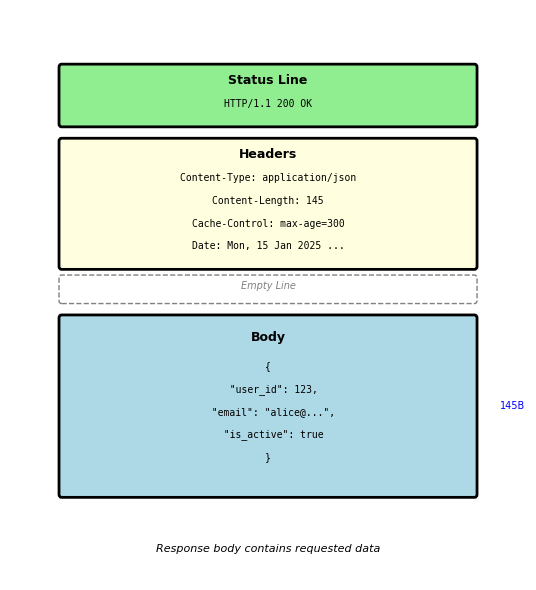
HTTP Response Structure - Server to Client
HTTP response anatomy:
HTTP/1.1 200 OK
Content-Type: application/json
Content-Length: 145
Cache-Control: max-age=300
Date: Mon, 15 Jan 2025 14:30:00 GMT
{
  "user_id": 123,
  "email": "alice@example.com",
  "is_active": true,
  "created_at": "2024-01-10T08:00:00Z"
}
Status line components:
- Protocol:
HTTP/1.1 - Status code:
200- numeric result indicator - Reason phrase:
OK- human-readable description
Response headers:
Content-Type: Format of response body (JSON, HTML, etc)Content-Length: Body size in bytesCache-Control: How long response can be cachedDate: When response was generated
Response body:
- Actual data returned by server
- Format specified by
Content-Typeheader - In this case: JSON with user data
Empty line separates headers from body (same as request)
4xx vs 5xx: Client Problem vs Server Problem
4xx = Your request has a problem
POST /users
Content-Type: application/json

{"email": "not-an-email", "age": "twenty"}
Response: 400 Bad Request
{
  "errors": [
    {"field": "email", "message": "Invalid email format"},
    {"field": "age", "message": "Must be integer"}
  ]
}
Client must fix the request:
- Validate input before sending
- Check required fields
- Use correct data types
5xx = Server has a problem
# Server code with bug
@app.route('/users/<id>')
def get_user(id):
    user = db.query(f"SELECT * FROM users WHERE id = {id}")
    return user.to_dict()  # Crashes if user is None
Response: 500 Internal Server Error
{
  "error": "Internal server error",
  "request_id": "7f3c6b2a"
}
Client should retry (server might recover):
- Use exponential backoff
- Have circuit breaker
- Log for debugging
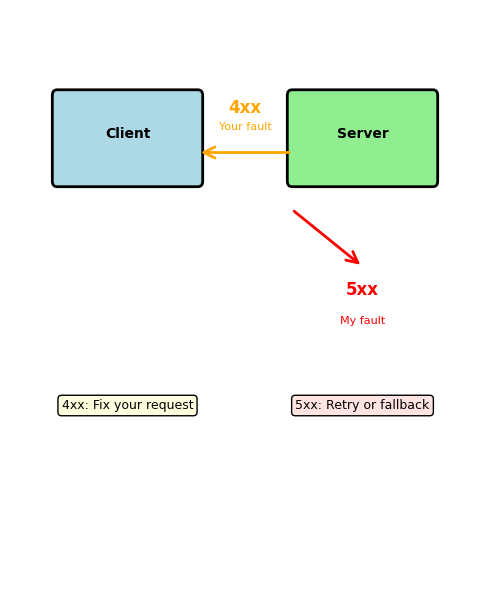
Retry strategies differ:
4xx errors: Don’t retry same request
- Fix the problem first
- 401: Get new token
- 429: Wait for rate limit reset
5xx errors: Retry might work
- Server might recover
- Different server might work
- Use exponential backoff
Safe and Unsafe Methods: Retry Implications
Safe methods can be called without side effects
# Safe to retry, cache, prefetch
GET /users/123
GET /users/123  # Same result
GET /users/123  # Same result

# Browser/proxy can cache
Cache-Control: max-age=300
Unsafe methods change server state
# DELETE is idempotent but unsafe
DELETE /users/123  # Returns 204 No Content
DELETE /users/123  # Returns 404 Not Found
DELETE /users/123  # Returns 404 Not Found
# Final state same, but state did change

# POST is neither safe nor idempotent
POST /orders       # Creates order 1
POST /orders       # Creates order 2 (duplicate!)
POST /orders       # Creates order 3 (duplicate!)
Network failure handling:
try:
    response = requests.post('/orders', data)
except requests.Timeout:
    # Did server process request before timeout?
    # Can't know - need idempotency key
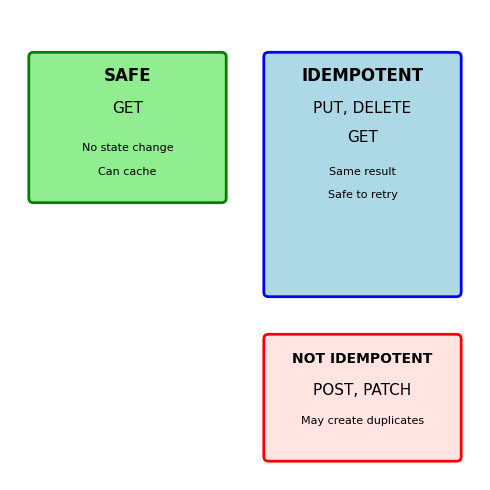
Retry safety:
Always safe: GET
Safe if idempotent: PUT, DELETE
Dangerous: POST, PATCH
Need idempotency keys for POST/PATCH
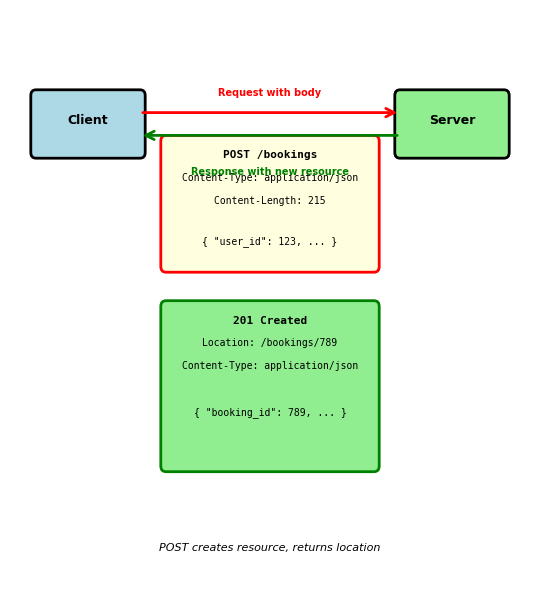
Request with Body - POST Example
Creating new booking via POST:
POST /bookings HTTP/1.1
Host: booking-service.airline.com
Content-Type: application/json
Content-Length: 215
Authorization: Bearer eyJhbGc...
{
  "user_id": 123,
  "flight_id": 456,
  "seat": "12A",
  "payment": {
    "method": "credit_card",
    "amount": 450.00,
    "currency": "USD"
  },
  "notifications": {
    "email": true,
    "sms": false
  }
}
Additional headers for body:
Content-Type: Specifies body format (JSON, XML, form data)Content-Length: Exact size in bytes (required by HTTP/1.1)
Server response:
HTTP/1.1 201 Created
Location: /bookings/789
Content-Type: application/json
Content-Length: 87
{
  "booking_id": 789,
  "status": "confirmed",
  "confirmation_code": "ABC123"
}
201 Created status indicates:
- New resource successfully created
Locationheader provides URL to access new resource- Response body contains resource details
Connection Lifecycle - TCP Under HTTP
HTTP runs over TCP connection:
1. TCP handshake (connection establishment):
Client            Server
  |                 |
  |--- SYN -------->| (50ms)
  |<-- SYN-ACK -----| (50ms)
  |--- ACK -------->| (50ms)
  |                 |
  [TCP established]
- 3-way handshake establishes connection
- Total latency: 150ms (client-server round trip)
- Required before any HTTP data sent
2. HTTP request/response over established connection:
  |                 |
  |- GET /users/123->| (50ms)
  |<- 200 OK + data -| (50ms)
  |                 |
- Request sent over TCP connection
- Response returned on same connection
- Total: 100ms for request/response
3. Connection close:
  |                   |
  |---- FIN --------->|
  |<--- FIN-ACK ------|
  |                   |
  [Connection closed]
Total measured latency for single request:
- TCP handshake: 150ms
- HTTP request/response: 100ms
- Total: 250ms
Round-trip latency varies by distance:
- Same datacenter: 1-2ms per round trip
- Cross-coast US: 60-80ms per round trip
- Transpacific: 150-200ms per round trip
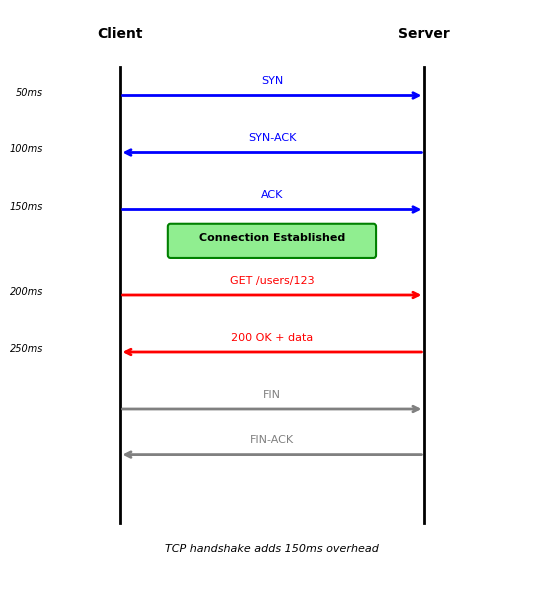
3-way handshake before HTTP request
Connection Pooling: Managing Concurrent Requests
A single connection serializes requests — concurrent clients need concurrent connections
Single connection serves requests sequentially:
Connection 1: [Req1]->[Resp1]->[Req2]->[Resp2]->[Req3]->[Resp3]
Connection pool serves requests in parallel:
Connection 1: [Req1]->[Resp1]        [Req4]->[Resp4]
Connection 2:        [Req2]->[Resp2]        [Req5]->[Resp5]
Connection 3:               [Req3]->[Resp3]
Connection pool implementation:
from urllib3 import PoolManager

# Create pool with size limits
pool = PoolManager(
    num_pools=10,      # Max 10 different hosts
    maxsize=20,        # Max 20 connections per host
    block=True         # Wait if pool exhausted
)

# Connections managed automatically
response = pool.request('GET', 'http://api/users/123')
# Connection returned to pool after response read
Pool sizing considerations:
- Too small: Requests wait for available connection
- Too large: Memory overhead, server connection limits
- Typical: 10-50 connections per host
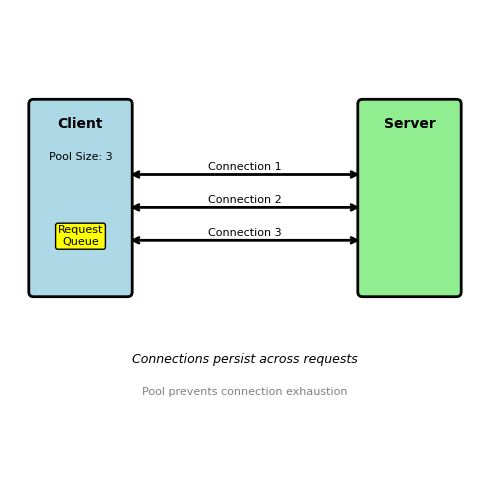
Pool exhaustion behavior:
# Pool size: 2, but 3 concurrent requests
pool = PoolManager(maxsize=2)

# Thread 1: Gets connection
# Thread 2: Gets connection
# Thread 3: Blocks waiting for available connection
# Thread 1 completes: Connection returned to pool
# Thread 3: Gets recycled connection
Real scenarios requiring pools:
- Web server → Database (10-20 connections)
- API Gateway → Backend services (50-100 per service)
- Microservice → Other microservices (10-30 per service)
REST - Architectural Style for APIs
REST: Representational State Transfer
Architectural style, not a protocol or standard
Coined by Roy Fielding (2000 dissertation) based on HTTP design principles
Core idea: Resources identified by URLs, manipulated via standard HTTP methods
What REST is NOT:
- Not a specification with compliance tests
- Not a protocol like HTTP or SOAP
- Not limited to JSON (can use XML, HTML, etc)
- Not the only way to design APIs
What REST provides:
- Set of design principles for building APIs
- Conventions for mapping operations to HTTP methods
- Guidelines for URL structure
- Constraints that enable scalability and simplicity
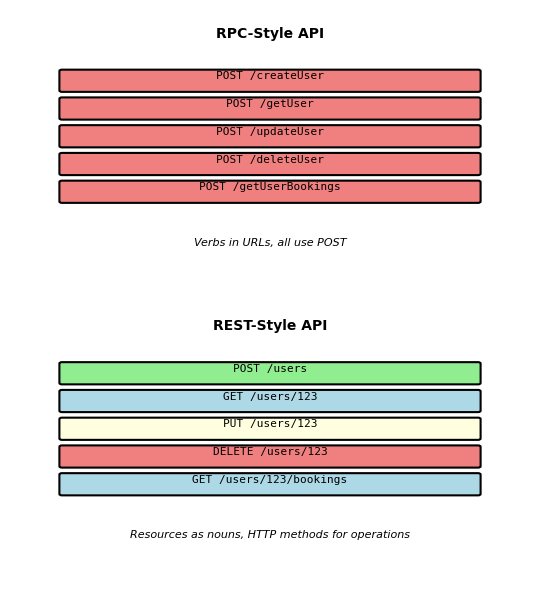
REST vs other approaches:
- RPC-style:
/createUser,/getUser,/deleteUser(verbs in URLs) - REST-style:
POST /users,GET /users/123,DELETE /users/123(resources + methods)
REST treats everything as a resource accessible via URL
Framework Choice: Flask
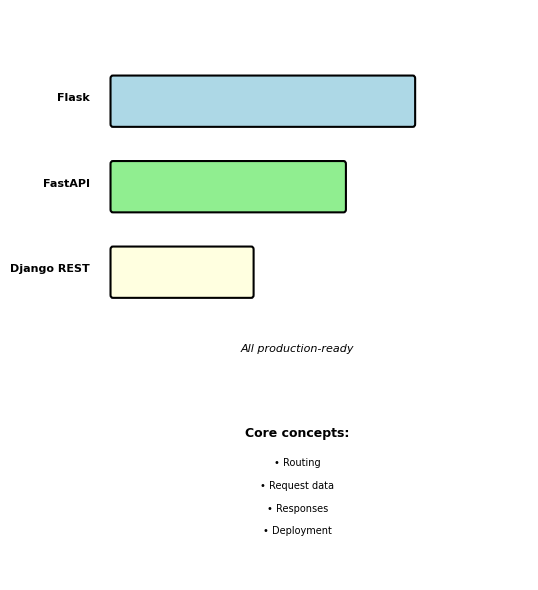
Python web frameworks for APIs:
- Flask: Minimal, explicit routing
- FastAPI: Modern, type-safe
- Django REST Framework: Full-featured
EE 547 uses Flask
Minimal abstractions make core concepts visible. Patterns transfer to FastAPI and Django REST.
Framework-agnostic concepts covered:
- Request/response flow
- URL routing and parameters
- Request data extraction
- Production deployment
Web Framework Architecture
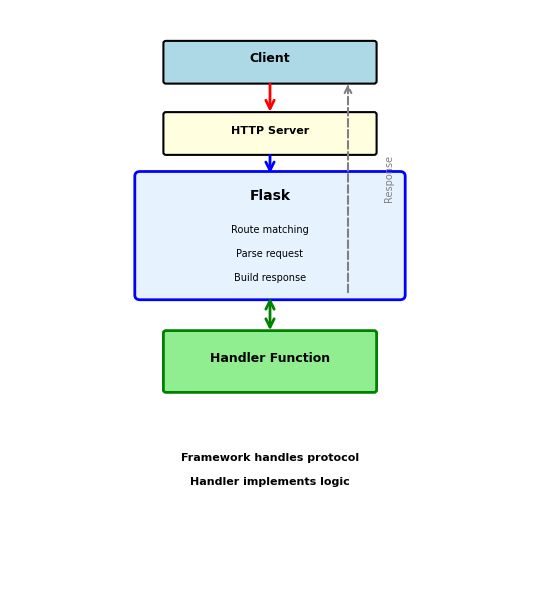
Framework sits between HTTP server and handler code
Client
↓ HTTP Request
HTTP Server (gunicorn)
↓ WSGI
Flask Framework
↓ Calls
Handler Function
↓ Returns
Flask Framework
↓ WSGI
HTTP Server
↓ HTTP Response
Client
What Flask does:
- Match URL to function
- Parse incoming data
- Call handler function
- Build HTTP response
Handler implementation:
- Functions that process requests
- Business logic
- Return data
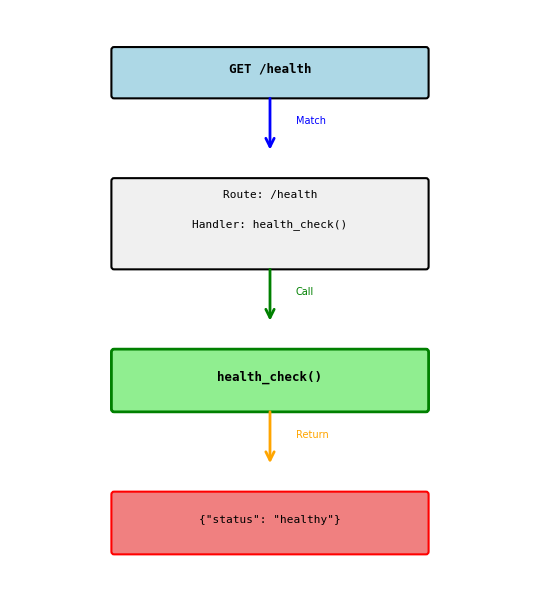
Simple Route Example
Connecting a URL to a function
from flask import Flask app = Flask(__name__) @app.route('/health') def health_check(): return {'status': 'healthy'}
What happens:
@app.route('/health')registers the route- Client sends:
GET /health - Flask sees
/healthmatches registered route - Flask calls
health_check()function - Function returns dict
- Flask converts to JSON response
Response:
HTTP/1.1 200 OK
Content-Type: application/json
{"status": "healthy"}
Flask automatically:
- Sets status code to 200
- Sets Content-Type header
- Converts dict to JSON
HTTP Methods in Routes
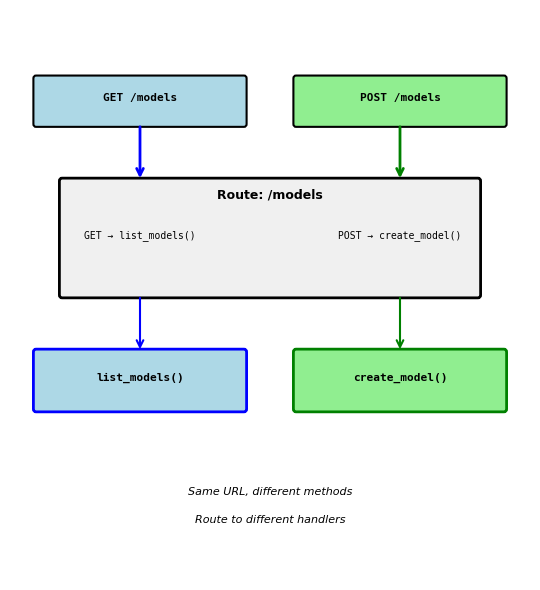
Restricting which HTTP methods a route accepts
@app.route('/models', methods=['GET'])
def list_models():
    return {'models': [...]}

@app.route('/models', methods=['POST'])
def create_model():
    return {'id': 123}, 201
Same URL, different methods:
GET /models→ callslist_models()POST /models→ callscreate_model()PUT /models→ 405 Method Not Allowed
Why separate by method:
- GET: Read data (list models)
- POST: Create data (new model)
- Different operations, different functions
- Clear separation of concerns
Default is GET only:
@app.route('/health')  # Only accepts GET
def health():
    return {'status': 'ok'}
URL Parameters
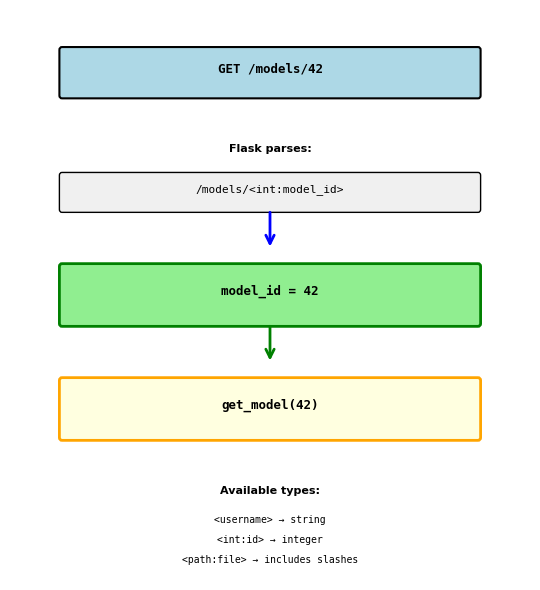
Capturing values from the URL
@app.route('/models/<model_id>')
def get_model(model_id):
    return {'id': model_id}
URL: GET /models/42
Result: model_id = "42" (string)
Type conversion:
@app.route('/models/<int:model_id>')
def get_model(model_id):
    return {'id': model_id}
URL: GET /models/42
Result: model_id = 42 (integer)
URL: GET /models/abc
Result: 404 Not Found (can’t convert to int)
Multiple parameters:
@app.route('/models/<int:model_id>/predictions/<pred_id>')
def get_prediction(model_id, pred_id):
    return {'model': model_id, 'prediction': pred_id}
URL: GET /models/42/predictions/xyz
Result: model_id = 42, pred_id = "xyz"
Accessing Request Data: JSON Body
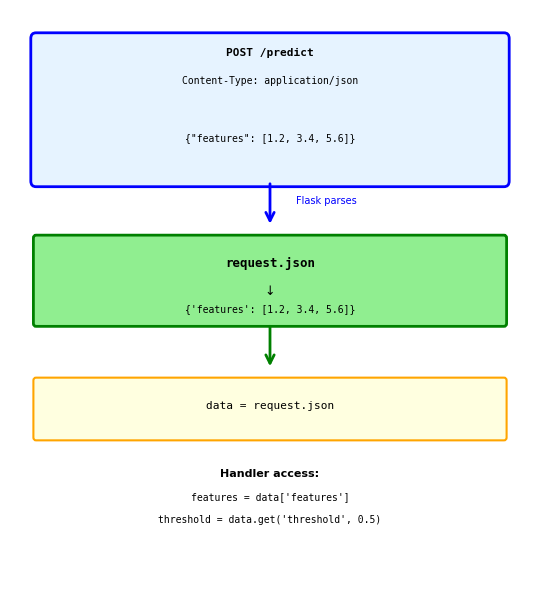
Reading JSON from request body
from flask import request

@app.route('/predict', methods=['POST'])
def predict():
    data = request.json
    # data is dict: {'features': [1, 2, 3]}

    features = data['features']
    result = model.predict(features)

    return {'prediction': float(result)}
Client sends:
POST /predict
Content-Type: application/json

{"features": [1.2, 3.4, 5.6]}
Flask automatically:
- Checks Content-Type header
- Parses JSON string
- Creates Python dict
- Makes available as
request.json
Safe access with get():
data = request.json
threshold = data.get('threshold', 0.5)  # Default if missing
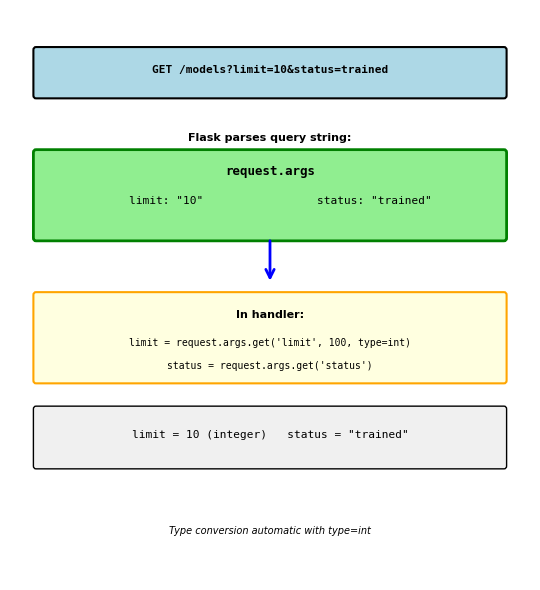
Accessing Request Data: Query Parameters
Reading parameters from URL query string
@app.route('/models')
def list_models():
    # GET /models?limit=10&status=trained

    limit = request.args.get('limit', 100, type=int)
    # limit = 10 (converted to int)

    status = request.args.get('status')
    # status = "trained"

    models = fetch_models(limit=limit, status=status)
    return {'models': models}
Query string after ? in URL:
- Key-value pairs:
key=value - Multiple params:
&separator /models?limit=10&status=trained
request.args.get() parameters:
- First arg: parameter name
- Second arg: default value if missing
type=int: convert to integer
Without default:
status = request.args.get('status') # None if missing
With default:
limit = request.args.get('limit', 100, type=int) # 100 if missing
Accessing Request Data: Headers
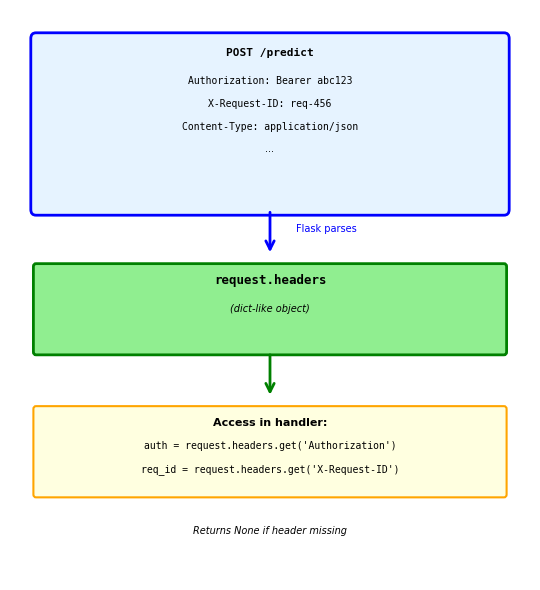
Reading HTTP headers
@app.route('/predict', methods=['POST'])
def predict():
    # Authorization header
    auth = request.headers.get('Authorization')
    # "Bearer eyJhbGci..."

    # Custom headers
    request_id = request.headers.get('X-Request-ID')

    # Content type
    content_type = request.headers.get('Content-Type')

    # Validate token
    if not auth:
        return {'error': 'Missing authorization'}, 401

    if not validate_token(auth):
        return {'error': 'Invalid token'}, 401

    # Process request
    return {'prediction': 0.87}
Common headers:
Authorization: Auth tokensContent-Type: Body formatX-Request-ID: Request trackingUser-Agent: Client information
Headers case-insensitive:
request.headers.get('Content-Type')
request.headers.get('content-type')  # Same
Building Responses: Simple Return
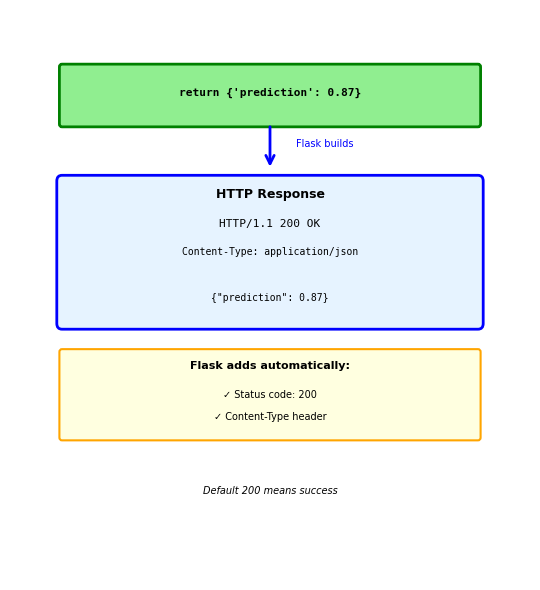
Return dict → Flask converts to JSON
@app.route('/predict', methods=['POST'])
def predict():
    result = model.predict(request.json['features'])
    return {'prediction': float(result)}
Response Flask generates:
HTTP/1.1 200 OK
Content-Type: application/json

{"prediction": 0.87}
Flask automatically:
- Sets status code to 200 (success)
- Sets Content-Type to application/json
- Converts Python dict to JSON string
- Returns properly formatted HTTP response
This is the most common pattern:
- Simple and clean
- Works for most GET/PUT requests
- Default 200 status appropriate for success
Building Responses: Custom Status Code
Return tuple: (data, status_code)
@app.route('/models', methods=['POST'])
def create_model():
    model_id = save_model(request.json)
    return {'id': model_id}, 201
Response:
HTTP/1.1 201 Created
Content-Type: application/json

{"id": 42}
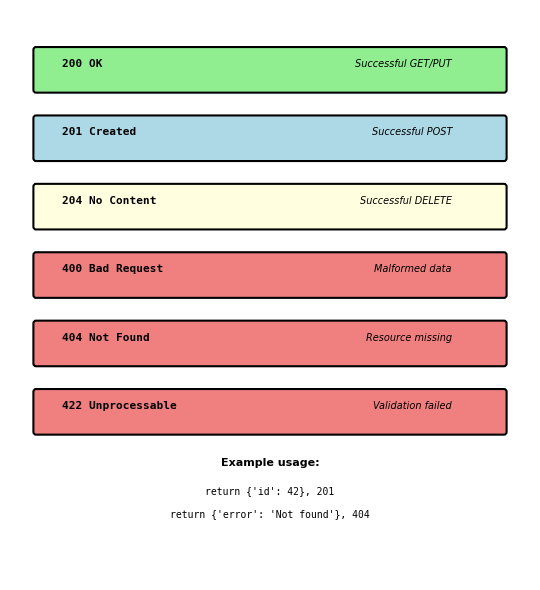
When to use different status codes:
201 Created - Resource successfully created (POST)
return {'id': new_id}, 201
204 No Content - Success but no data to return (DELETE)
return '', 204
404 Not Found - Resource doesn’t exist
return {'error': 'Model not found'}, 404
422 Unprocessable Entity - Validation failed
return {'error': 'Invalid input'}, 422
Building Responses: Adding Headers
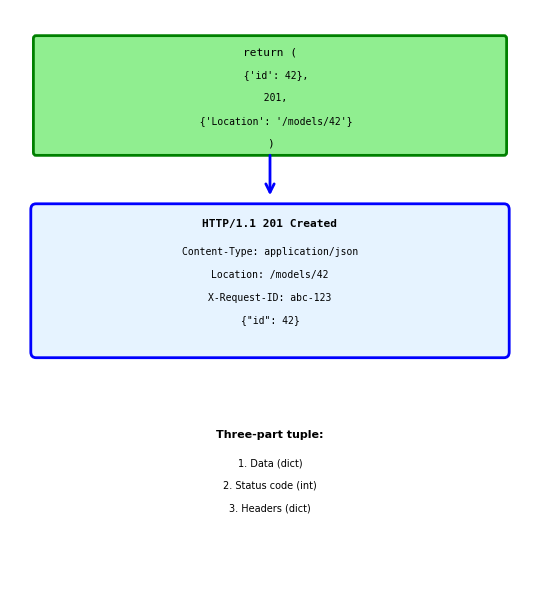
Return tuple: (data, status, headers)
@app.route('/models', methods=['POST'])
def create_model():
    model_id = save_model(request.json)

    return {'id': model_id}, 201, {
        'Location': f'/models/{model_id}',
        'X-Request-ID': request.headers.get('X-Request-ID')
    }
Response:
HTTP/1.1 201 Created
Content-Type: application/json
Location: /models/42
X-Request-ID: abc-123

{"id": 42}
Common response headers:
Location - URL of newly created resource
'Location': f'/models/{model_id}'
X-Request-ID - Echo back for tracking
'X-Request-ID': request.headers.get('X-Request-ID')
Cache-Control - Control caching
'Cache-Control': 'max-age=300'
Production: Why Not flask run
Development server not for production
flask run
Problems:
- Single process, single thread
- Handles one request at a time
- No crash recovery
- Debug mode exposes code
- Poor performance under load
Example:
@app.route('/predict')
def predict():
    time.sleep(2)  # Prediction takes 2 seconds
    return {'result': 0.87}
With flask run:
- Request 1: 0-2 seconds
- Request 2: 2-4 seconds (waits)
- Request 3: 4-6 seconds (waits)
- All sequential, no concurrency
Production needs:
- Multiple worker processes
- Concurrent request handling
- Automatic crash recovery
- Process management
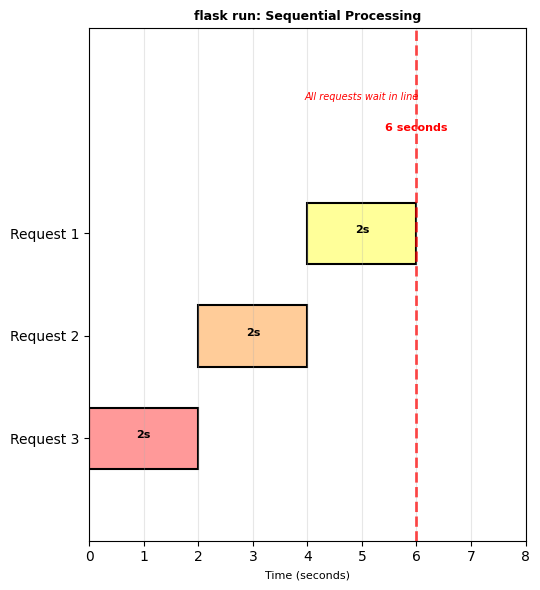
Single process means:
- One request blocks others
- No parallelism
- Poor resource usage
- Unacceptable for production
Production: Gunicorn with Workers
Gunicorn - Production WSGI server
pip install gunicorn
gunicorn --workers 4 --bind 0.0.0.0:5000 app:app
What this does:
- Starts 4 separate worker processes
- Each worker handles one request at a time
- 4 concurrent requests possible
- Load balanced across workers
Worker calculation:
workers = (CPU cores × 2) + 1
2-core machine → 5 workers 4-core machine → 9 workers
Same 2-second prediction with 4 workers:
- Requests 1-4: All start at 0s, finish at 2s
- Request 5: Starts at 2s when worker frees
4× improvement for concurrent requests
Configuration file:
# gunicorn.conf.py
workers = 4
bind = "0.0.0.0:5000"
timeout = 30
gunicorn -c gunicorn.conf.py app:app
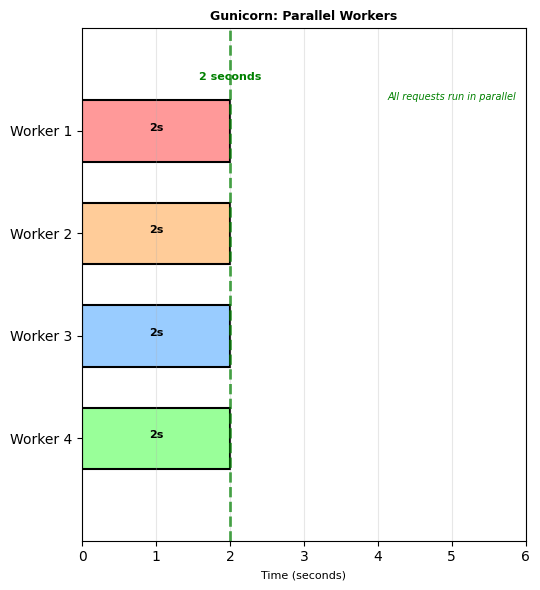
Multiple workers = concurrent processing
Each worker is independent process
Static Files: Production Strategies
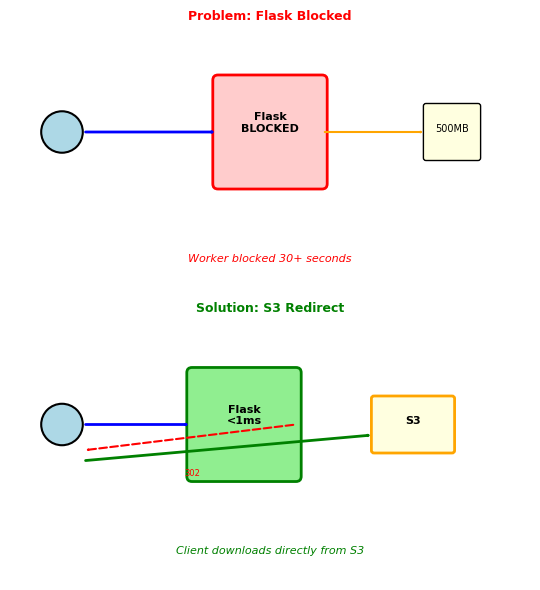
Flask serves static files synchronously, blocking the worker for the entire transfer
GET /static/model_weights.pkl # 500MB file
What happens:
- Flask worker reads 500MB file
- Sends to client over network
- Worker blocked 30+ seconds
- 4 concurrent downloads = all workers blocked
Solution 1: Nginx serves static files
Nginx handles /static/* directly
Flask never sees these requests
Workers free for API calls
Solution 2: S3 redirect pattern
@app.route('/models/<model_id>/download')
def download_model(model_id):
    # Generate temporary S3 URL (expires in 1 hour)
    s3_url = generate_presigned_url(
        bucket='models',
        key=f'{model_id}.pkl',
        expires_in=3600
    )
    return redirect(s3_url)
Flow:
- Client requests file from Flask
- Flask returns 302 redirect to S3
- Client downloads directly from S3
- Flask worker free in <1ms
Use S3 redirect for: Large files (>10MB), model weights, datasets, user uploads
Authentication Breach: LinkedIn 2012
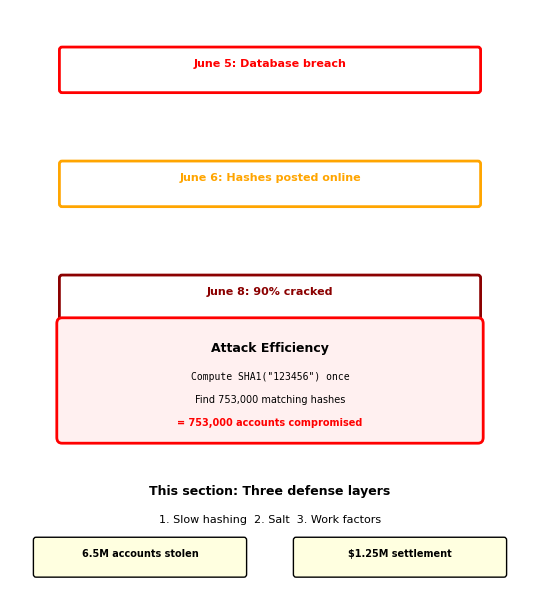
June 2012: 6.5 million LinkedIn password hashes stolen[1]
What LinkedIn did:
-- Stored password hashes (not plaintext) ✓
SELECT user_id, email, password_hash FROM users;

-- But used SHA-1 without salt ✗
password_hash = SHA1(password)
What attackers did:
- Built password dictionary (10 million common passwords)
- Computed hashes once:
common_hashes = {
    SHA1("password123"): "password123",
    SHA1("123456"): "123456",
    # ... 10 million entries
}
- Searched stolen database:
for hash in stolen_hashes:
    if hash in common_hashes:
        compromised.append(common_hashes[hash])
Reported result: ~90% of passwords cracked within 72 hours
Why it failed:
- SHA-1 designed for speed: GPU computes 10 billion hashes/second
- No salt: Same password → same hash
- One computation → thousands of accounts compromised
Same password “123456” compromised 753,000 accounts simultaneously
Later found: 117M. ↩︎
Identity in Distributed Systems
LinkedIn’s breach shows authentication failures cascade across systems
ML API requires authentication to prevent unauthorized access:
DELETE /models/production/v2
# Who sent this? Can they delete production models?
Every API request needs to answer two questions:
- Who is making this request? (Authentication)
- Can they perform this action? (Authorization)
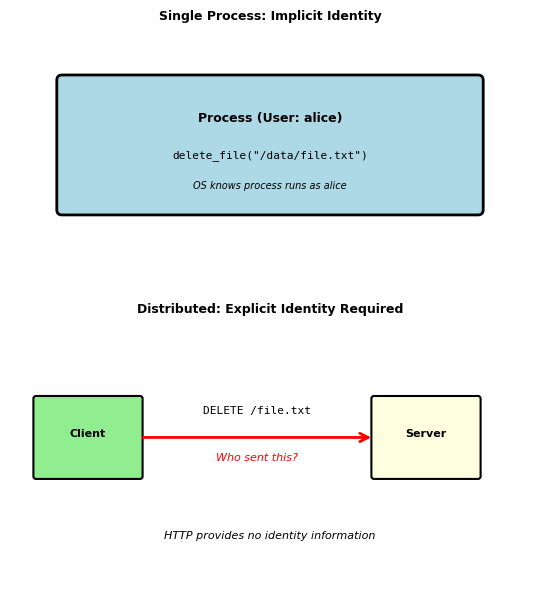
In a single process, identity is implicit:
def delete_file(filepath):
    # Running as OS user 'alice'
    # OS checks if alice can delete filepath
    os.remove(filepath)
In distributed systems, identity must be explicit:
def handle_delete_request(request):
    # Who sent this HTTP request?
    user = authenticate(request)  # Extract identity

    # Can they delete this file?
    if not authorize(user, 'delete', filepath):
        return 403

    delete_file(filepath)
HTTP is stateless - no memory between requests:
- No persistent connection to maintain identity
- Each request independent
- Must prove identity every time
Three approaches to maintaining identity across requests:
- Include credentials every request (HTTP Basic Auth)
- Create server-side session (Cookie-based)
- Issue cryptographic proof (Token-based)
Each approach makes different trade-offs between security, scalability, and complexity.
Password Authentication: Converting Secrets to Identity
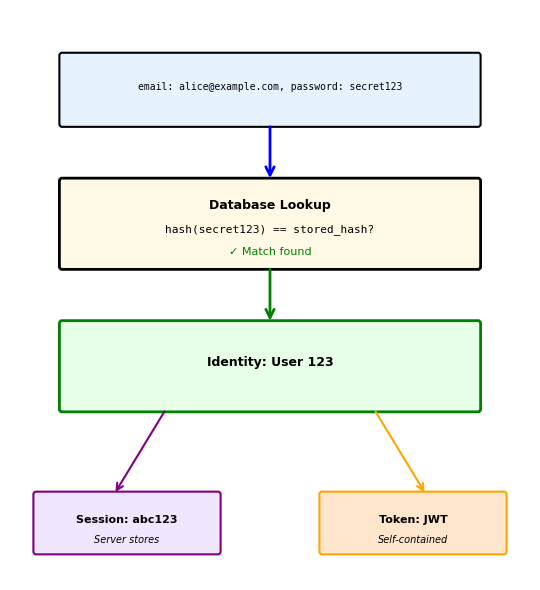
Authentication transforms a secret into verified identity
Step 1: User provides credentials
POST /login
{"email": "alice@example.com", "password": "secret123"}
Step 2: Server verifies against stored credentials
def authenticate(email, password):
    user = db.query("SELECT * FROM users WHERE email = ?", email)
    if verify_password(password, user.password_hash):
        return user.id  # Identity established
    return None
Step 3: Server issues proof of authentication
# Option A: Server-side session
session_id = generate_random_id()
sessions[session_id] = user_id
return {"session_id": session_id}

# Option B: Cryptographic token
token = jwt.encode({"user_id": user_id, "exp": time() + 3600})
return {"token": token}
Password storage determines breach impact:
Never store plaintext passwords:
-- CATASTROPHIC: Database breach exposes all passwords
SELECT * FROM users WHERE password = 'secret123'
Store cryptographic hashes instead:
-- Safe: Cannot reverse hash to get password
SELECT * FROM users WHERE email = 'alice@example.com'
-- Then verify: hash(provided_password) == stored_hash
Hash Functions: Time as a Defense Mechanism
LinkedIn used SHA-1 hashing - why wasn’t that enough?
First, understand why plaintext is catastrophic:
Database breach with plaintext passwords:
SELECT email, password FROM users LIMIT 3;
-- alice@example.com | secret123
-- bob@example.com   | secret123
-- carol@example.com | password1
All accounts immediately compromised.
Hash functions provide one-way transformation:
hash("secret123") → "5994471abb01112afcc18159f6cc74b4f511b99806da59b3caf5a9c173cacfc5"
Cannot reverse: hash → original password (computationally infeasible)
Asymmetry favors attackers:
Legitimate use: Verify one password for one user
# Single hash computation: < 1ms
if hash(provided_password) == stored_hash:
    authenticate_user()
Attack: Try millions of passwords against all users
# Attacker with stolen hash database
common_passwords = ["password", "123456", "secret123", ...]
for password in common_passwords:  # 10 million
    test_hash = hash(password)
    for stored_hash in database:  # 100,000 users
        if test_hash == stored_hash:
            compromised.append(...)
Solution: Make hashing deliberately slow
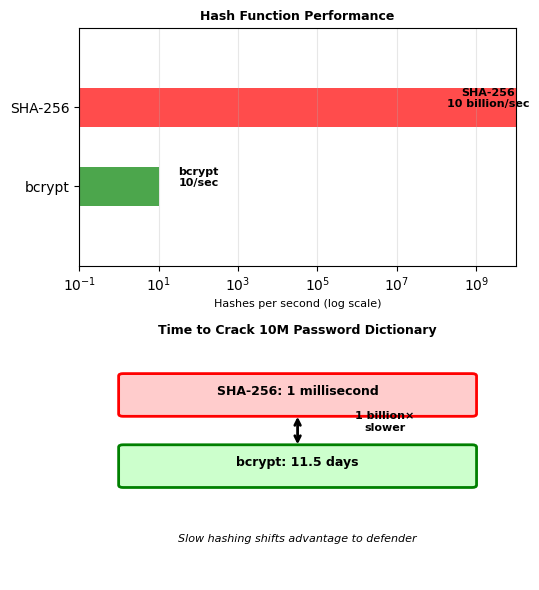
- SHA-1 (LinkedIn’s mistake): Designed for speed → 10 billion/second on GPU
- bcrypt: Designed for passwords → 10/second on GPU
- Time difference: 1 billion× slower
This is why LinkedIn’s passwords fell in 72 hours - SHA-1 allowed rapid dictionary attacks.
This asymmetry favors defenders over attackers.
Salt: Preventing Parallel Attacks
LinkedIn’s second mistake: No salt
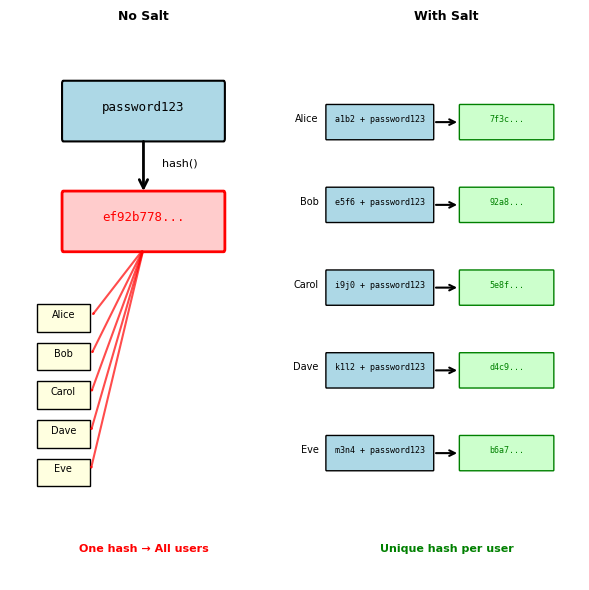
Even with slow hashing, common passwords create identical hashes:
Without salt, all users with “password123” have same hash:
hash("password123") → "ef92b778bafe771e89245b89ecb..."
# Database search finds 1,847 users with this hash
# All compromised with single hash computation
Salt: Random value unique to each user
def create_user(email, password):
    salt = generate_random_bytes(16)  # Unique per user
    password_hash = hash(salt + password)
    db.store(email, salt, password_hash)
Now identical passwords produce different hashes:
# User 1
salt1 = "a1b2c3d4..."
hash("a1b2c3d4..." + "password123") → "7f3c6b2a..."

# User 2
salt2 = "e5f6g7h8..."
hash("e5f6g7h8..." + "password123") → "92a8b7c6..."

# Different hashes despite same password
Impact on attack strategy:
Without salt: One computation compromises all instances
target_hash = "ef92b778..."
if computed_hash == target_hash:
    # Found password for ALL users with this hash
With salt: Must attack each user individually
for user in users:
    for password in dictionary:
        if hash(user.salt + password) == user.hash:
            # Found password for ONE user only
Salt is not secret - stored with hash, prevents mass attacks not targeted ones
With salt, LinkedIn’s 753,000 “123456” users would each need individual attacks
Work Factors: Adaptive Security
Combining defenses: Slow hashing + Salt + Adaptive work factor
bcrypt’s configurable work factor scales with hardware improvements:
# Work factor determines iteration count: 2^factor
bcrypt.gensalt(10)  # 2^10 = 1,024 iterations (2010)
bcrypt.gensalt(12)  # 2^12 = 4,096 iterations (2020)
bcrypt.gensalt(14)  # 2^14 = 16,384 iterations (2030)
Each increment doubles computation time:
| Factor | Iterations | Time/Hash | Passwords/Day |
|---|---|---|---|
| 10 | 1,024 | 50ms | 1.7M |
| 11 | 2,048 | 100ms | 864K |
| 12 | 4,096 | 200ms | 432K |
| 13 | 8,192 | 400ms | 216K |
| 14 | 16,384 | 800ms | 108K |
Balancing security and usability:
def choose_work_factor():
    # Target: 250ms computation time
    test_password = b"benchmark"

    for factor in range(10, 15):
        start = time.time()
        bcrypt.hashpw(test_password, bcrypt.gensalt(factor))
        duration = time.time() - start

        if duration > 0.250:  # 250ms target
            return factor

    return 14  # Maximum reasonable factor
Moore’s Law compensation:
- Computing power doubles every 2 years
- Increase work factor by 1 every 2 years
- Maintains constant security margin
Security parameter improves over time without code changes

Sessions vs Tokens: State Management Trade-offs
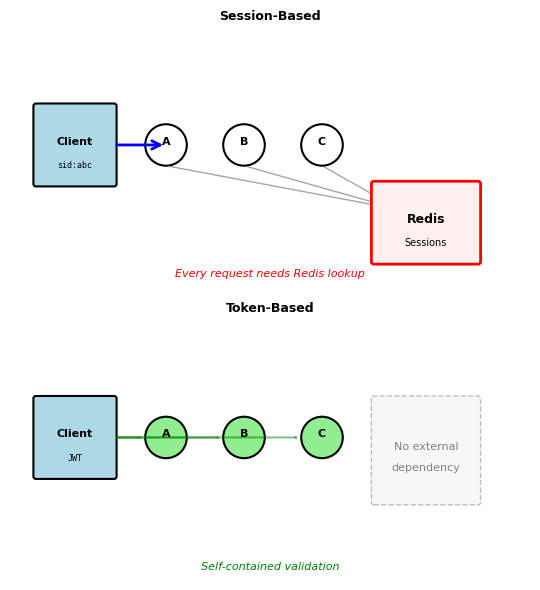
Server sessions: Centralized state
# Login creates session in shared store
session_id = generate_uuid()
redis.set(f"session:{session_id}", {
    "user_id": 123,
    "created": timestamp,
    "permissions": ["read", "write"]
})
response.set_cookie("session_id", session_id)

# Every request requires lookup
def handle_request(request):
    session_id = request.cookies.get("session_id")
    session = redis.get(f"session:{session_id}")  # Network call
    if not session:
        return 401
Tokens: Distributed state
# Login creates self-contained token
payload = {
    "user_id": 123,
    "exp": timestamp + 3600,
    "permissions": ["read", "write"]
}
token = jwt.encode(payload, SECRET_KEY)
return {"token": token}

# Every request validates locally
def handle_request(request):
    token = request.headers["Authorization"].split(" ")[1]
    payload = jwt.decode(token, SECRET_KEY)  # CPU only
    # No network call required
Trade-offs in practice:
| Aspect | Sessions | Tokens |
|---|---|---|
| Revocation | Immediate | At expiration |
| Scaling | Requires shared store | Linear |
| Network calls | Every request | None |
| State size | Server: O(users) | Server: O(1) |
| Client complexity | Simple cookie | Header management |
Authorization: From Identity to Permissions
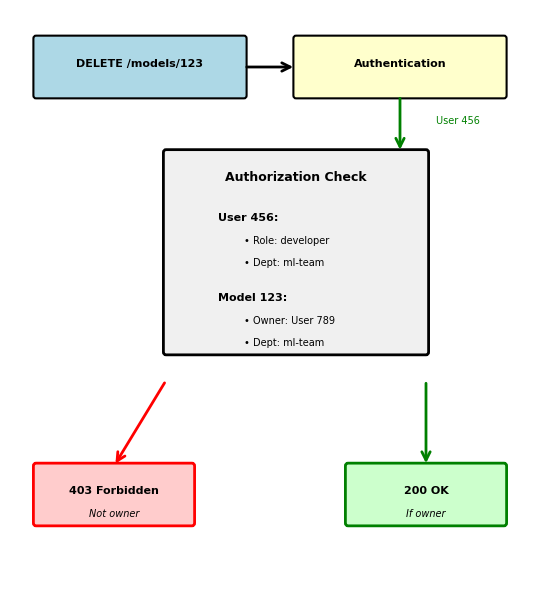
Authentication establishes identity; authorization determines capabilities
def process_request(request):
    # Step 1: Who are you? (Authentication)
    user_id = validate_token(request.headers['Authorization'])
    if not user_id:
        return 401  # Unauthorized - don't know who you are

    # Step 2: What can you do? (Authorization)
    resource = request.path  # e.g., /models/123
    action = request.method   # e.g., DELETE

    if not has_permission(user_id, resource, action):
        return 403  # Forbidden - know who you are, can't do this

    # Step 3: Execute
    return perform_action(resource, action)
Three authorization models:
1. Role-Based (RBAC): Users have roles, roles have permissions
user.roles = ["developer", "viewer"]
role_permissions = {
    "developer": ["read", "write", "deploy"],
    "viewer": ["read"],
    "admin": ["read", "write", "deploy", "delete"]
}
# Can user deploy? Check if any role has permission
2. Attribute-Based (ABAC): Decisions based on attributes
can_access = (
    user.department == resource.department and
    user.clearance_level >= resource.sensitivity and
    current_time in user.work_hours
)
3. Resource-Based: Users own resources
if resource.owner_id == user_id:
    return FULL_ACCESS
elif user_id in resource.shared_with:
    return READ_ONLY
else:
    return NO_ACCESS
Token Expiration and Revocation Trade-offs
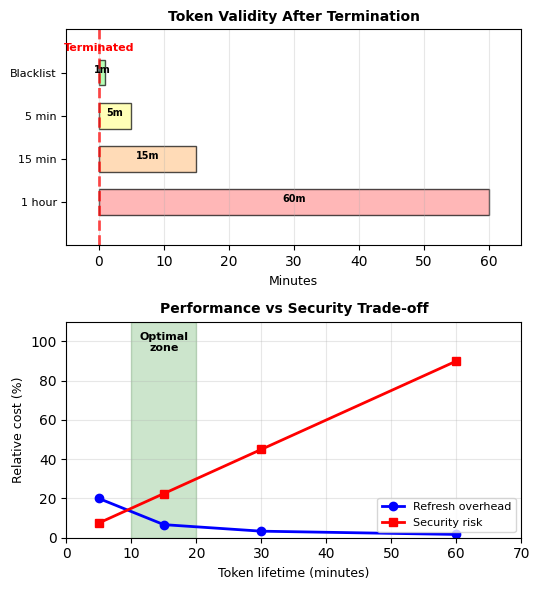
Tokens can’t be recalled after issuing:
Once issued, JWT remains valid until expiration:
token_payload = {
    "user_id": 123,
    "exp": time() + 3600,  # Valid for 1 hour
    "scopes": ["read:data", "write:data", "delete:data"]
}
Employee terminated at 2:00 PM:
- Token issued: 1:30 PM
- Token expires: 2:30 PM
- Problem: 30 minutes of unauthorized access
Three approaches to bounded revocation:
1. Short-lived access tokens (15 minutes)
access_token = create_token(expires_in=15*60)
refresh_token = create_token(expires_in=30*24*60*60)

# After termination, refresh fails
def refresh():
    if user_terminated(refresh_token.user_id):
        return 401  # No new access token
    return create_access_token()
2. Blacklist critical tokens
# Maintain revoked token list (small subset)
revoked_tokens = redis.set()  # Only for terminated users

def validate_token(token):
    if token.jti in revoked_tokens:  # Quick check
        return None
    return decode_token(token)
3. Version-based invalidation
# User has token_version in database
user.token_version = 2  # Increment on revocation

# Token includes version
token.version = 1

# Validation checks version
if token.version < user.token_version:
    return 401  # Token outdated
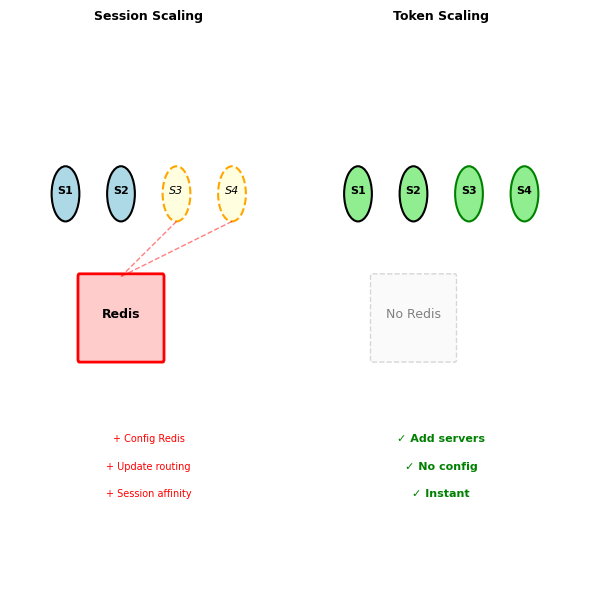
Stateless Scaling: The Operational Advantage
Session-based scaling requires coordination
Adding servers with sessions:
# Server 1 has session for User A
# Server 2 has session for User B
# Load balancer must remember routing (sticky sessions)
# OR share sessions via Redis (single point of failure)
Measured impact with 1000 requests/second:
- Sticky sessions: Imbalanced load (Server 1: 89%, Server 2: 11%)
- Redis sessions: 2ms added latency per request
- Redis failure: All users logged out
Token-based scaling is trivial
Adding servers with tokens:
# Any server can validate any token
# No coordination required
# No shared state
Measured impact with 1000 requests/second:
- Round-robin load balancing: Even distribution (25% each for 4 servers)
- Token validation: 0.1ms CPU time
- Server failure: Requests rerouted, no user impact
Deployment advantages:
| Operation | Sessions | Tokens |
|---|---|---|
| Add server | Update session store | Add server |
| Remove server | Migrate sessions | Remove server |
| Deploy update | Coordinate session drain | Rolling update |
| Region failover | Replicate sessions | No change |
Cost at scale (10K concurrent users):
- Sessions: Redis cluster ($200/month) + Complexity
- Tokens: No infrastructure + 0.1% CPU overhead
Stateless tokens eliminate the shared session store — scaling adds servers, not infrastructure.
JWT: Self-Contained Identity Tokens
JSON Web Tokens encode identity without server state
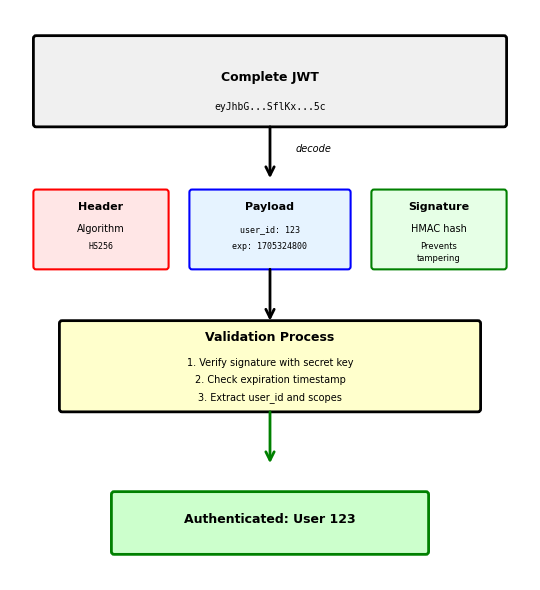
JWT structure: Three Base64-encoded parts separated by dots
eyJhbGciOiJIUzI1NiIsInR5cCI6IkpXVCJ9.
eyJ1c2VyX2lkIjoxMjMsImVtYWlsIjoiYWxpY2VAZXhhbXBsZS5jb20iLCJleHAiOjE3MDUzMjQ4MDB9.
SflKxwRJSMeKKF2QT4fwpMeJf36POk6yJV_adQssw5c
Part 1: Header (Algorithm and type)
{
  "alg": "HS256",  // HMAC SHA-256
  "typ": "JWT"     // Token type
}
Part 2: Payload (Claims about user)
{
  "user_id": 123,
  "email": "alice@example.com",
  "exp": 1705324800,  // Expires: Unix timestamp
  "iat": 1705321200,  // Issued at
  "scopes": ["read", "write"]
}
Part 3: Signature (Prevents tampering)
HMACSHA256(
  base64(header) + "." + base64(payload),
  server_secret_key
)
Critical properties:
- Self-contained: All data in token, no database lookup
- Tamper-proof: Invalid signature = rejected token
- Stateless: Server only needs secret key
- Not encrypted: Payload readable by anyone (Base64 decode)
JWT Validation: Cryptographic Trust
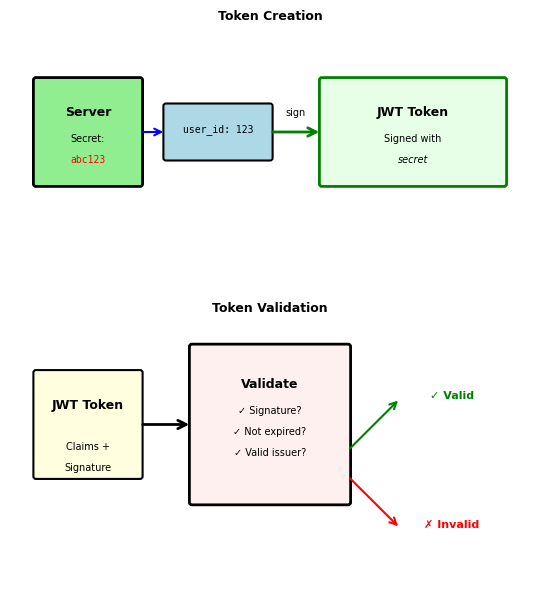
Signature prevents token forgery
Server creates token with secret:
import jwt

secret_key = "server-secret-abc123"  # Only server knows

payload = {
    "user_id": 123,
    "email": "alice@example.com",
    "exp": time.time() + 3600
}

token = jwt.encode(payload, secret_key, algorithm="HS256")
# Result: eyJhbGciOiJIUzI1NiIs...
Client cannot modify token:
# Attacker tries to change user_id
decoded = base64.decode(token.split('.')[1])
decoded['user_id'] = 999  # Change to admin
fake_payload = base64.encode(decoded)

# But cannot generate valid signature without secret
fake_token = header + "." + fake_payload + "." + random_signature
# Server will reject: Invalid signature
Server validates with same secret:
def validate_token(token):
    try:
        payload = jwt.decode(token, secret_key, algorithms=["HS256"])
        # Signature valid, token not expired
        return payload
    except jwt.InvalidSignatureError:
        return None  # Tampered token
    except jwt.ExpiredSignatureError:
        return None  # Token too old
Symmetric (HS256) vs Asymmetric (RS256):
- HS256: Same secret for signing and verifying (simple, fast)
- RS256: Private key signs, public key verifies (allows third-party validation)
JWT Claims: Standard Fields and Custom Data
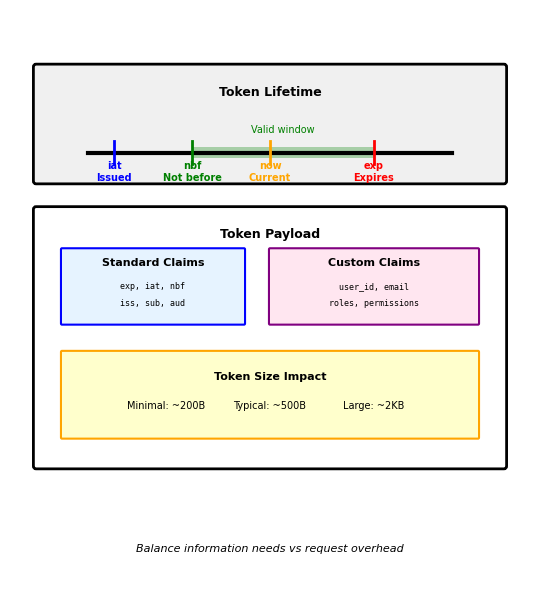
Standard claims provide common functionality
Registered claims (predefined meanings):
{
  "iss": "https://auth.company.com",  // Issuer
  "sub": "user:123",                   // Subject (user)
  "aud": "https://api.company.com",    // Audience (recipient)
  "exp": 1705324800,                   // Expiration time
  "nbf": 1705321200,                   // Not before
  "iat": 1705321200,                   // Issued at
  "jti": "a1b2c3d4"                    // JWT ID (unique)
}
Time-based validation:
current_time = 1705323000  # Unix timestamp

# Token not yet valid (nbf = not before)
if current_time < token['nbf']:
    return "Token not yet valid"

# Token expired
if current_time > token['exp']:
    return "Token expired"

# Valid time window: nbf <= current_time <= exp
Custom claims for application data:
{
  // Standard claims
  "exp": 1705324800,
  "iat": 1705321200,

  // Custom application claims
  "user_id": 123,
  "email": "alice@example.com",
  "roles": ["developer", "reviewer"],
  "department": "engineering",
  "permissions": {
    "models": ["read", "write"],
    "data": ["read"]
  }
}
Token size considerations:
- Each claim adds bytes to every request
- HTTP header limit: ~8KB
- Typical JWT: 200-500 bytes
- With permissions: 500-2000 bytes
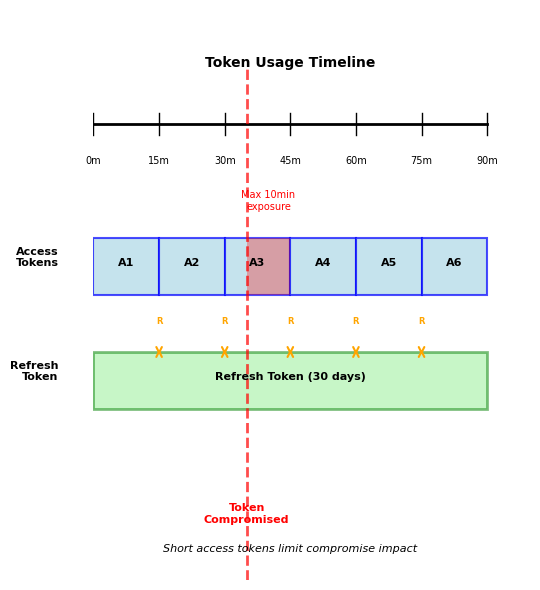
Refresh Tokens: Balancing Security and Usability
Short access tokens + long refresh tokens minimize risk
Dual token pattern:
def login(email, password):
    if authenticate(email, password):
        # Short-lived for API calls
        access_token = create_jwt(
            user_id=123,
            expires_in=15*60  # 15 minutes
        )

        # Long-lived for obtaining new access tokens
        refresh_token = create_jwt(
            user_id=123,
            token_type="refresh",
            expires_in=30*24*60*60  # 30 days
        )

        # Store refresh token for revocation
        db.store_refresh_token(refresh_token)

        return {
            "access_token": access_token,
            "refresh_token": refresh_token,
            "expires_in": 900
        }
Token refresh flow:
def refresh_access_token(refresh_token):
    # Validate refresh token
    payload = jwt.decode(refresh_token, secret_key)

    # Check if revoked (requires DB check)
    if is_revoked(refresh_token):
        return 401  # Revoked

    # Issue new access token
    new_access = create_jwt(
        user_id=payload['user_id'],
        expires_in=15*60
    )

    return {"access_token": new_access}
Security boundaries:
- Compromise window: Maximum 15 minutes (access token lifetime)
- Refresh check: Database lookup only on refresh (every 15 min)
- Immediate revocation: Possible via refresh token blacklist
- Performance: 1 DB check per 15 minutes vs every request
OAuth 2.0: Delegated Authorization
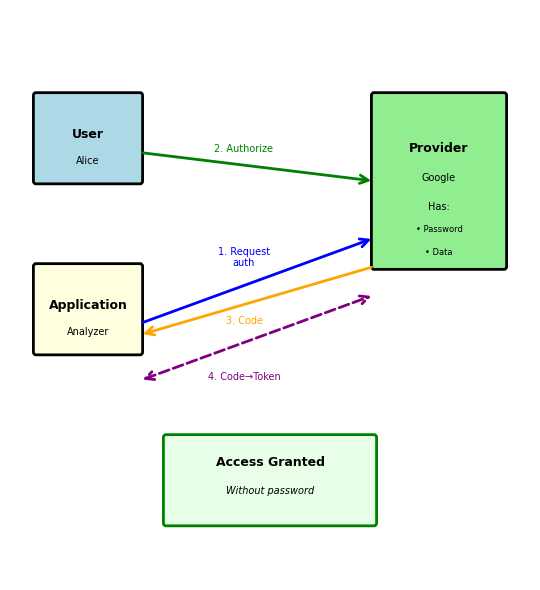
OAuth allows third-party access without sharing passwords
OAuth solves password sharing with third parties:
# WITHOUT OAuth (dangerous):
# GitHub analyzer needs your Google Drive files
analyzer.login(
    google_email="alice@gmail.com",
    google_password="secret123"  # Giving password to third party!
)
OAuth authorization flow:
Step 1: User authorizes at provider
Browser → https://accounts.google.com/oauth/authorize?
    client_id=github-analyzer&
    redirect_uri=https://analyzer.com/callback&
    scope=drive.readonly&
    response_type=code
Step 2: Provider redirects with authorization code
Browser ← https://analyzer.com/callback?code=abc123
Step 3: Exchange code for token (backend)
# Server-to-server, not visible to browser
response = requests.post('https://oauth2.googleapis.com/token', {
    'code': 'abc123',
    'client_id': 'github-analyzer',
    'client_secret': 'secret-key-xyz',  # Proves identity
    'grant_type': 'authorization_code'
})

tokens = response.json()
# {
#   "access_token": "ya29.a0ARrdaM...",
#   "token_type": "Bearer",
#   "expires_in": 3600,
#   "scope": "drive.readonly"
# }
Key principles:
- User never gives password to third party
- Provider controls exactly what access is granted
- Access can be revoked without changing password
OAuth Scopes: Granular Permissions
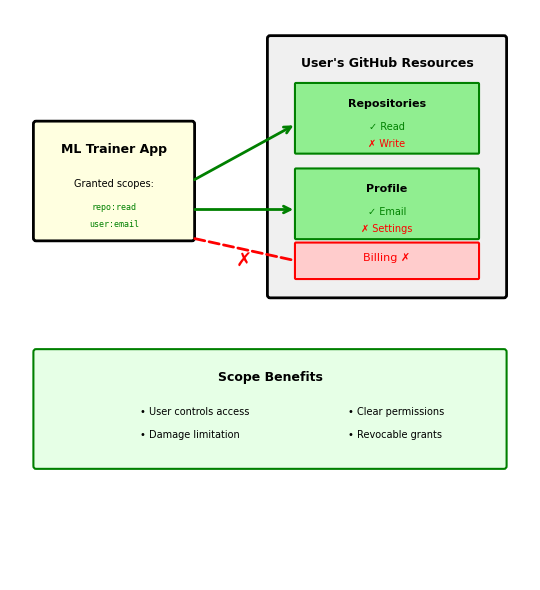
Scopes limit what applications can access
Requesting specific permissions:
# Application requests only what it needs
auth_url = "https://github.com/login/oauth/authorize?" + urlencode({
    "client_id": "ml-trainer-app",
    "scope": "repo:read user:email",  # Specific permissions
    "redirect_uri": "https://mlapp.com/callback"
})
User sees requested permissions:
ML Trainer App wants to access your GitHub account:
✓ Read access to repositories
- View code, issues, pull requests
- View repository metadata
✓ Read user email addresses
- View primary email
- View verified status
✗ Will NOT be able to:
- Write to repositories
- Delete anything
- Access billing information
[Authorize] [Deny]
Token contains granted scopes:
{ "access_token": "gho_16C7e42F292c6912E7710c838347Ae178B4a", "token_type": "bearer", "scope": "repo:read user:email", // What was actually granted "expires_in": 28800 }
Common scope patterns:
| Provider | Scope | Permission |
|---|---|---|
| GitHub | repo |
Full repository access |
| GitHub | repo:status |
Only commit status |
drive.readonly |
Read files only | |
drive.file |
Only files created by app | |
| Slack | chat:write |
Post messages |
| Slack | users:read |
View user information |
Principle of least privilege: Request minimum necessary scope
OAuth Grant Types: Different Flows for Different Needs
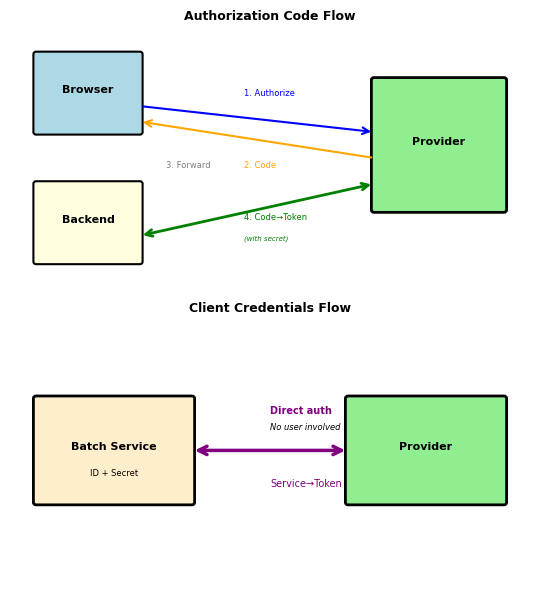
OAuth defines multiple flows for different scenarios
1. Authorization Code (web apps with backend)
# Most secure: Code exchanged server-to-server # Frontend never sees client_secret flow = "user → provider → code → backend → token"
2. Client Credentials (service-to-service)
# No user involved, service authenticates directly response = requests.post('https://oauth2.provider.com/token', { 'grant_type': 'client_credentials', 'client_id': 'batch-processor', 'client_secret': 'secret-xyz', 'scope': 'data.process' }) # Used for: Cron jobs, backend services, APIs calling APIs
3. Implicit Flow (deprecated, was for SPAs)
// Token returned directly in URL fragment // Insecure: Token visible in browser history // Replaced by: Authorization Code + PKCE
4. Password Grant (deprecated, legacy systems)
# User gives password to application directly # Defeats purpose of OAuth # Only use: Migrating legacy systems
Modern standard: Authorization Code + PKCE
# PKCE (Proof Key for Code Exchange) adds security code_verifier = generate_random_string(128) code_challenge = sha256(code_verifier) # Include challenge in authorization request # Include verifier in token exchange # Prevents code interception attacks
Grant type selection:
- User-facing web app → Authorization Code
- Backend service → Client Credentials
- Mobile/SPA → Authorization Code + PKCE
- Never → Password or Implicit
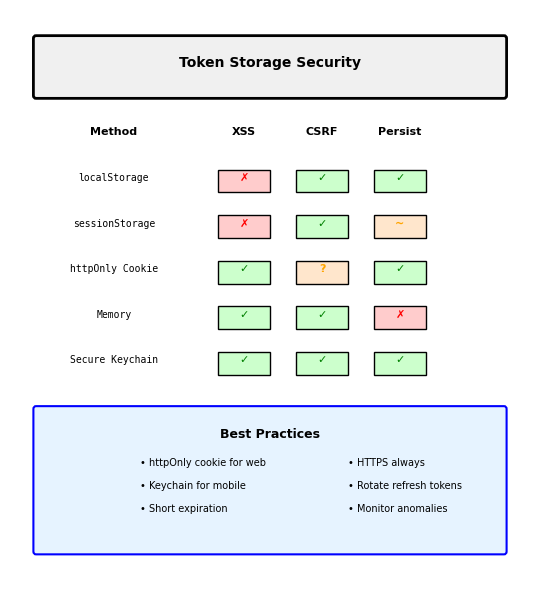
Security Considerations: Token Storage and Transmission
Where and how to store tokens determines security
Browser storage options:
// localStorage - Persistent but vulnerable to XSS localStorage.setItem('token', jwt_token); // ⚠️ Any JavaScript can read: <script>alert(localStorage.token)</script> // sessionStorage - Per-tab, still XSS vulnerable sessionStorage.setItem('token', jwt_token); // httpOnly cookie - Not accessible to JavaScript // ✓ XSS protected, ✗ CSRF vulnerable Set-Cookie: token=jwt_token; HttpOnly; Secure; SameSite=Strict // Memory only - Most secure but lost on refresh const token = jwt_token; // JavaScript variable
Mobile app storage:
# iOS Keychain / Android Keystore (encrypted) keychain.set('access_token', token, accessible=WHEN_UNLOCKED) # SharedPreferences / UserDefaults (not encrypted) # ⚠️ Accessible if device rooted/jailbroken
Token transmission:
# Always use Authorization header headers = {'Authorization': f'Bearer {token}'} # Never in URL parameters (logged, cached, shared) # ✗ GET /api/data?token=jwt_token # Appears in logs! # Never in request body for GET (non-standard) # ✗ GET /api/data {"token": "jwt_token"}
Security checklist:
- ✓ HTTPS only (never HTTP)
- ✓ Short expiration times
- ✓ Refresh token rotation
- ✓ Validate on every request
- ✓ Log anomalies (geographic changes)
- ✗ Don’t log token values
- ✗ Don’t store in git
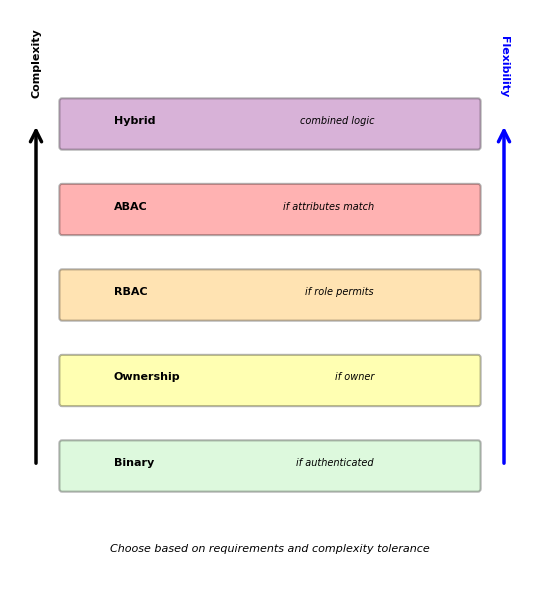
Authorization Models: From Simple to Sophisticated
Evolution of authorization complexity
Level 1: Binary access (all or nothing)
if authenticated: return FULL_ACCESS else: return NO_ACCESS # Problem: Every authenticated user can do everything
Level 2: Resource ownership
def can_access(user_id, resource): if resource.owner_id == user_id: return True return False # Problem: No sharing, no admin access
Level 3: Role-based (RBAC)
user_roles = ["developer"] role_permissions = { "viewer": ["read"], "developer": ["read", "write"], "admin": ["read", "write", "delete"] } # Problem: Roles are coarse-grained
Level 4: Attribute-based (ABAC)
def can_access(user, resource, action, context): return ( user.department == resource.department and action in user.permissions and resource.sensitivity <= user.clearance_level and context.time in user.work_hours and context.location in user.allowed_locations ) # Fine-grained but complex
Real systems use hybrid approaches:
- Ownership for user-created resources
- Roles for system-wide permissions
- Attributes for special cases
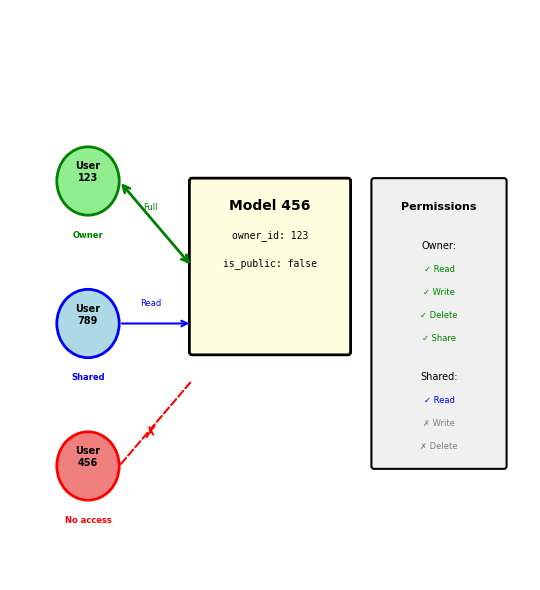
Resource Ownership: The Foundation Pattern
Users control resources they create
Database schema enforces ownership:
CREATE TABLE models ( id INTEGER PRIMARY KEY, owner_id INTEGER NOT NULL, name VARCHAR(255), created_at TIMESTAMP, is_public BOOLEAN DEFAULT FALSE, FOREIGN KEY (owner_id) REFERENCES users(id) ); CREATE TABLE model_shares ( model_id INTEGER, user_id INTEGER, permission VARCHAR(20), -- 'read', 'write' PRIMARY KEY (model_id, user_id) );
Authorization logic:
def get_permission(user_id, model_id): model = db.query("SELECT * FROM models WHERE id = ?", model_id) # Owner has full control if model.owner_id == user_id: return ["read", "write", "delete", "share"] # Check explicit shares share = db.query(""" SELECT permission FROM model_shares WHERE model_id = ? AND user_id = ? """, model_id, user_id) if share: return share.permission.split(",") # Public resources allow read if model.is_public: return ["read"] return [] # No access
Common patterns:
- Private by default: New resources only accessible to owner
- Explicit sharing: Owner grants specific permissions to specific users
- Public option: Owner can make resource world-readable
- Transfer ownership: Special operation with audit trail
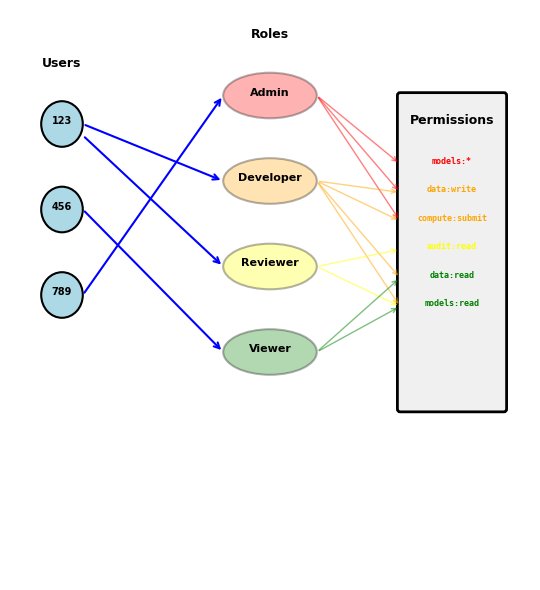
Role-Based Access Control (RBAC)
Users have roles, roles have permissions
Three-level hierarchy:
# 1. Users are assigned roles user_roles = { 123: ["developer", "reviewer"], 456: ["viewer"], 789: ["admin", "developer"] } # 2. Roles define permissions role_permissions = { "viewer": { "models": ["read"], "data": ["read"] }, "developer": { "models": ["read", "write", "execute"], "data": ["read", "write"], "compute": ["submit"] }, "reviewer": { "models": ["read", "approve"], "audit": ["read"] }, "admin": { "models": ["read", "write", "delete"], "data": ["read", "write", "delete"], "compute": ["submit", "cancel"], "users": ["read", "write"] } } # 3. Check if any role grants permission def has_permission(user_id, resource_type, action): user_role_list = user_roles.get(user_id, []) for role in user_role_list: permissions = role_permissions.get(role, {}) allowed_actions = permissions.get(resource_type, []) if action in allowed_actions: return True return False
RBAC advantages:
- Simple to understand and audit
- Easy to onboard users (assign role)
- Consistent permissions across resources
- Well-supported by frameworks
RBAC limitations:
- Roles proliferate over time
- Exceptions require new roles
- No context awareness
Attribute-Based Access Control (ABAC)
Access decisions based on attributes, not roles
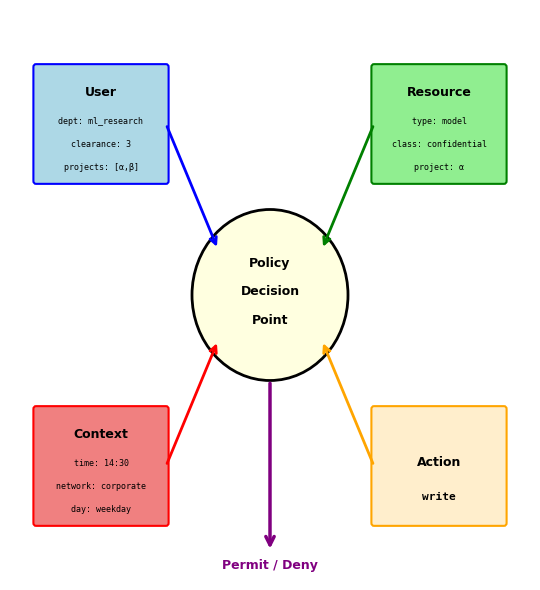
ABAC evaluates attributes from multiple sources per request:
- User: department, clearance level, location
- Resource: classification, owning project
- Environment: time of day, network, IP address
Example: “Allow write if user’s department matches resource’s department, clearance meets classification, and request is during business hours”
vs RBAC: No role explosion — context-aware decisions without a role for every combination
Trade-off: Harder to audit (“what can user X do?” depends on context at request time)
Real systems combine approaches: ownership for user resources, roles for broad permissions, attributes for special cases
Different Clients Need Different Data
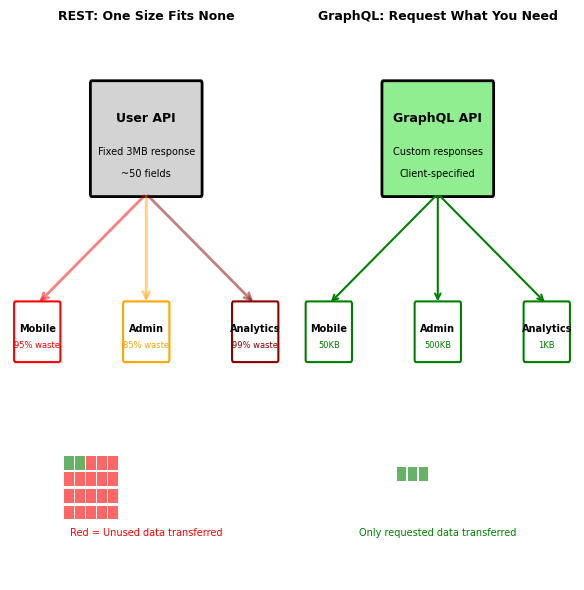
Different clients need different data from same resources
REST endpoint returns fixed structure:
GET /api/users/123 { "user_id": 123, "email": "alice@example.com", "name": "Alice Chen", "profile_image": "base64...[2MB]", "preferences": {...50 fields...}, "activity_history": [...200 entries...], "connected_devices": [...}, "subscription": {...}, "recommendations": [...} }
Each client uses different subset:
Mobile app needs:
name,profile_image(thumbnail)- Downloads 3MB, uses 50KB
Admin dashboard needs:
email,subscription,activity_history- Downloads 3MB, uses 500KB
Analytics service needs:
user_id,preferences.language- Downloads 3MB, uses 1KB
REST over-fetches:
- 95% of transferred data unused
- Mobile battery drain
- Network bandwidth cost
- Server CPU for serialization
REST solutions are inadequate:
- Sparse fieldsets:
/users/123?fields=name,email(non-standard) - Multiple endpoints:
/users/123/mobile,/users/123/admin(proliferation) - API versioning: v1, v2, v3… (maintenance burden)
GraphQL: Query Language for APIs
GraphQL lets clients specify exactly what data they need
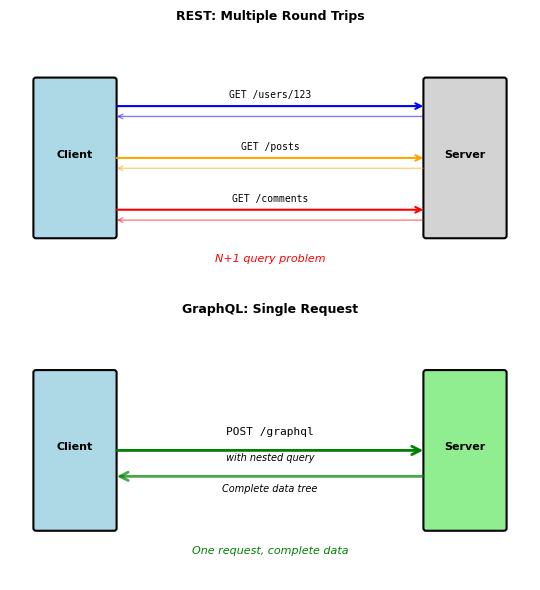
Instead of multiple REST calls:
# REST: 3 requests, 3 round trips user = GET('/users/123') posts = GET('/users/123/posts?limit=5') for post in posts: comments = GET(f'/posts/{post.id}/comments?limit=2')
Single GraphQL query:
query GetUserWithPosts { user(id: 123) { name email posts(limit: 5) { title createdAt comments(limit: 2) { text author { name } } } } }
Response matches query structure exactly:
{ "data": { "user": { "name": "Alice Chen", "email": "alice@example.com", "posts": [ { "title": "GraphQL Benefits", "createdAt": "2024-01-15", "comments": [ { "text": "Great post!", "author": {"name": "Bob"} } ] } ] } } }
Key differences from REST:
- Single endpoint:
POST /graphqlfor everything - Client controls response shape
- Nested data in one request
- No versioning needed (fields are added/deprecated)
GraphQL Type System
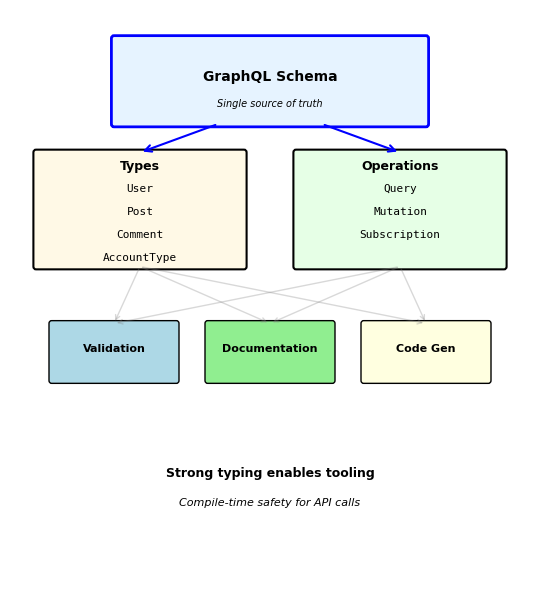
Everything in GraphQL has a type
Schema definition:
type User { id: ID! # ! means non-null name: String! email: String! posts: [Post!]! # Array of Posts (never null) friendCount: Int accountType: AccountType! # Enum type } type Post { id: ID! title: String! content: String author: User! # Relationship to User comments: [Comment!]! likes: Int! } enum AccountType { FREE PREMIUM ENTERPRISE } type Query { user(id: ID!): User # Can return null if not found users(limit: Int = 10): [User!]! } type Mutation { createUser(input: CreateUserInput!): User! deleteUser(id: ID!): Boolean! }
Type system provides:
- Contract enforcement: Server must return correct types
- Query validation: Invalid queries rejected before execution
- Auto-documentation: Tools can introspect schema
- Code generation: Type-safe clients in any language
Query validation example:
# INVALID: 'invalid_field' doesn't exist { user(id: 123) { invalid_field } } # Error: Field 'invalid_field' not found on type 'User'
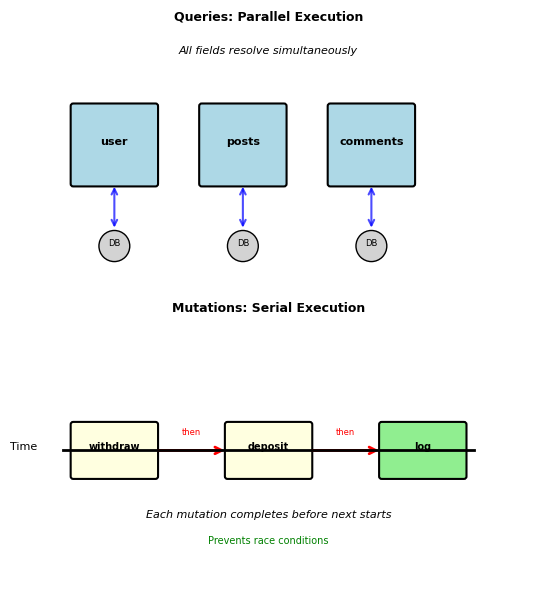
Query vs Mutation: Read vs Write Separation
GraphQL separates reads from writes explicitly
Query: Read operations (no side effects)
query GetUserData { user(id: 123) { name email posts { title publishedAt } } }
- Can be cached
- Executed in parallel
- Safe to retry
- No state changes
Mutation: Write operations (changes state)
mutation CreatePost { createPost(input: { title: "GraphQL Benefits" content: "..." authorId: 123 }) { id # Return created post title publishedAt author { name } } }
- Never cached
- Executed serially (in order)
- Not safe to retry
- Returns modified data
Serial execution prevents race conditions:
mutation TransferFunds { # These execute in order, not parallel withdraw(account: "A", amount: 100) { balance } deposit(account: "B", amount: 100) { balance } }
Convention: Mutations return the modified object so client can update its cache without refetching.
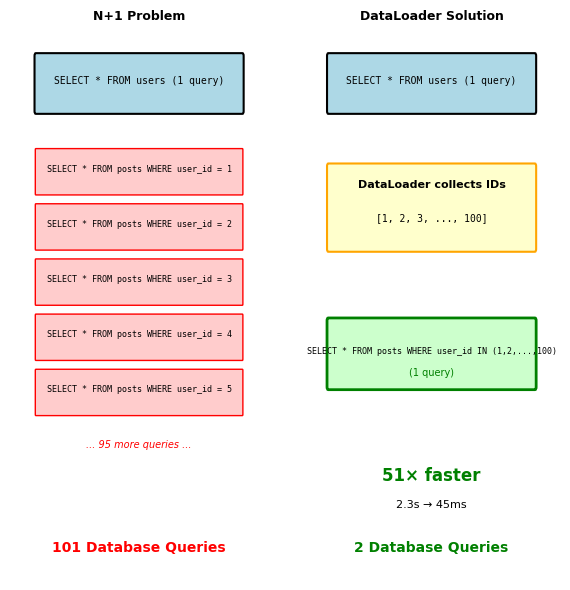
The N+1 Query Problem
GraphQL’s flexibility creates performance challenges
Query requests users and their posts:
query GetUsersWithPosts { users(limit: 100) { name posts { title content } } }
Naive resolver implementation:
def resolve_users(limit): # 1 query return db.query("SELECT * FROM users LIMIT ?", limit) def resolve_posts(user): # Called for EACH user (N queries) return db.query("SELECT * FROM posts WHERE user_id = ?", user.id) # Total: 1 + 100 = 101 database queries!
Problem scales with nesting:
users(100) → posts → comments → author # 1 + 100 + 500 + 1500 = 2101 queries
Solution: DataLoader pattern (batching)
# Collects all user IDs, makes single query post_loader = DataLoader(batch_load_posts) def batch_load_posts(user_ids): # Single query for all users posts = db.query( "SELECT * FROM posts WHERE user_id IN (?)", user_ids ) # Group by user_id and return in order return group_by_user(posts) # Now: 1 + 1 = 2 queries total
Measured impact:
- Without DataLoader: 2.3 seconds (101 queries)
- With DataLoader: 45ms (2 queries)
- 51× faster
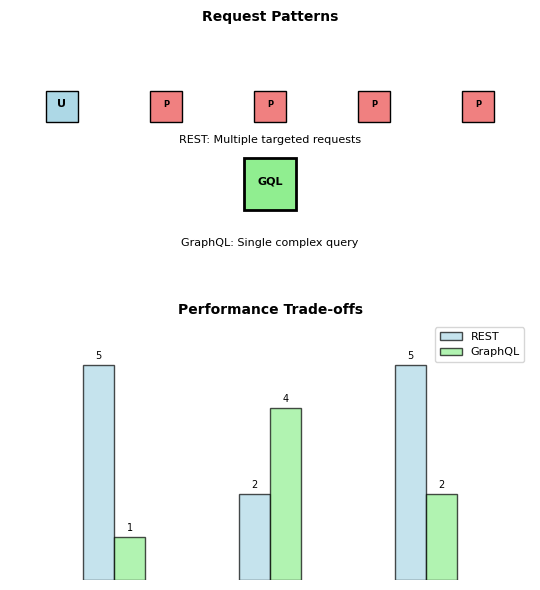
GraphQL Architectural Trade-offs
GraphQL changes fundamental assumptions about APIs
Unified query interface:
# Single endpoint handles all queries POST /graphql query GetDashboardData { user(id: 123) { name recentPosts(limit: 3) { title comments(limit: 1) { text } } } }
Contrast with REST equivalent:
GET /users/123 # User data GET /users/123/posts # User's posts GET /posts/456/comments # Comments for each post GET /posts/789/comments GET /posts/012/comments
Performance characteristics:
GraphQL advantages:
- Fewer network round trips
- Precise data fetching (no over-fetching)
- Strong typing prevents runtime errors
GraphQL costs:
- Query parsing overhead
- Complex caching (can’t use HTTP cache)
- Potential for expensive queries
- N+1 query problems without careful design
Error handling differences:
REST: HTTP status codes indicate error types
GET /users/999 → 404 Not Found GET /users/123 → 200 OK with user data
GraphQL: Always returns 200 with error details
{ "data": {"user": null}, "errors": [ {"message": "User not found", "path": ["user"]} ] }
Timeouts Cascade Across Service Boundaries
Network calls introduce unpredictable delays
Single process function call:
def calculate_score(data): result = complex_computation(data) # 50ms, predictable return result
Distributed service call:
def calculate_score(data): response = requests.post('http://ml-service/predict', json=data) # ??? ms, unpredictable return response.json()
Sources of unpredictability:
- Network latency: 1-100ms base cost
- Server load: Queue time varies
- Geographic distance: Speed of light limits
- Network congestion: Shared bandwidth
- Service cold starts: 1-10 second delays
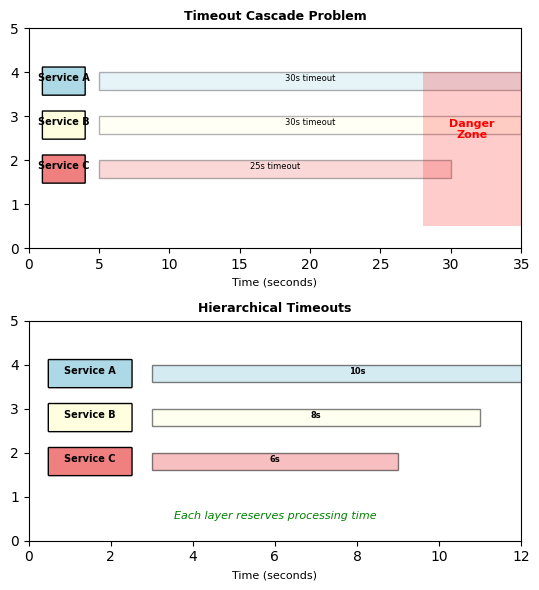
Timeouts cascade through service chains:
Service A calls Service B calls Service C:
# Service A: 30 second timeout response_b = requests.get(url_b, timeout=30) # Service B: 30 second timeout response_c = requests.get(url_c, timeout=30) # Service C: Takes 25 seconds to respond
What happens:
- C takes 25 seconds (within its timeout)
- B waits 25 seconds, then processes (29 total)
- A waits 29 seconds, gets response just in time
- Any additional delay breaks everything
Timeout strategies must coordinate across service boundaries
Hierarchical timeouts:
# Service A: Generous timeout for user-facing request timeout_a = 10.0 # 10 seconds # Service B: Leaves buffer for processing timeout_b = 8.0 # 8 seconds # Service C: Tightest timeout for backend timeout_c = 6.0 # 6 seconds
Each layer reserves time for its own processing.
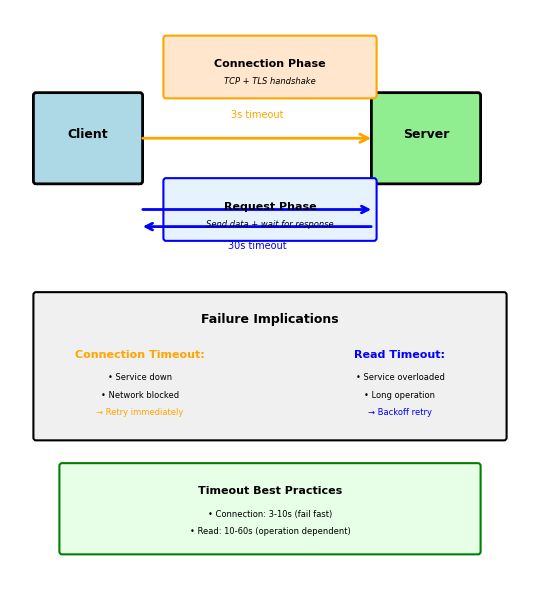
Connection vs Request Timeouts
Different phases of network communication have different failure modes
Connection timeout: Establishing TCP connection
import socket import requests # Connection timeout: How long to wait for TCP handshake requests.get('http://api.service.com/data', timeout=(3, 30)) # (connect, read) # ↑ # 3 seconds to establish connection
Connection establishment steps:
- DNS resolution: 10-100ms
- TCP handshake: 1-3 round trips
- TLS handshake: 2-3 round trips (HTTPS)
Typical connection timeout: 3-10 seconds
Read timeout: Waiting for response
# Read timeout: How long to wait for response after connection requests.get('http://api.service.com/data', timeout=(3, 30)) # (connect, read) # ↑ # 30 seconds for complete response
Why separate timeouts matter:
Connection timeout failures indicate:
- Service completely down
- Network infrastructure problems
- DNS resolution issues
- Firewall blocking connections
Read timeout failures indicate:
- Service overwhelmed (high queue time)
- Long-running operation
- Partial network failure
- Service processing issues
Retry strategy depends on timeout type:
def call_service(url, data, max_retries=3): for attempt in range(max_retries): try: response = requests.post(url, json=data, timeout=(3, 30)) return response.json() except requests.ConnectTimeout: # Connection failed - service likely down # Retry immediately (fail fast) continue except requests.ReadTimeout: # Request sent but no response # Longer backoff (service may be overloaded) time.sleep(2 ** attempt) continue raise ServiceUnavailableError()
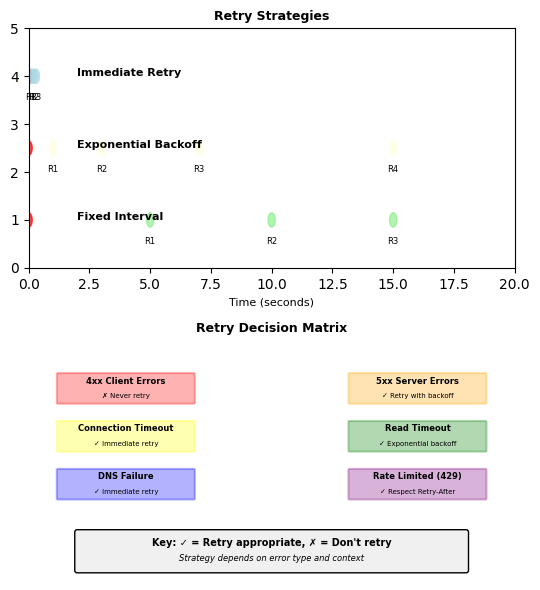
Retry Strategies: When and How
Not all failures should trigger retries
Immediate retry (no backoff):
def immediate_retry(func, max_attempts=3): for attempt in range(max_attempts): try: return func() except ConnectionError: # Network connectivity issue - retry immediately if attempt == max_attempts - 1: raise continue # Use for: Connection failures, DNS timeouts
Exponential backoff with jitter:
import random import time def exponential_backoff_retry(func, max_attempts=5): for attempt in range(max_attempts): try: return func() except (ReadTimeout, ServerError) as e: if attempt == max_attempts - 1: raise # Base delay: 2^attempt seconds delay = 2 ** attempt # Add jitter to prevent thundering herd jitter = random.uniform(0, 0.1 * delay) total_delay = delay + jitter time.sleep(total_delay) continue # Retry sequence: 1s, 2s, 4s, 8s, 16s (with jitter)
Fixed interval retry:
def fixed_interval_retry(func, interval=5, max_attempts=3): for attempt in range(max_attempts): try: return func() except ServiceUnavailableError: if attempt == max_attempts - 1: raise time.sleep(interval) # Always wait 5 seconds # Use for: Known service restart windows
When NOT to retry:
def should_retry(exception, response=None): # Never retry these conditions if isinstance(exception, AuthenticationError): return False # 401 - bad credentials if isinstance(exception, AuthorizationError): return False # 403 - insufficient permissions if response and response.status_code == 400: return False # Bad request - won't improve if response and response.status_code == 404: return False # Not found - resource doesn't exist # Retry these conditions if isinstance(exception, (ConnectionError, ReadTimeout)): return True # Transient network issues if response and response.status_code in [500, 502, 503, 504]: return True # Server errors - may recover return False
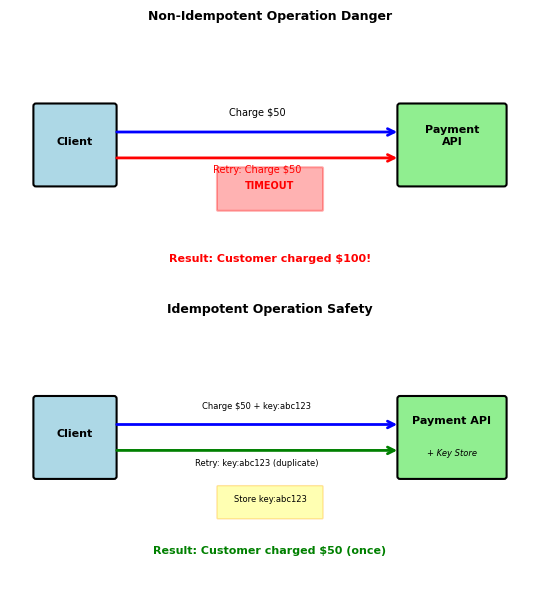
Idempotency: Safe Retry Foundation
Retries are only safe when operations are idempotent
POST retries risk duplicate side effects:
# Dangerous to retry - could double-charge customer def charge_credit_card(customer_id, amount): response = requests.post('https://payments.api/charge', { 'customer_id': customer_id, 'amount': amount, 'currency': 'USD' }) # Network timeout after sending request # Did the charge succeed? Unknown - timeout occurred before response return response.json() # Retry could result in: charge_credit_card(123, 50.00) # $50 charged # Timeout, retry... charge_credit_card(123, 50.00) # Another $50 charged!
Solution: Idempotency keys
import uuid def charge_credit_card_safe(customer_id, amount, idempotency_key=None): if not idempotency_key: idempotency_key = str(uuid.uuid4()) response = requests.post('https://payments.api/charge', { 'customer_id': customer_id, 'amount': amount, 'currency': 'USD', 'idempotency_key': idempotency_key # Unique per logical operation }) return response.json() # Server implementation tracks processed keys: def process_payment(request): key = request.get('idempotency_key') # Check if already processed existing = db.query("SELECT * FROM payments WHERE idempotency_key = ?", key) if existing: return existing.response # Return same result as before # Process payment result = charge_card(request) # Store result with key db.execute("INSERT INTO payments (idempotency_key, response) VALUES (?, ?)", key, result) return result
GET, PUT, and DELETE are naturally idempotent — repeated calls produce the same server state (covered in REST Principles). POST is the problem: retrying a POST can create duplicates or, as above, double-charge a customer.
Idempotency keys make POST retries safe by giving the server a way to recognize duplicate submissions and return the original response.
Circuit Breaker Pattern
Retries assume the downstream service will recover — if it doesn’t, the caller exhausts its own resources waiting
5 retries × 30s timeout = 2.5 minutes per request. Thread pools fill, memory grows, and the caller becomes unavailable too. One failing service takes down its dependents.
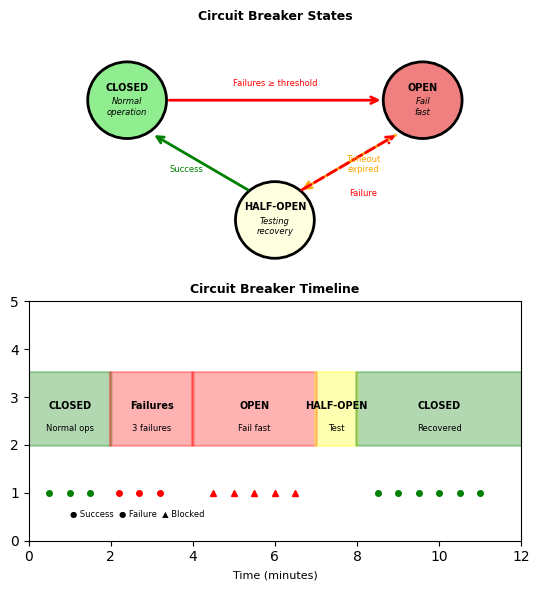
Circuit breaker: stop calling, fail fast, test periodically
Three states:
- Closed — requests pass through normally. Failures are counted.
- Open — after N failures, all requests fail immediately (no network call). Returns fallback or error in <1ms.
- Half-open — after a recovery timeout, one test request is allowed through. Success → closed. Failure → back to open.
Caller behavior with circuit breaker:
try: result = breaker.call( lambda: requests.get(f'http://ml-service/recommend/{user_id}', timeout=5).json() ) except CircuitBreakerOpenError: result = get_default_recommendations(user_id)
Open state returns immediately — no 30s timeout, no wasted threads.
Tuning parameters:
- Failure threshold: 3-10 consecutive failures to open
- Recovery timeout: 30-300s before testing recovery
- Fallback strategy: Cached data, defaults, or degraded response
Long Operations Require Asynchronous Patterns
Some operations take too long for synchronous HTTP
Typical HTTP request/response works for fast operations:
# Fast operation: 50ms response = requests.get('https://api.service.com/users/123') user = response.json() # Works fine
Long-running operations break this model:
# Video transcoding: 5 minutes response = requests.post('https://api.service.com/transcode', json={'video_url': 'input.mp4'}, timeout=300) # Wait 5 minutes? # Problems: # - Client connection held open entire time # - Network interruption loses everything # - No progress visibility # - Client can't do anything else
Core problem: Need to decouple submission from completion
Three solutions exist, each with different trade-offs:
- Polling: Client repeatedly checks “are you done yet?”
- Webhooks: Server calls client when done
- WebSockets: Persistent bidirectional connection
All three share the same pattern: Submit job → get job_id → retrieve result later. They differ in how the result is retrieved.
Pattern comparison at a glance:
Polling - Simple but wasteful:
job_id = submit_job() while not done: status = check_status(job_id) # Repeated HTTP requests time.sleep(5) # Most return "not done yet"
Webhooks - Efficient but complex setup:
job_id = submit_job(callback_url='https://my-app.com/done') # Server POSTs result to callback_url when complete # No wasted requests, but client needs public endpoint
WebSockets - Real-time but resource-intensive:
ws.connect() # Single persistent connection ws.send(start_job) # Server pushes updates as they happen # Immediate updates, but holds connection open
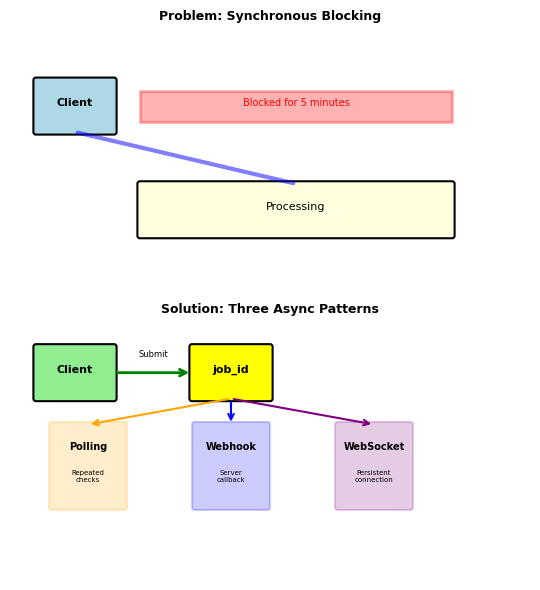
All three patterns decouple submission from completion.
Polling and Webhooks: Two Retrieval Strategies
Polling: Client-driven status checks
Submit once, check repeatedly:
# Submit → get job_id immediately job_id = submit_job({'operation': 'transcode', 'input': 'video.mp4'}) # Poll until complete while True: status = check_status(job_id) if status['complete']: return status['result'] time.sleep(5) # Wait and try again
Server tracks job state:
jobs["abc-123"] = { "status": "processing", # pending → processing → completed/failed "progress": 45, "result": None }
Webhooks: Server-driven notifications
Submit with callback URL:
# Client submits with callback URL job_id = submit_job({ 'operation': 'transcode', 'input': 'video.mp4', 'callback_url': 'https://my-app.com/webhooks/transcode' }) # Client provides endpoint - server calls this when done @app.post('/webhooks/transcode') def handle_complete(request): data = request.json() # {job_id, status, result} update_database(data['job_id'], data['result'])
Server notifies client:
# When job completes, POST to client's callback_url requests.post(callback_url, json={'job_id': job_id, 'result': result})
Trade-offs comparison:
| Aspect | Polling | Webhooks |
|---|---|---|
| Efficiency | Wasteful (most checks return “not ready”) | Efficient (one notification) |
| Latency | poll_interval/2 average | Immediate |
| Client requirements | Simple HTTP client | Public endpoint required |
| Firewall-friendly | Yes (outbound only) | No (needs inbound) |
| Reliability | Client controls retry | Server must retry failed deliveries |
When to use:
- Polling: Mobile apps, browsers, firewall-restricted clients
- Webhooks: Server-to-server, CI/CD pipelines, payment processors
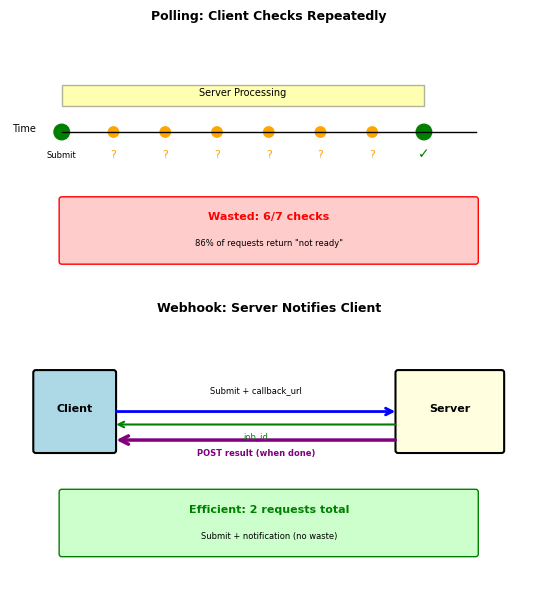
Polling is simple but wasteful; webhooks are efficient but require public endpoints.
WebSockets: Continuous vs Discrete Updates
Polling and webhooks handle discrete operations
Submit job → wait → get result. One submission, one result.
WebSockets handle continuous streams
# Connection stays open, updates flow continuously ws.connect("wss://api.service.com/live") ws.send({"subscribe": "job_updates"}) while True: update = ws.recv() # Server pushes whenever state changes # Progress: 25%, 50%, 75%, 100%
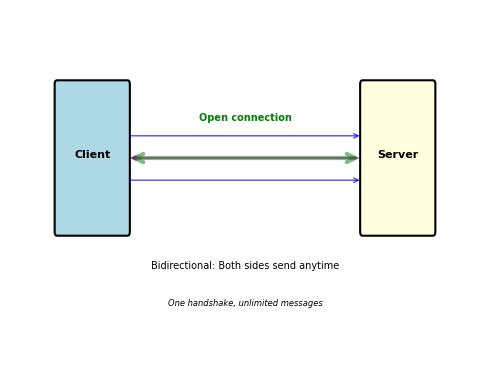
The connection itself is the communication channel, not individual HTTP requests.
Video transcoding (5 minutes)
Discrete: submit → wait → result
- Polling: 30 checks, 29 return “not ready”
- Webhook: 2 requests (submit + notification)
- WebSocket: Unnecessary overhead
Live dashboard (updates every second)
Continuous: constant stream of values
- Polling: 3600 requests/hour per client
- Webhook: Doesn’t fit (not discrete events)
- WebSocket: Push updates as they occur
Mobile app vs Backend service
Mobile can’t receive webhooks (no public endpoint):
- Must use polling or WebSocket
- Polling simpler for discrete operations
Backend can expose endpoints:
- Webhooks for discrete events (payments)
- WebSocket for continuous streams
Combining approaches for reliability:
# Webhook with polling fallback job_id = submit_job(callback='https://my-app.com/webhook') result = wait_for_webhook(timeout=300) or poll_until_done(job_id)
Webhook efficiency when network is reliable, polling safety when it isn’t.
CORS - Browser Same-Origin Security
Browsers enforce origin restrictions that other HTTP clients do not
// JavaScript in browser at http://localhost:3000 fetch('http://localhost:5000/predict', { method: 'POST', body: JSON.stringify({features: [1, 2, 3]}) }) // Error: CORS policy: No 'Access-Control-Allow-Origin' header
Same-origin policy - Browser security restriction:
- Requests allowed to same protocol + domain + port
- Requests blocked to different origins
Examples:
http://localhost:3000 → http://localhost:5000
Blocked - Different ports
https://app.example.com → https://api.example.com
Blocked - Different subdomains
https://app.example.com → https://app.example.com
Allowed - Same origin
Not an API problem - browser enforces this
Postman bypasses CORS (not a browser) curl bypasses CORS (not a browser) Browser JavaScript cannot bypass CORS
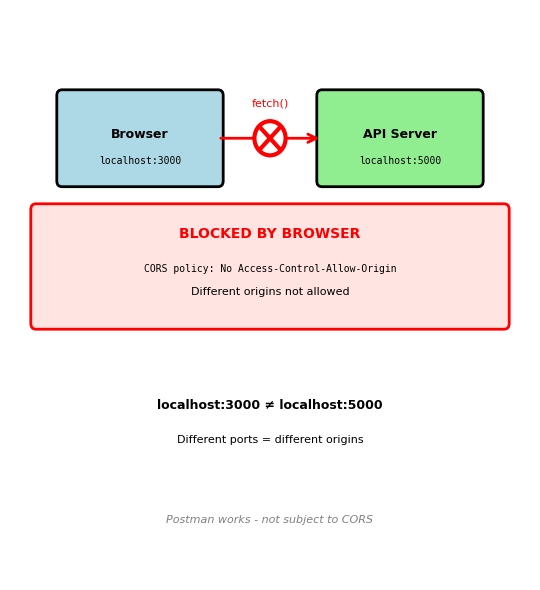
CORS - Server Response Grants Permission
Browser sends preflight OPTIONS request before actual request
OPTIONS /predict HTTP/1.1
Host: localhost:5000
Origin: http://localhost:3000
Access-Control-Request-Method: POST
Access-Control-Request-Headers: Content-Type
Server must respond with permission headers:
HTTP/1.1 200 OK
Access-Control-Allow-Origin: http://localhost:3000
Access-Control-Allow-Methods: POST, GET, OPTIONS
Access-Control-Allow-Headers: Content-Type, Authorization
Access-Control-Max-Age: 3600
Then browser sends actual request:
POST /predict HTTP/1.1
Host: localhost:5000
Origin: http://localhost:3000
Content-Type: application/json
{"features": [1, 2, 3]}
Flask implementation:
from flask_cors import CORS app = Flask(__name__) CORS(app, origins=['http://localhost:3000']) # Or manual headers @app.after_request def add_cors_headers(response): response.headers['Access-Control-Allow-Origin'] = 'http://localhost:3000' response.headers['Access-Control-Allow-Headers'] = 'Content-Type' return response
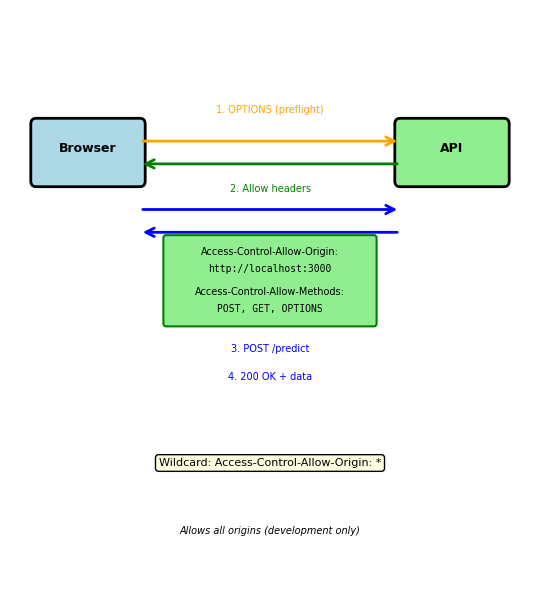
Credentials require explicit permission:
# If sending cookies or Authorization header Access-Control-Allow-Credentials: true # Cannot use wildcard with credentials Access-Control-Allow-Origin: http://localhost:3000
Preflight cached for Access-Control-Max-Age seconds
Correlation IDs for Request Tracing
Tracing requests across multiple services requires unique identifiers
Three services generating thousands of log entries:
# Gateway logs (10,000 entries) [14:23:01.123] Processing request [14:23:01.134] Processing request [14:23:01.145] Processing request # User Service logs (5,000 entries) [14:23:01.234] Database query [14:23:01.245] Database query [14:23:01.256] Database query failed # Payment Service logs (8,000 entries) [14:23:01.345] Processing payment [14:23:01.356] Processing payment
Without correlation: Cannot identify which entries belong to same request
With correlation ID: Thread unique identifier through all services
# Generate at API entry point @app.before_request def assign_request_id(): request_id = request.headers.get('X-Request-ID', str(uuid.uuid4())) g.request_id = request_id # Forward to downstream services headers = { 'X-Request-ID': g.request_id, 'Authorization': get_token() } response = requests.post(user_service_url, headers=headers) # Include in every log message logger.info(f"[{g.request_id}] User {user_id} query failed")
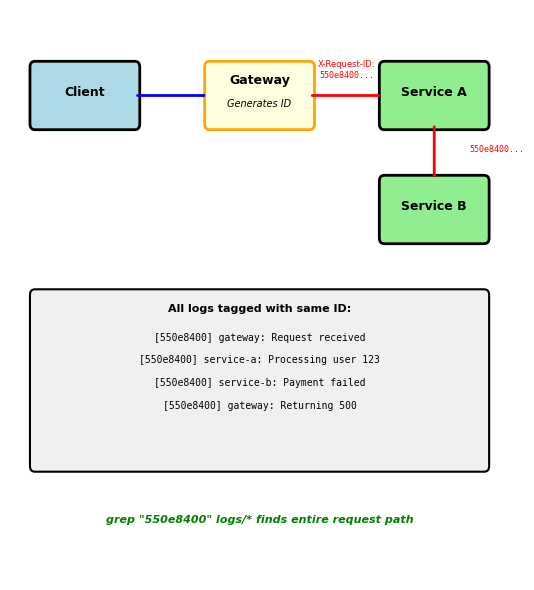
Debugging with correlation ID:
grep "550e8400" *.log | sort
Logging Best Practices - Structured Format
Structured logging: JSON format, not text strings
# Bad: Text logs hard to parse logger.info(f"User {user_id} made prediction, took {duration}ms") # Good: Structured JSON logs logger.info(json.dumps({ "timestamp": "2024-01-15T10:30:45Z", "level": "INFO", "request_id": "550e8400-e29b-41d4-a716-446655440000", "user_id": 123, "endpoint": "POST /predict", "duration_ms": 247, "status_code": 200 }))
Why JSON:
- Easy to parse programmatically
- Query with tools like
jq - Aggregate metrics from logs
- Filter by any field
What to log:
request_id- Correlation across servicesuser_id- Which user affectedendpoint- What operationduration_ms- How long it tookstatus_code- Success or failureerror_message- What went wrong (if failed)
What NOT to log:
- Passwords or API tokens
- Credit card numbers
- Request bodies with PII (personally identifiable information)
- Full JWTs (contains user data)
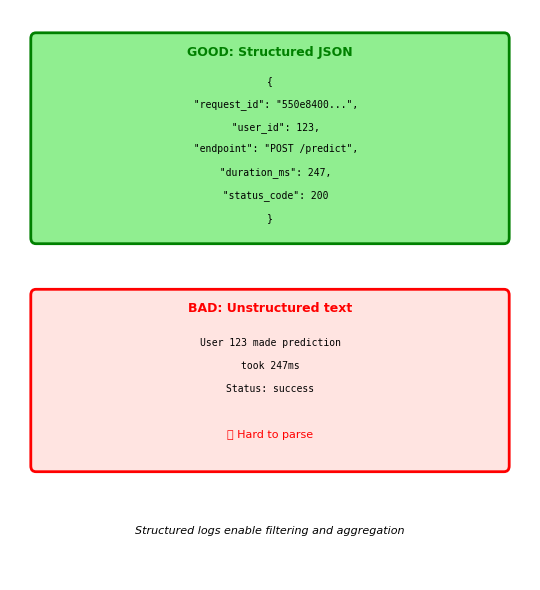
Query structured logs:
# Find all failed requests jq 'select(.status_code >= 500)' logs.json # Find slow requests jq 'select(.duration_ms > 1000)' logs.json # Aggregate by endpoint jq '.endpoint' logs.json | sort | uniq -c
API Gateway - Central Control Point
API Gateway sits between clients and backend services
Why gateway: Implement cross-cutting concerns once, not in every service
Six core functions:
1. Authentication/Authorization
- Validate API keys or JWT tokens
- Check permissions before routing
- Single point for auth logic
2. Rate Limiting
- Prevent abuse (100 requests/minute per client)
- Protect backend services from overload
- Return 429 when limit exceeded
3. Request Routing
- Route to service versions (v1 vs v2)
- A/B testing and canary deployments
- Load balance across instances
4. Response Caching
- Cache GET responses to reduce backend load
- Configurable TTL per endpoint
- Invalidation on mutations
5. Monitoring/Analytics
- Track request counts, latencies, error rates
- Per-client usage metrics
- Identify problem clients
6. CORS Headers
- Add Access-Control-Allow-Origin centrally
- Don’t implement in every backend service
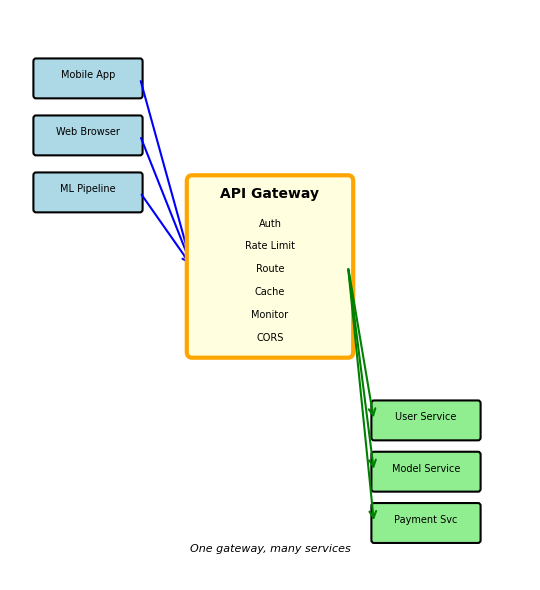
Without gateway:
- Each service implements auth
- Each service adds CORS
- Each service does rate limiting
- Each service monitors itself
With gateway:
- Auth once at edge
- CORS once at edge
- Rate limiting once at edge
- Centralized monitoring
AWS API Gateway Configuration
AWS API Gateway - Managed service, no servers to run
Endpoint structure:
https://{api-id}.execute-api.{region}.amazonaws.com/{stage}/{resource}
https://abc123.execute-api.us-east-1.amazonaws.com/prod/predict
↑ ↑ ↑ ↑
API ID Region Stage Resource
Configuration components:
Resources - URL paths
/users/predict/models/{id}
Methods - HTTP operations per resource
- GET /users
- POST /predict
- DELETE /models/{id}
Integration - Backend target
- Lambda function (serverless)
- HTTP endpoint (existing API)
- AWS service (DynamoDB, S3, etc.)
Stages - Environment separation
prod- Production trafficstaging- Pre-production testingdev- Development environment
Each stage has independent configuration
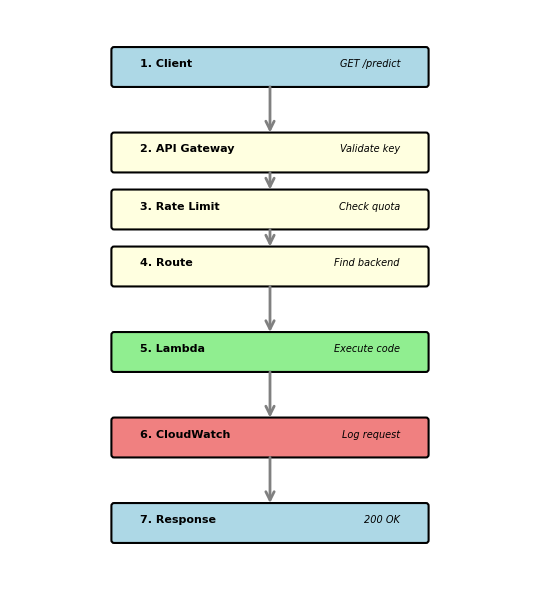
Usage plans - Rate limits per API key:
# Create usage plan { "name": "Basic Plan", "throttle": { "rateLimit": 100, # requests/second "burstLimit": 200 # burst capacity }, "quota": { "limit": 10000, # requests "period": "DAY" # per day } }
Pricing:
- $3.50 per million requests
- $0.09 per GB data transfer
- Caching: $0.02/hour per GB cache
API Gateway Request Lifecycle
Complete request flow through AWS API Gateway
1. Client makes request
curl -X POST \ https://abc123.execute-api.us-east-1.amazonaws.com/prod/predict \ -H 'x-api-key: 8fk3jsl9dkfj3k4j' \ -H 'Content-Type: application/json' \ -d '{"features": [1.2, 3.4, 5.6]}'
2. API Gateway validates API key
- Checks if key exists and is valid
- Returns 403 if invalid
3. API Gateway checks usage plan quota
- Checks rate limit (100 req/sec)
- Checks daily quota (10,000 req/day)
- Returns 429 if exceeded
4. API Gateway routes to backend
- Invokes Lambda function, or
- Forwards to HTTP endpoint, or
- Calls AWS service directly
5. Backend processes request
def lambda_handler(event, context): features = json.loads(event['body'])['features'] prediction = model.predict(features) return { 'statusCode': 200, 'body': json.dumps({'prediction': float(prediction)}) }
6. API Gateway logs to CloudWatch
- Request ID, latency, status code
- Enables debugging and monitoring
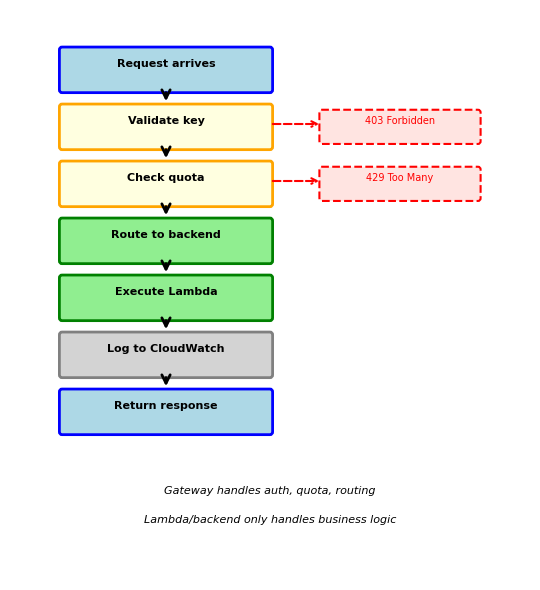
7. API Gateway adds CORS headers
Access-Control-Allow-Origin: *
Access-Control-Allow-Methods: POST, GET, OPTIONS
8. Response returned to client
{ "prediction": 0.87 }
CloudWatch metrics available:
- Request count
- Latency (p50, p90, p99)
- Error rate
- Cache hit rate