Replicas Hold the Same Data on Separate Servers
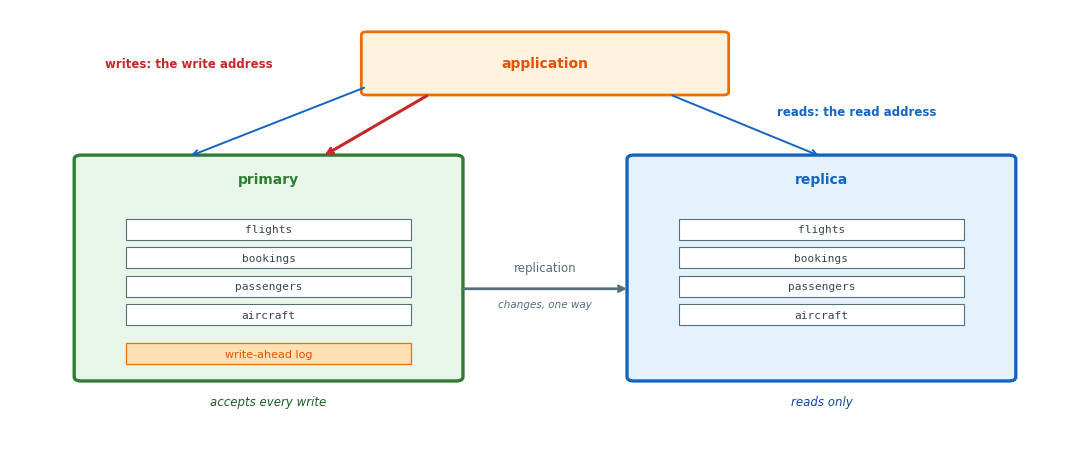
Primary: the one server that accepts writes
Replica: a second server, with its own disk and memory
- A copy of every table
- Applies the primary’s changes in order
- Serves reads only
Routing: two addresses, one for writes and one for reads
- A write sent to the read address is refused
Read load: the departures board, reports, any table read far more than it is written
- Served by the replica
- The primary’s capacity left for writes
Loss of the primary: a current copy already on another server
- Service continues without a restore from backup
Replicas Lag Behind the Primary
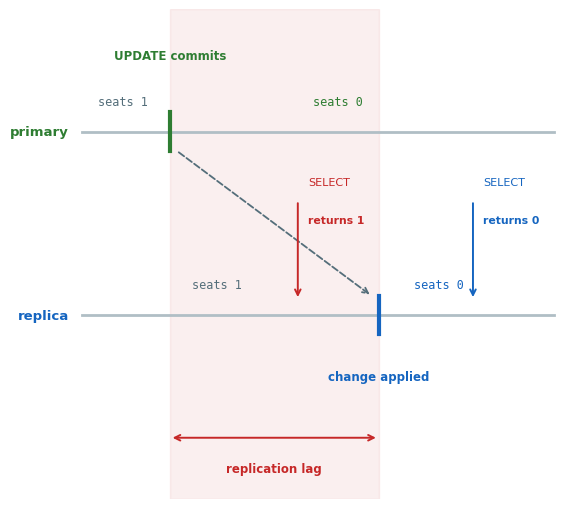
primary> UPDATE flights SET seats_remaining = 0
         WHERE flight_id = 7;
UPDATE 1

replica> SELECT seats_remaining FROM flights
         WHERE flight_id = 7;
       1
replica> [same query, a moment later]
       0
Replication lag: the time from the commit on the primary until the replica has applied the same change
- Measured as how far the replica’s last applied record is behind the primary’s newest
Stale rows: both answers correct for the replica’s data at that moment
- Neither result includes the age of the data
Replicas Replay the Primary’s Log
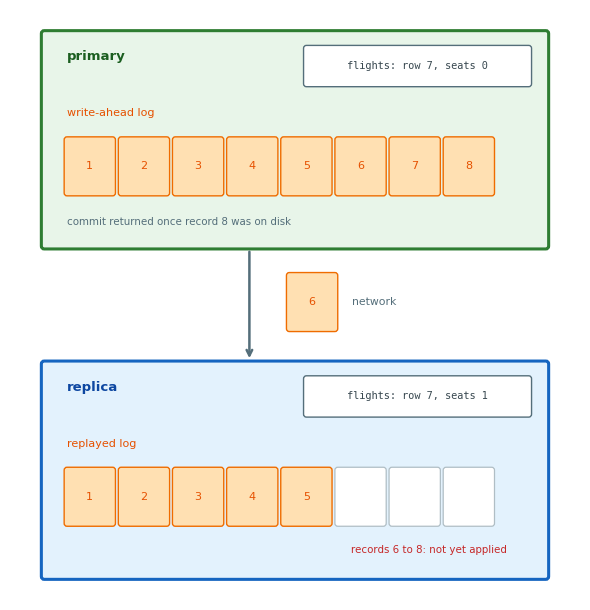
Write-ahead log
- Every change appended
- Forced to disk before the commit returns
- Each record*: the page and the bytes that changed (*PostgreSQL, here and wherever marked)
Shipping
- The same records sent over the network
- Applied on the replica in the same order
- The replica’s tables equal the primary’s tables as of its last applied record
Lag: the records the replica has not yet applied
- Distance: one or two milliseconds within a region, about 100 ms across an ocean
- Usually under a second in total
- A burst of writes: records queue on the replica for seconds, sometimes minutes
- Downtime: a replica down for ten minutes returns ten minutes behind
Synchronous Replication: Commits Wait for the Replica
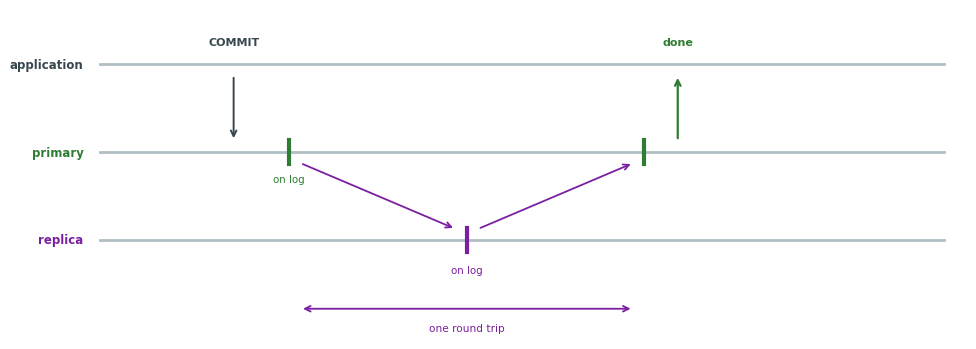
Commit
- Change on the primary’s log
- Record sent to the replica and written to its log
- Confirmation to the primary
- Commit returned to the application
Two disks: every committed write on two servers
- No committed write lost with the primary
Round trip: added to every write
- One or two milliseconds between availability zones
- About 100 ms across an ocean
Unreachable replica: every commit waits until the replica is reachable again or is removed from the pair
On AWS: RDS Multi-AZ, a standby in a second availability zone
- No reads served from the standby
Asynchronous Replication: Commits Return First
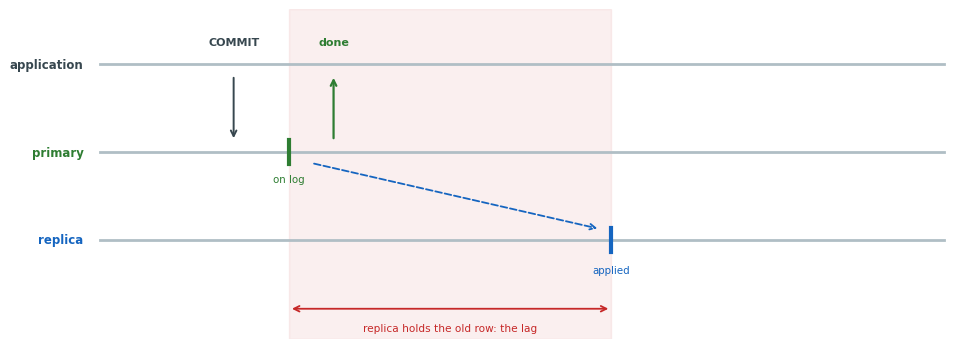
Commit
- Change on the primary’s log
- Commit returned to the application
- Record sent, then applied on the replica after the lag
No added wait: a write completes as on one server
- Replicas in any region, in any number
Lag: each replica serves reads as of its last applied record
Loss of the primary: records not yet sent are lost
- Their commits already returned to the application
On AWS: a read replica
Writers See Stale Rows on Replicas
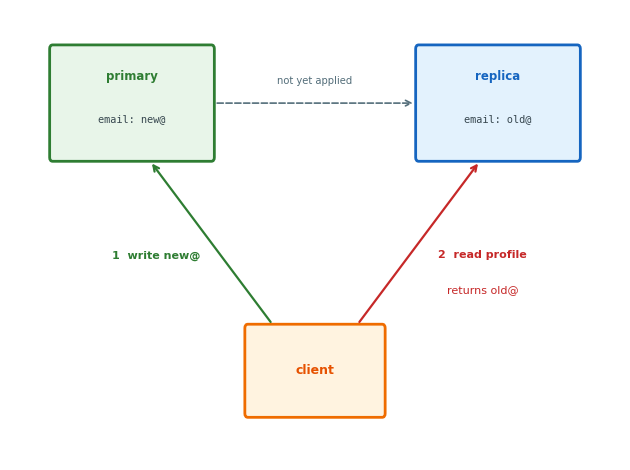
Email change
- The new address is written to the primary
- The profile read again, from a replica
- The replica, without the change, returns the old address
One reader notices: the client that wrote the new value, the only reader that has seen it
Routing fixes
- Send this client’s reads to the primary for a few seconds after each of its writes
- Repeat the read until the row matches the value written
- Send operations that need the current row to the primary and the rest to replicas
Which reads follow a client’s own write is visible only to the application
Failover: Replica Becomes Primary
Promotion
- The replica is made the primary
- The write address is pointed at it
- Connections fail for about a minute
- The same address serves again
- Transactions open at the failure are rolled back and retried by the application
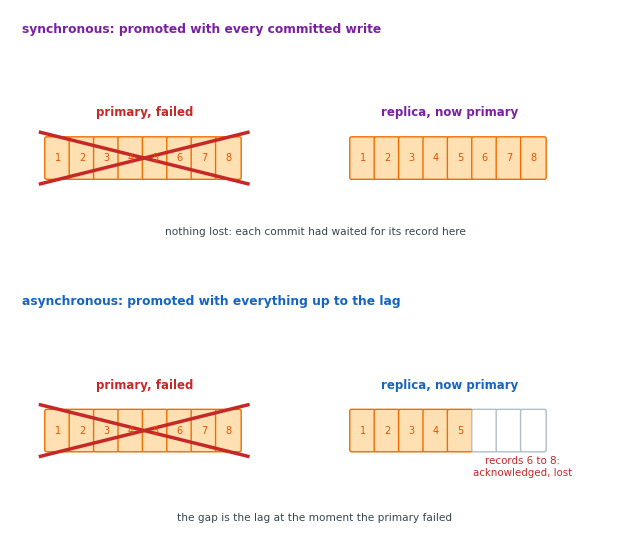
Data on the new primary
- Synchronous replica: every committed write
- Asynchronous replica: everything up to its lag
Lost records: with an asynchronous replica, the records not yet sent at the failure
- Their commits already returned to the application
- On no server
Writes Still Go to One Primary
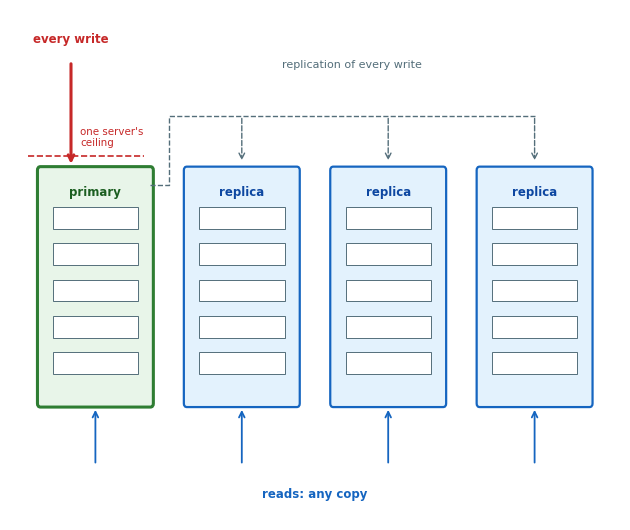
Read capacity: each replica serves reads from its own disk and memory
Continuity: a lost primary is replaced by a copy, with no restore from backup
Distance: a replica in Frankfurt serves Frankfurt’s reads
Write capacity: one server accepts every write
- Its disk, memory and connection limit are the ceiling
Storage: every copy holds all the data
- A primary and three replicas: four times the storage
- Every write performed four times
Shards Hold Different Rows on Separate Servers
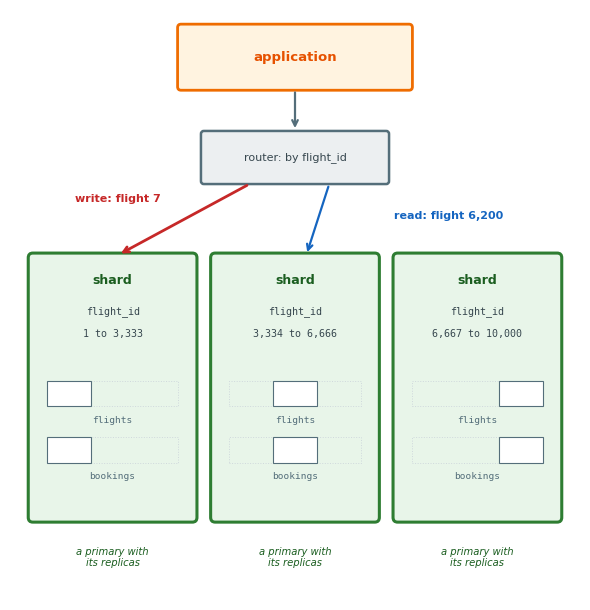
Shard: a server holding part of the rows of every table
- All shards together hold every row once
- Each shard is a primary with its replicas
Shard key: the column a row’s shard is computed from
flight_idfor flights and for their bookings- A flight and its bookings on one shard
Routing: each read or write sent to the shard holding its key, by the application or by a router in front of the shards
Capacity: the shards together hold more rows than one disk and accept more writes a second than one server
- Each shard performs only the writes for its own rows
Queries Without the Shard Key Go to Every Shard
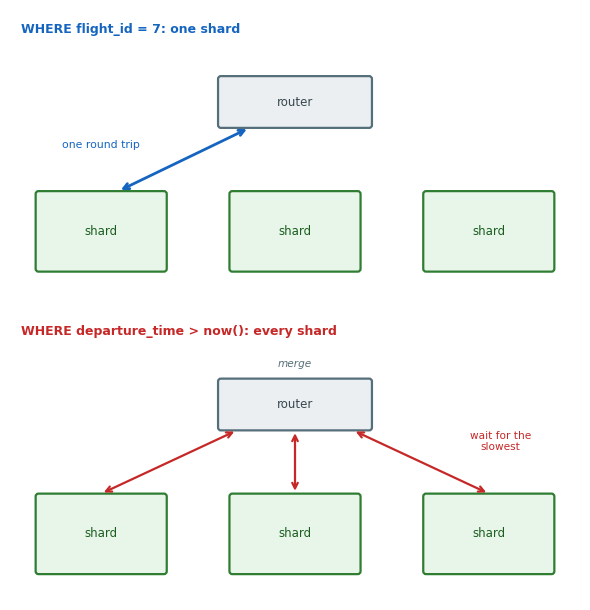
By the shard key: WHERE flight_id = 7
- The router computes the shard from the key and sends the query there
- One shard, one index lookup, one answer
Without the shard key: WHERE departure_time > now()
- No shard ruled out
- The query sent to all N
- Each shard scans its own
flightsrows - The router merges N partial results
- The result is ready when the slowest shard has answered
- N queries of work for one result
With flight_id as the shard key, the departures board, the most frequent read, goes to every shard
Hash Placement: Rows Spread Evenly
Hash function: maps a key to a number in a fixed range
- The same key always gives the same number
- Neighboring keys give unrelated numbers
hash("N12345") = 2 303 133 630   mod 4 = 2
hash("N12346") =   273 569 284   mod 4 = 0
hash("N12347") = 1 732 863 634   mod 4 = 2
                 (same shard as N12345, by chance)
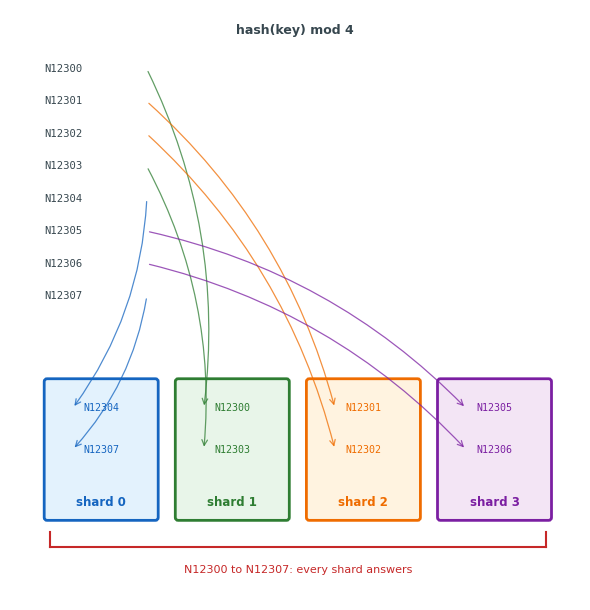
Placement: hash(key) mod N is the shard number, for N shards
- Computed the same way on every server
- No lookup table
Even spread: on average each shard holds the same number of rows and accepts the same share of the writes, for any set of keys
One shard per key: a read or write for a key goes to exactly one server
Neighbors apart: N12345 and N12346 on different shards
- A query over registrations N12300 to N12399 goes to every shard
Range Placement: Neighboring Rows Share a Shard
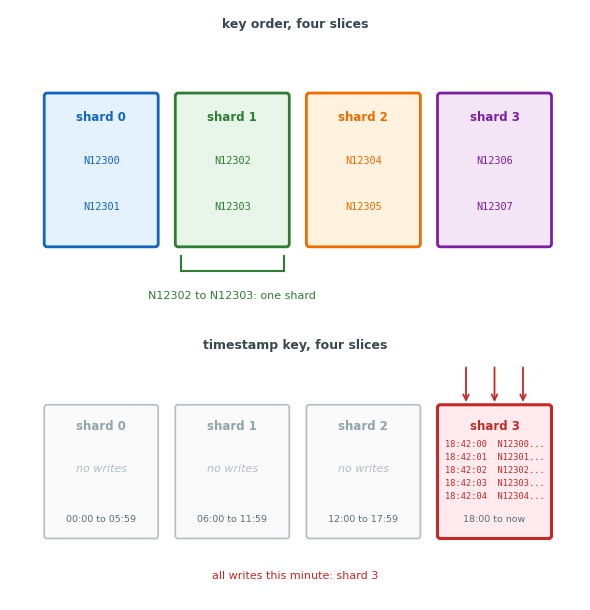
Placement: each shard holds one contiguous slice of the keys in sorted order
- A small table of slice boundaries, copied to every server, gives the shard for a key
Range queries: go to the one or two shards whose slices cover the range
Uneven spread: the number of rows in a slice depends on the keys
- A slice that outgrows its server is split and part of it moved to another
Hot shard: with a timestamp as the key, every row written this minute goes to the shard holding the current slice
- No writes to the other shards
Hash when reads are by one key and writes should spread; range when reads cover a range of keys and the key is not the time of arrival
Adding a Shard Moves Whole Partitions
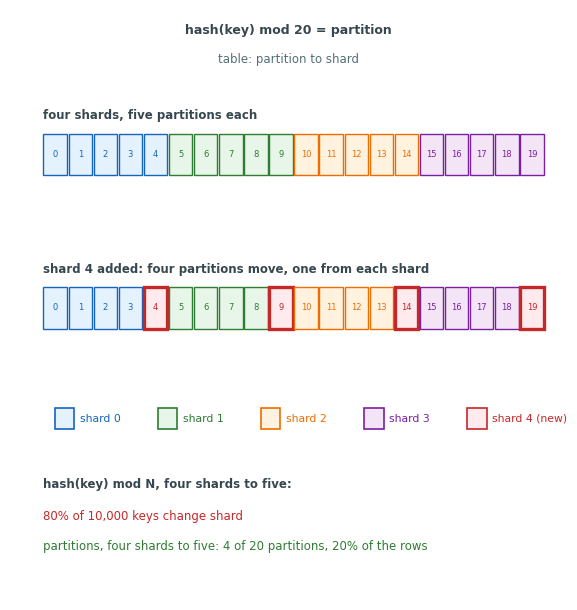
With hash(key) mod N, a change in N changes the shard of most rows
- Four shards to five: about four rows in five move
- Every shard sends and accepts rows at once
Partition: a fixed slice of the hash range
- Each key hashed to a partition
- A small table gives the shard for each partition
Partition count: set far above the number of shards, hundreds to tens of thousands (Redis Cluster: 16,384), or partitions split as they grow (MongoDB chunks, DynamoDB partitions)
Shard added: the new shard is given whole partitions, one from each existing shard in turn
- Only the rows of those partitions move
- About one row in five, from four shards to five
Shard removed: its partitions are given to the remaining shards
Ring: the same scheme drawn on a circle (Cassandra’s form)
- Each shard holds the arc of hash values up to its position
- A new shard is given part of one arc
The hash of a key never changes, only the partition table
Joins and Transactions Across Shards Add Round Trips
Join on one shard: a flight and its bookings placed by the same flight_id
- Both read from one disk
Join across shards: bookings placed by passenger_id
- One passenger’s bookings on one shard
- Each booking’s flight on another shard
- One network round trip per booking
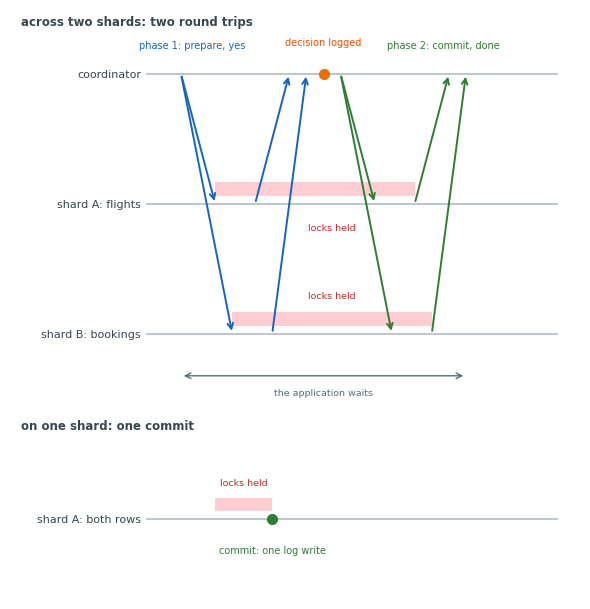
Two-phase commit: the seat count on one shard and the new booking row on another
- Prepare: each shard writes the change to its log, holds its locks, and returns yes
- The coordinator records the decision to commit
- Commit: each shard applies the change and releases its locks
Failure between the phases: a shard that has returned yes holds its locks until the coordinator’s decision arrives
- Its rows blocked for every other writer until then
A commit is one log write on one shard and two round trips across two
Network Partitions Separate Healthy Servers
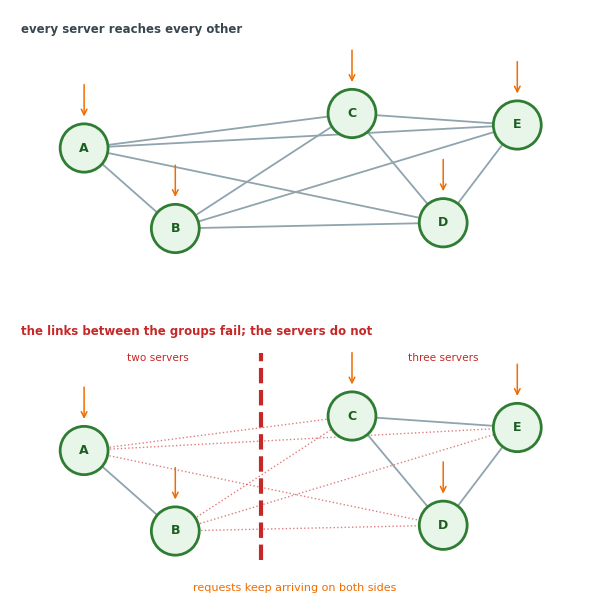
Network partition: the links between two groups of servers fail
- Every server continues running
- Each group receives requests from the clients on its side
app (zone a)> UPDATE flights ...   -- primary, zone b
connection to server at "db-b.internal"
  (10.0.2.14), port 5432 failed:
  Connection timed out

app (zone a)> SELECT ...           -- replica, zone a
seats_remaining
       1
Causes
- A switch fails inside a data center
- A fiber route between regions is cut
- A routing change isolates one subnet
Duration: seconds for a reroute, minutes for a switch restart, hours for a repair
Each side
- Its own servers answer
- The other side’s servers do not answer
- A server that does not answer cannot be told from a slow one
Both sides hold copies of the same rows, and both are receiving writes
CAP: At Most Two of Three Properties
Consistency: every read returns the most recent write, from whichever server answers it
- Two clients reading the same row at the same moment get the same value
Availability: every request to a working server gets an answer that is not an error
- No client is refused because of what another server is doing
Partition tolerance: the database continues operating while its servers are split into groups that cannot communicate
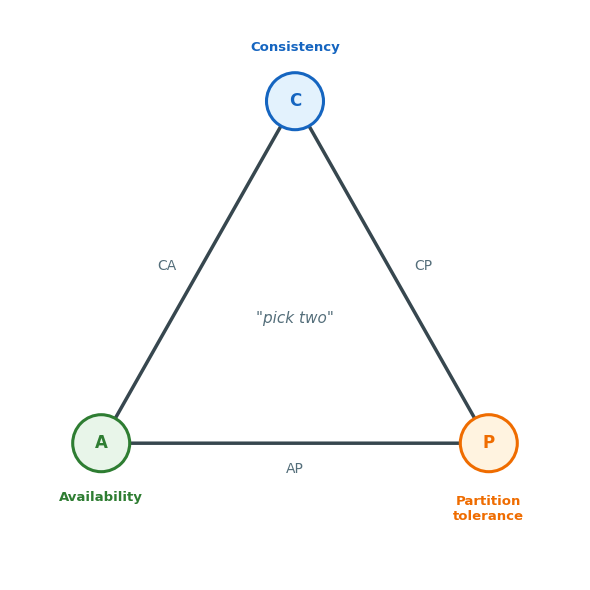
Pick two: a database has at most two of the three
- CA: one server, or copies that stop when a link fails
- CP: refuses rather than disagree
- AP: answers rather than refuse
Cut-Off Servers Either Answer or Refuse
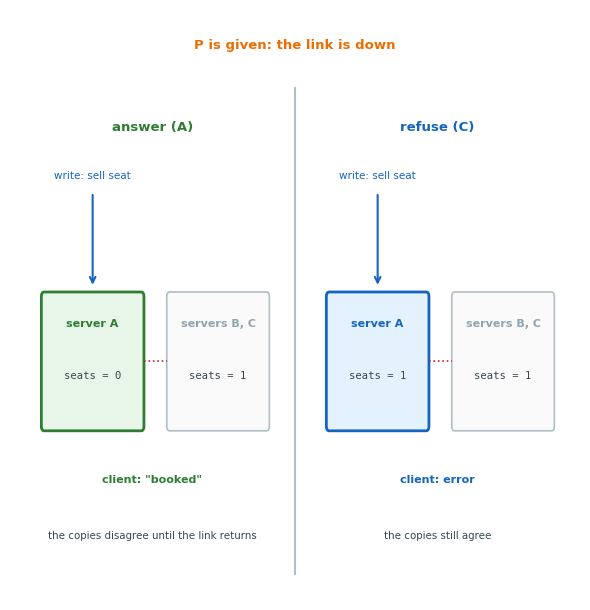
Partition tolerance: required, since links fail
- The choice is between C and A
A write arrives at a server cut off from the other copies
- Answer: available, not consistent
- The write is applied to the local copy and “booked” returned
- The copies disagree
- Refuse: consistent, not available
- An error returned until a majority of the copies can confirm
- Waiting for the link: a refusal to the waiting client
Without a partition
- Consistent and available at once
- The choice applies only during the split
Per operation: one database answers for some operations and refuses for others
- Seat sale: refuses
- Position report: answers
Writes Continue on the Majority Side
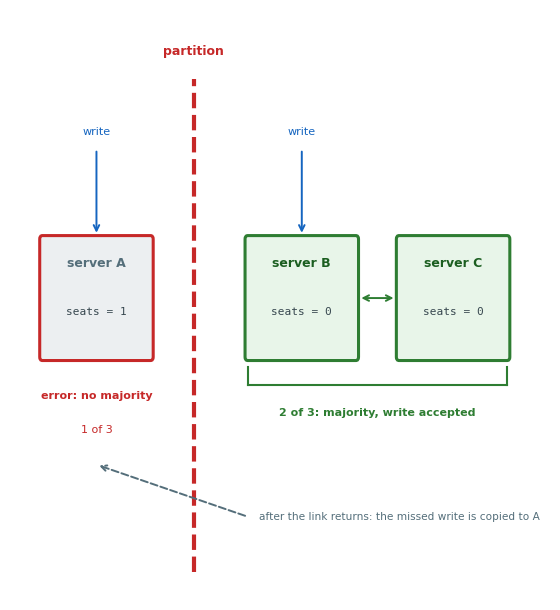
Majority rule: a write completes only when more than half of the copies confirm it, two of three
During the partition
- The side with two of three copies continues accepting writes
- The side with one copy refuses writes, and reads when a stale answer is not acceptable
- Its clients get errors until the link returns
- Two sides cannot both hold a majority
- Two servers never accept writes for the same row at once
After the link returns: the minority copy receives the writes it missed, with nothing to reconcile
Copies and losses
- Three copies continue with one unreachable, five with two
- An even count adds no tolerance: two equal halves have no majority
Answering on Both Sides Leaves Two Versions
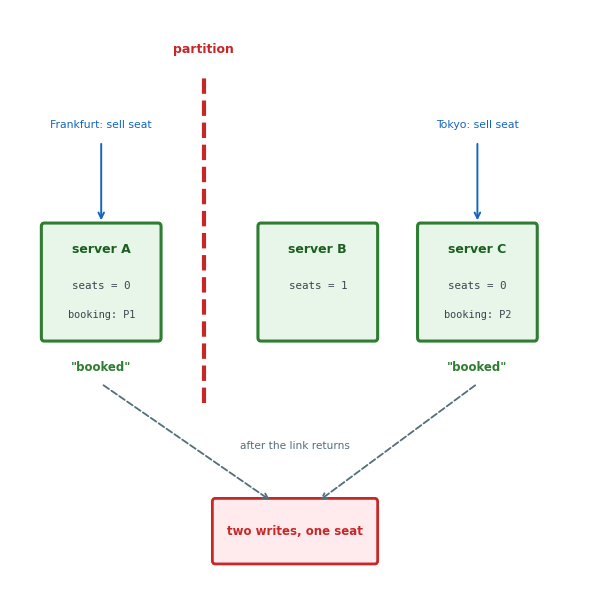
During the partition
- Flight 7 has one seat left on every copy
- A client in Frankfurt books it through server A; a client in Tokyo books it through server C
- Both clients receive “booked”
- A has one booking and C another, each with
seats = 0
After the link returns: one of three rules resolves the disagreement
- Last writer wins: the version with the later timestamp replaces the other, deleting one booking with no error
- Application rule: both bookings kept, one moved to standby by the airline’s existing rule
- Both versions kept: the next reader receives both and resolves them
Eventual consistency: the copies agree once every copy has applied every write and each conflict is resolved
- Until then, reads on two copies may differ
Last Writer Wins Assumes Synchronized Clocks
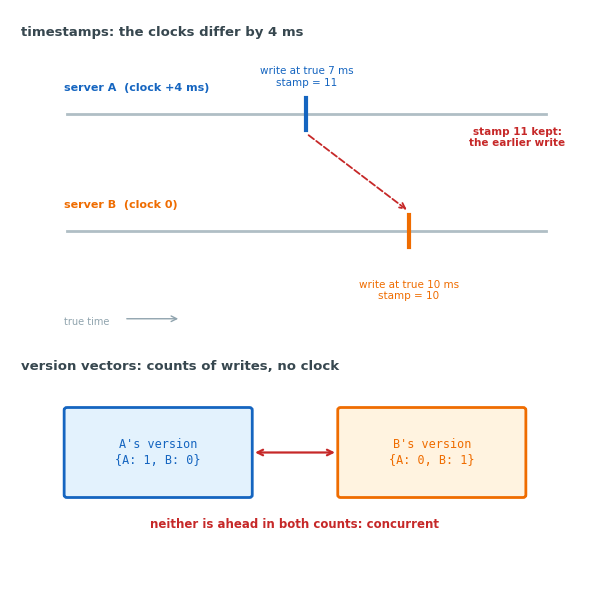
Clock skew: synchronized clocks on two servers differ by milliseconds
- Two writes a few milliseconds apart on two servers can carry timestamps in the wrong order
- The later timestamp wins even when its write happened first
- The other write is discarded with no error
Version vector: a count of the writes applied from each server, stored with the row, such as {A: 3, B: 5}
- A version ahead in every count was written after the other and replaces it
- Two versions each ahead in one count: concurrent, neither copy had received the other
- The database reports a conflict instead of an order
Read result
- Timestamps: one value, no warning
- Version vectors: both values, marked as conflicting
Quorums: Reads Overlap Writes When \(W + R > N\)
Three counts
- \(N\): copies of a row
- \(W\): copies that confirm before a write is acknowledged
- \(R\): copies a read consults; the newest version among them is returned
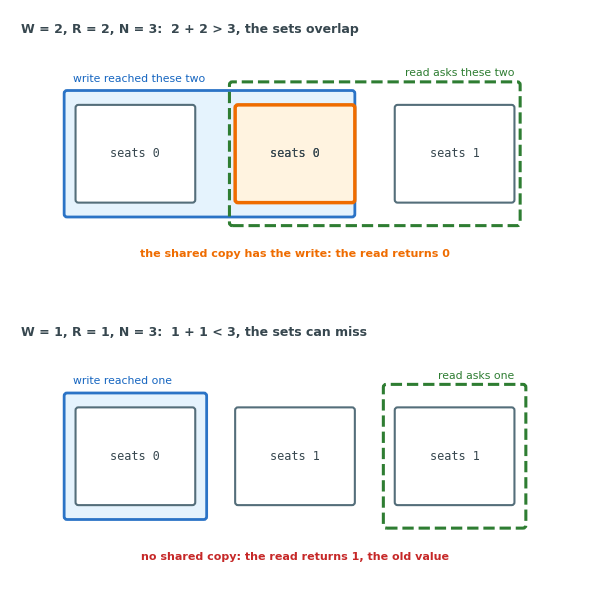
Overlap: with \(W + R > N\), every read set shares at least one copy with the last write set, and that copy has the write
- \(N = 3\), \(W = 2\), \(R = 2\): \(2 + 2 = 4 > 3\); the read returns the latest value
- \(N = 3\), \(W = 1\), \(R = 1\): \(1 + 1 = 2 \le 3\); the read may miss the write and return the old value
Settings
- \(W = N\): one unreachable copy blocks every write
- \(W = 1\): a read on another copy may miss the write
- \(W = R = 2\) of 3: reads overlap writes with one copy unreachable
Cassandra sets ONE, QUORUM or ALL per operation, and DynamoDB a strongly consistent read
The Application Chooses a Consistency Level per Operation
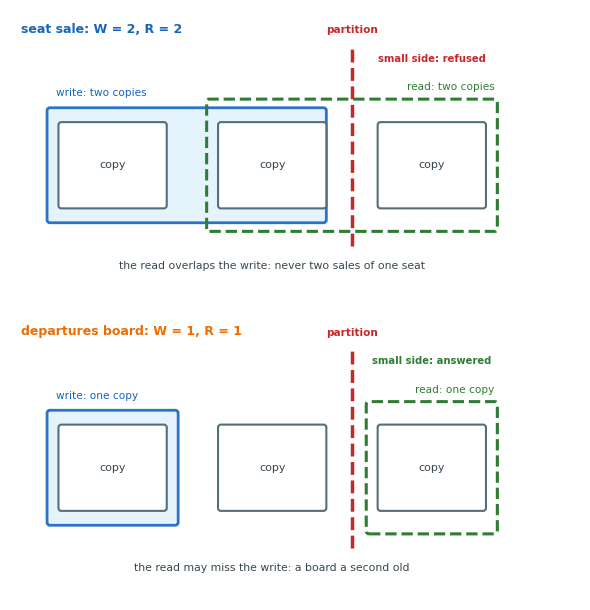
Consistency level: W and R set per operation by the cost of a stale or a refused answer, on the same three copies
Seat sale: majority for the write and the read
- A stale read sells the last seat twice
- A refused minute loses one sale
Departures board: one copy for the write and the read
- A board one second old is correct enough
- An error on the board is not
Fixed level: a database with one level applies the same choice to every operation
Under a partition, the seat sale refuses on the small side and the board continues
Key-Value Stores Hold Values in Memory by Key
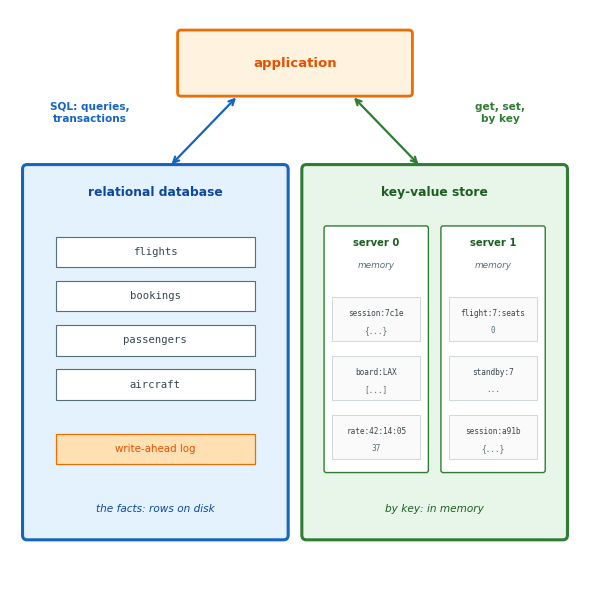
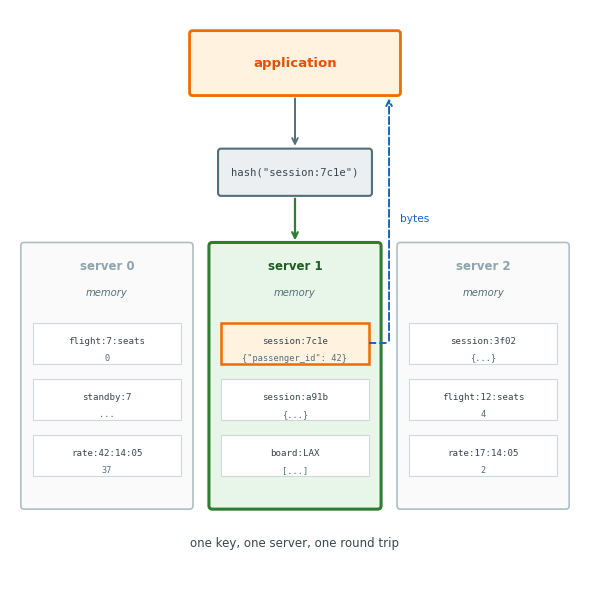
Key-value store: key and value pairs in memory on one or more servers, beside the database
Key: a string the application chooses, and the only thing indexed
Value: bytes, opaque to the store
Instances
- Redis and Memcached, as a server or a cluster
- ElastiCache on AWS
- DynamoDB, when every access is by key
Stored values: the login session, the cached departures board, a request count, the standby list
- The facts stay in the tables
Lookups Use the Key (and Nothing Else)
import redis, json
r = redis.Redis(host="cache.internal")

r.set("session:7c1e",
      json.dumps({"passenger_id": 42}))
r.get("session:7c1e")
# b'{"passenger_id": 42}'
r.get("session:0000")
# None
Get: one key in, the bytes out, or nothing
- No condition on the bytes inside
- No second column
- No “sessions of passenger 42”: nothing indexes the value
Round trip: one request to the server the key hashes to
- About a millisecond within a zone
- The store’s own work is a hash probe
Serialization: object to bytes and back, in the application
Writes Return Once They Are in Memory
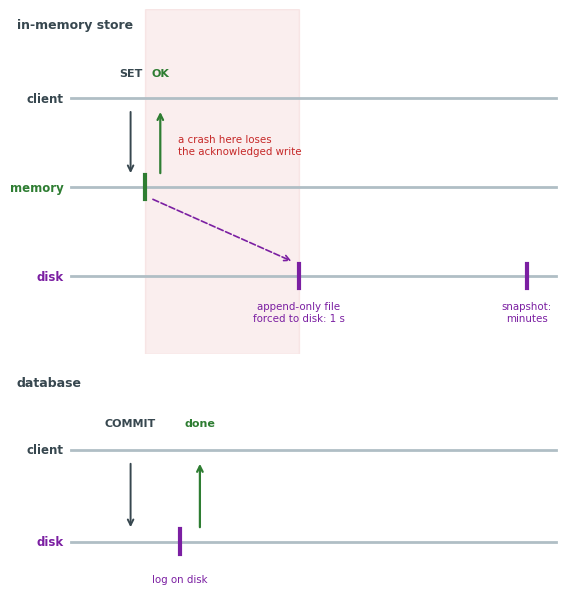
Write path
- Value into the server’s memory
- Client answered
- Disk later, or never
Persistence settings* (*Redis defaults; other stores name the same choices differently)
- Append-only file: every write appended to a log; forced to disk once a second
- Snapshot: the whole data set written to disk, minutes apart
- Neither: memory only; a restart starts empty
Replication: the replica receives each write after the acknowledgement, as an asynchronous database replica does
Loss at a crash
- Append-only file: the last second of writes
- Snapshot: the last minutes
- Neither: everything
Sessions, cached values and counters can be lost and rebuilt without harm
Caches Serve Repeated Reads from Memory
def departures(airport):
    key = f"board:{airport}"
    hit = r.get(key)
    if hit is not None:
        return json.loads(hit)
    rows = db.query(
        "SELECT ... FROM flights "
        "WHERE origin = %s "
        "AND departure_time > now() ...",
        airport)
    r.set(key, json.dumps(rows), ex=30)
    return rows
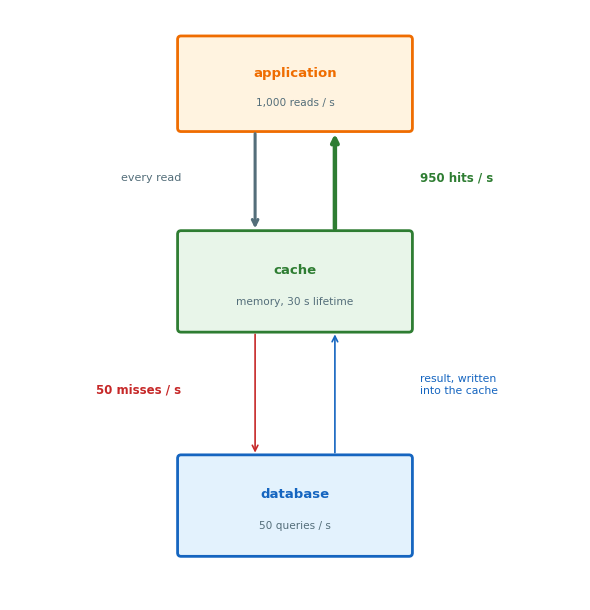
Hit: the value is in the cache; one round trip, no query
Miss: the key is absent or expired
- The query runs
- Its result is written to the cache with a 30 s lifetime
Hit rate: the fraction of reads answered from the cache
- 1,000 reads a second at a 95% hit rate: 50 queries a second at the database
Cached Copies Are Stale Until They Expire
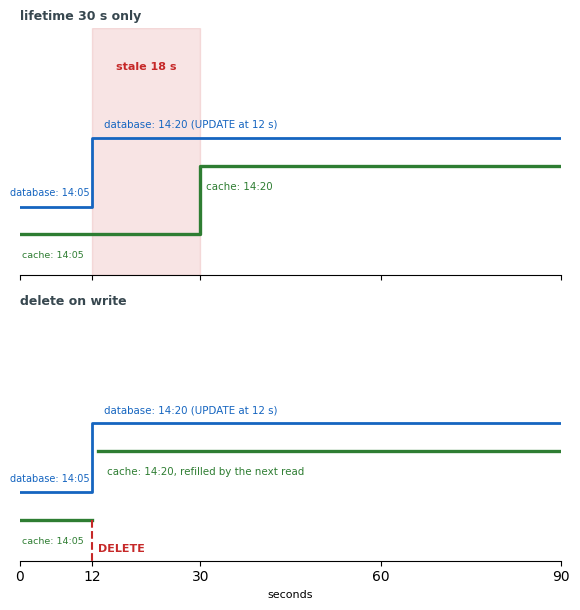
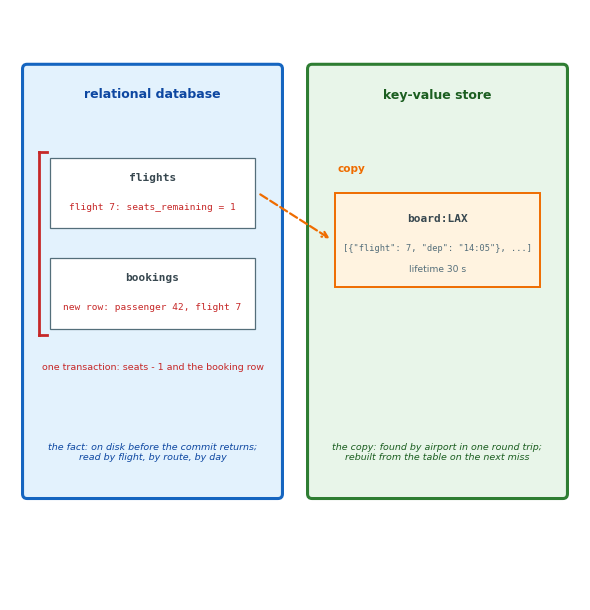
Two copies: the row in the database and its copy in the cache
- A write changes the row, not the copy
Lifetime: the copy is served until it expires, regardless of writes to the database
- A 30 s lifetime: the board is at most 30 s old
Delete on write: the cached key deleted with the row’s write, and the next read refills it
db.execute(
    "UPDATE flights SET departure_time = %s "
    "WHERE flight_id = 7", t)
r.delete("board:LAX")
- Two stores, no transaction: a crash between the statements leaves the old copy until it expires
- Each write deletes every cached key that copies its row
Eviction: at full memory, the cache removes keys, least recently used first
- Any key can be absent at any time
- A miss is never an error
Every Read Misses Between Expiry and Refill
Hot key: one key read far more than the rest
-
The board for a hub airport, on every display and every phone in the terminal
-
Hashed to one server
-
Adding servers spreads the other keys, not this one
-
That server’s link and CPU are the ceiling for this key
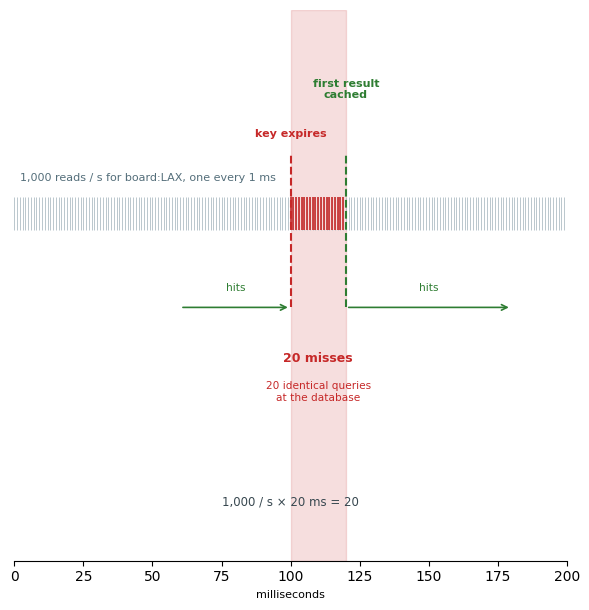
At expiry: the key is gone until the first miss has run the query and written the result
- 1,000 reads a second, a 20 ms query
- 20 reads arrive in the window; all 20 miss
- 20 identical queries arrive at the database at once
Claiming the refill: set-if-absent on a lock key succeeds for one request
- That request runs the query
- The others wait a few milliseconds and read the new value
The same arithmetic applies to every popular key at every expiry
Sorted Sets Return Members by Rank or by Score
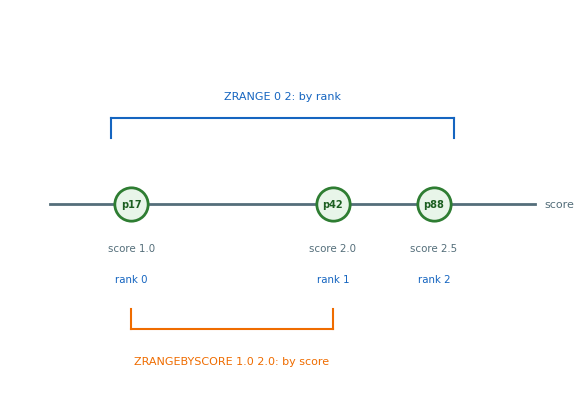
Standby list for flight 7: passengers ordered by priority; read as “the next three” and “where am I”
# score: priority
r.zadd("standby:7",
       {"p42": 2.0, "p17": 1.0, "p88": 2.5})
r.zrange("standby:7", 0, 2)
# [b'p17', b'p42', b'p88']
r.zrank("standby:7", "p88")          # 2
r.zrangebyscore("standby:7", 1.0, 2.0)
r.zrem("standby:7", "p17")           # seat assigned
Score: a number per member, with members stored in score order
Operations on the server: insert, rank, range by rank, range by score
- Each O(log N) in the number of members
- The list is never sent to the application for sorting
Other value types: hash (field and value pairs in one key), list, set
- Each with its own operations on the server
- Each still one key on one server
Every Operation Starts From a Known Key
Key-value fit: data the application names by a key it already has, reads or writes whole, and can lose or rebuild
Departures board: fits, as a copy
- Named by airport; read whole; rebuilt from the flights table on the next miss
- Nothing is lost if the store restarts empty
Seat count: does not fit
- Sold together with the booking row, in one transaction the store cannot offer across keys
- Must not be lost in a crash
- The store acknowledges before writing to disk
- Read by flight, but also summed by route and by day, which no key names
Facts are stored in the tables, copies in the key-value store
Loading Related Rows One at a Time Costs N + 1 Queries
bookings = db.query(
    "SELECT * FROM bookings "
    "WHERE passenger_id = %s", pid)
for b in bookings:                 # N rows
    b.flight = db.query(           # one query each
        "SELECT * FROM flights "
        "WHERE flight_id = %s", b.flight_id)
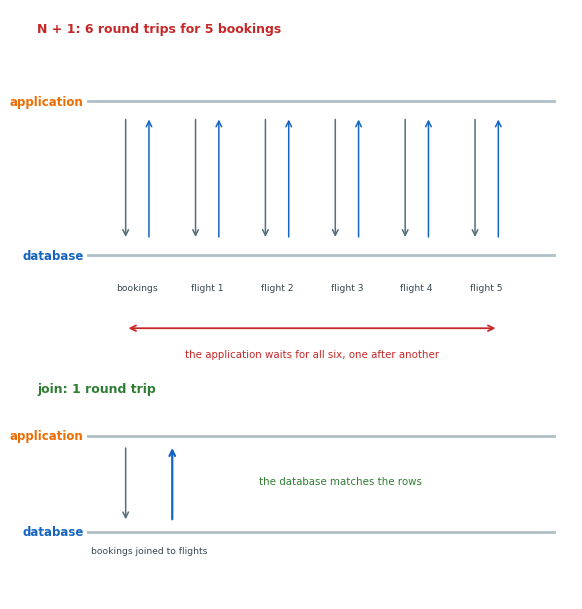
N + 1: one query for the list, then one per row
- 5 bookings: 6 queries
- 50 bookings: 51 queries
- One round trip each, one after another
Join: the same rows in one query
SELECT b.*, f.origin, f.destination,
       f.departure_time
FROM bookings b
JOIN flights f ON f.flight_id = b.flight_id
WHERE b.passenger_id = %s;
- Rows matched by the database
- One round trip
N + 1 appears wherever the application follows identifiers itself
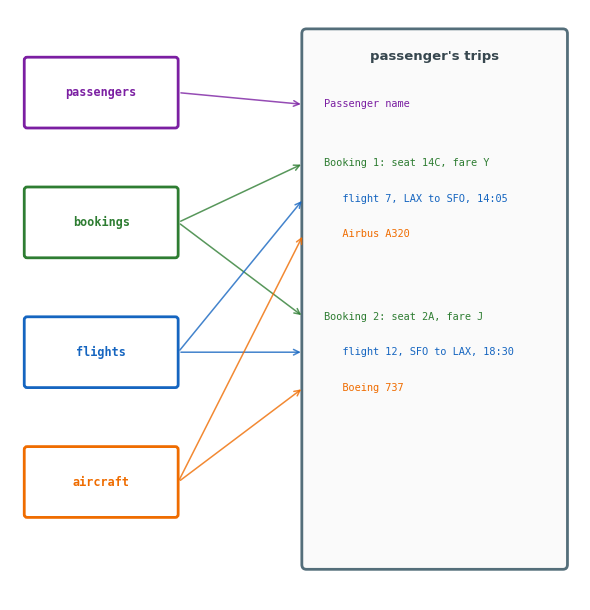
Reads Assemble Facts From Several Tables
Passenger’s trips: one read of the passenger’s upcoming flights with seat, flight and aircraft
- Name:
passengers - Seat and fare class:
bookings - Flight number, route, departure time:
flights - Aircraft model:
aircraft
Normalized tables: each fact once, in its own table
- The departure time: one value in one row, for all 180 bookings
- Rows matched across tables on every read
Access pattern: a read or write the application makes, with the facts it needs together and how often it runs
- Passenger’s trips: the passenger, their bookings, each with its flight
- Departures board: an airport, its flights in the next hours
- Seat sale: a flight’s seat count and one new booking
Embedding Stores Together What Is Read Together
{ "passenger_id": 42, "name": "A. Rivera",
  "bookings": [
    { "booking_id": 9001, "seat": "14C",
      "fare_class": "Y",
      "flight": { "flight_id": 7,
                  "number": "UA 455",
                  "origin": "LAX",
                  "destination": "SFO",
                  "departure_time": "2026-10-09T14:05",
                  "aircraft": "Airbus A320" } },
    { "booking_id": 9144, "seat": "2A",
      "fare_class": "J",
      "flight": { "flight_id": 12, "...": "..." } }
  ] }
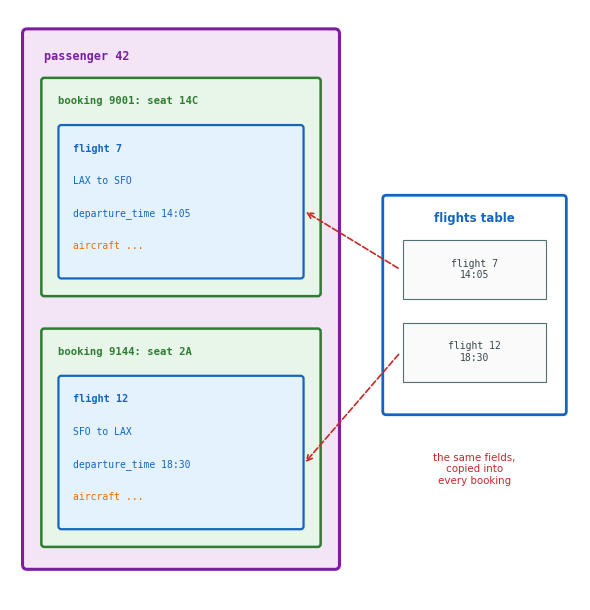
Document: the passenger, the bookings inside it, each flight’s fields inside its booking
Read: a passenger’s trips in one document, one round trip, no matching
Write: a new booking added to this document, with the flight’s fields copied in
Copies: the departure time, in every passenger document with a booking on flight 7, and in flights
The Application Updates Each Copy Separately
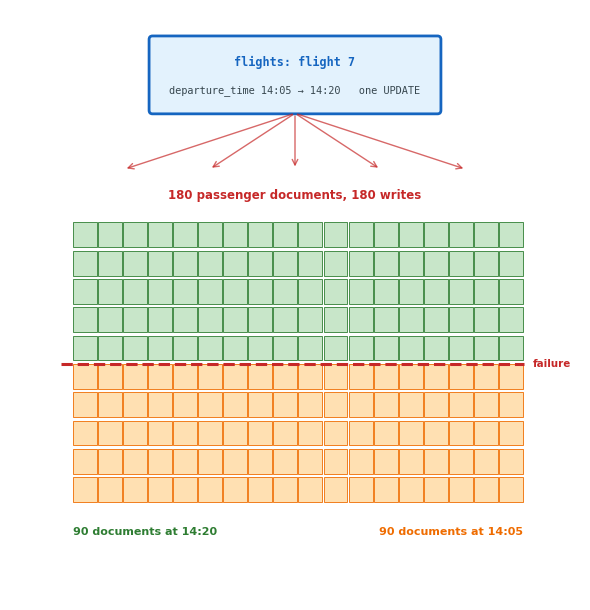
Schedule change: flight 7, 14:05 to 14:20
- Normalized: one
UPDATE, one row - Embedded: 180 passenger documents, 180 separate writes by the application
- To the store, 180 unrelated documents
Half done: a failure after 90 writes
- 90 documents at 14:20, 90 at 14:05
- No statement covers the set
- The rest found by a scan for the old value
- Two passengers on one flight, two departure times
Facts to copy: read on every request, changed rarely
- Airport name, aircraft model
Facts to reference: changed while bookings exist
- Departure time, seat count
A copy saves a read on every request and adds a write on every change
Following a Reference Adds a Second Read
{ "passenger_id": 42, "name": "A. Rivera",
  "bookings": [
    { "booking_id": 9001, "seat": "14C",
      "fare_class": "Y", "flight_id": 7 },
    { "booking_id": 9144, "seat": "2A",
      "fare_class": "J", "flight_id": 12 }
  ] }
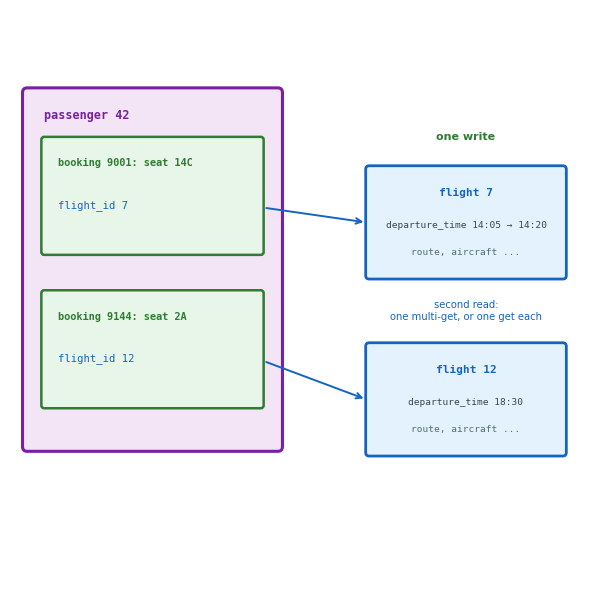
Reference: flight_id in the booking, the flight’s fields in the flight document only
One copy: one write per schedule change, the new value on every read
Second read: the passenger document, then the flight documents it names
- One multi-get for all of them, or one get each: N + 1 again
- The identifier is followed by the application or by a join, never by the store
Embed what the read returns, reference what changes
Growing Lists Belong in Their Own Documents
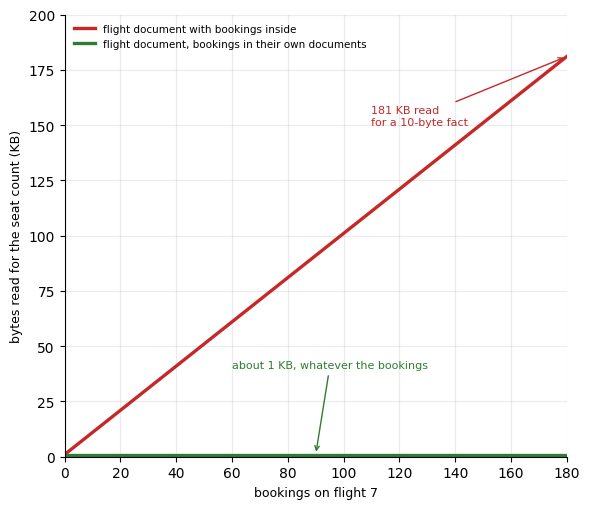
Flight document with its bookings inside: every booking for flight 7 in one list
- Read whole: 180 bookings of 1 KB arrive with a 10-byte seat count
- Written whole: each new booking rewrites the document, 1 KB larger
Document size limit: 16 MB, about 16,000 bookings at 1 KB each
Lists that grow: bookings per flight, position reports per aircraft, events per flight
- Each item its own document, keyed by the parent: a booking document with
flight_id - The parent stays small
- The list read only by requests for the list
Lists that fit inside: read whole every time, with a small known bound
- The seats on one aircraft, not the bookings on one flight
Data Models Favor Certain Access Patterns
Data model: the shape given to the data
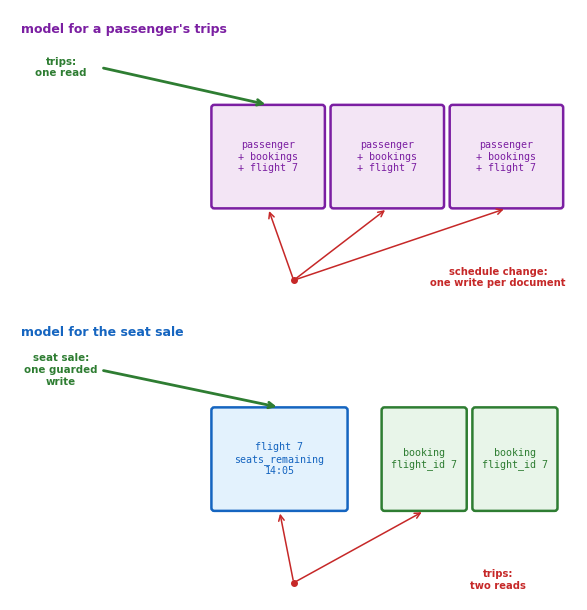
- Chosen for the access pattern that runs most often
- Every other access pattern served from it
Model for a passenger’s trips: passenger document, bookings inside, flight fields copied in
- Passenger’s trips: one round trip
- Schedule change: one write per passenger document with a booking on the flight
- Seat sale: two writes, the flight document’s count and a passenger document
Model for the seat sale: flight document with the count, booking documents of their own
- Seat sale: one guarded write on one document
- Passenger’s trips: the booking documents, then the flight documents they name
Each model makes one access pattern a single round trip and the others several
Each Access Pattern Has Its Own Copy
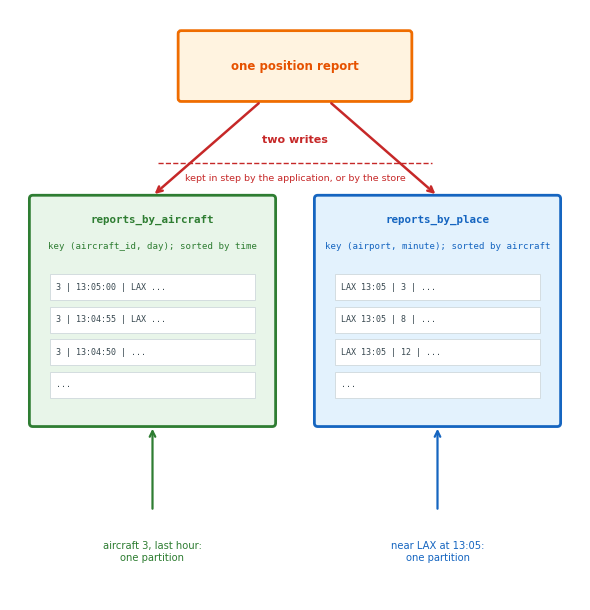
Table per query: the same data stored in one shape per access pattern, each keyed for its query
- Every insert written to all of them
Position reports: two questions, two tables
- By aircraft: key
(aircraft_id, day), sorted by time, for “aircraft 3, last hour” - By place: key
(airport, minute), sorted by aircraft, for “every aircraft near LAX at 13:05” - One report arrives: two writes
Copy writes
- By the application: two writes, no transaction between them
- A failure after the first write leaves one table ahead
- By the store: a secondary index, the second copy written by the store itself
- Example: DynamoDB’s global secondary index
Cost: storage and writes, each multiplied by the number of copies
A question without its own copy is a scan
A Document Is One Entity With Its Related Data Inside
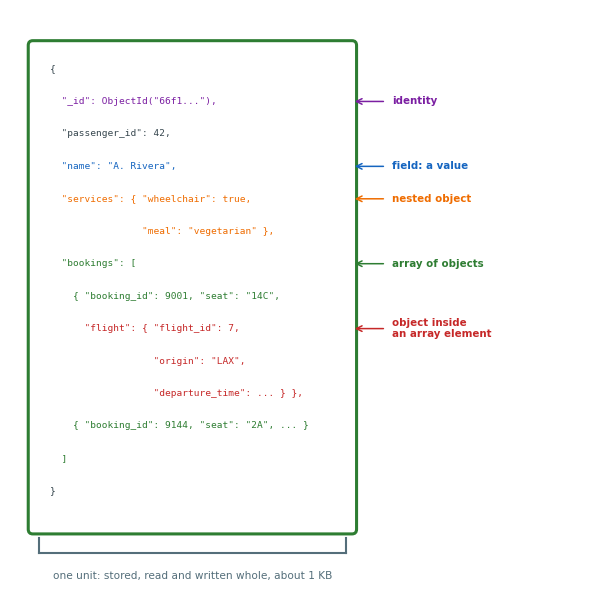
Document: one JSON object, stored, read and written as a unit
- Fields with values: numbers, strings, dates, booleans
- Nested objects: a field whose value is another object
- Arrays: a field whose value is a list, of values or of objects
Entity: one document for one thing and what belongs to it
- The passenger, with the bookings inside
Identity: _id, one field every document has
- Unique in its collection
- Generated by the store when the application sets none
Collection: a named set of documents
- No declared fields
- Stored on one replica set, or split across shards on a chosen field
Instances
- MongoDB
- DocumentDB on AWS, a managed service with the MongoDB interface
Queries Filter on Any Field
from pymongo import MongoClient
db = MongoClient("mongodb://db.internal").airline

# by a field, not a key
db.passengers.find_one({"passenger_id": 42})
# {'_id': ObjectId('..'), 'passenger_id': 42,
#  'name': 'A. Rivera', 'bookings': [...]}

# a field inside an array
db.passengers.find(
    {"bookings.flight.flight_id": 7})

# operator, and a projection
db.flights.find(
    {"origin": "LAX",
     "departure_time": {"$gt": now}},
    {"flight_number": 1, "departure_time": 1})
Filter: a document
- A stored document matches when every field in the filter matches
- Equality by value
- Operators as nested documents:
{"$gt": now},{"$in": [...]} - A dotted path names a nested field
- On an array, a match on any element
Indexes Can Address Nested Document Fields, Even Arrays
db.passengers.create_index(
    "passenger_id", unique=True)
db.passengers.create_index(
    "bookings.flight.flight_id")   # multikey
db.flights.create_index(
    [("origin", 1), ("departure_time", 1)])
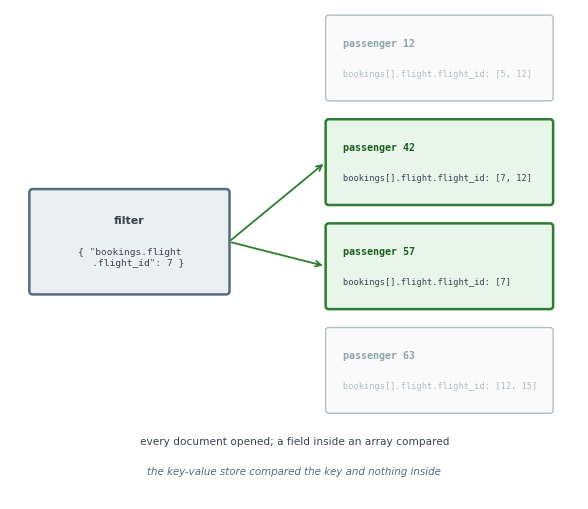
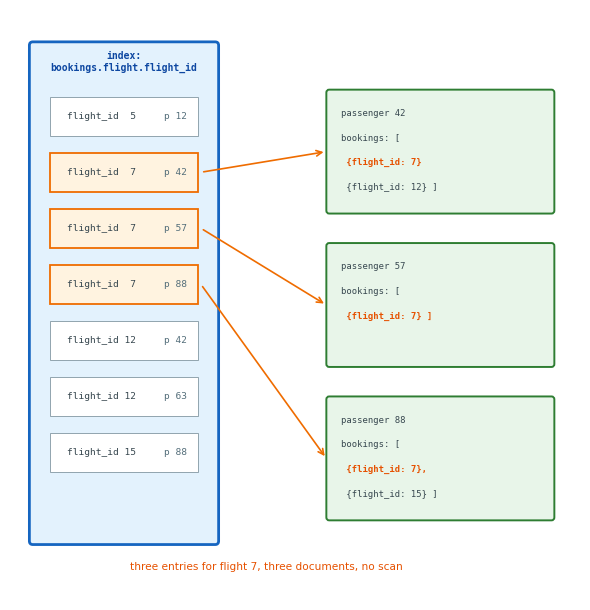
Without an index: find opens every document in the collection, as a table scan reads every row
Index on a field: one entry per document, as in a table
Multikey index: one entry per distinct array element
- 10,000 passengers with 5 bookings each: 50,000 entries
- “Passengers booked on flight 7”: an index lookup, no documents opened
Compound index: origin, then departure time
- Departures board: one range read
Every index is written on every insert and on every update of its field
The Application Can Set Write and Read Levels per Operation
from pymongo import WriteConcern, ReadPreference

sales = db.flights.with_options(
    write_concern=WriteConcern(w="majority"))
board = db.flights.with_options(
    read_preference=
        ReadPreference.SECONDARY_PREFERRED)

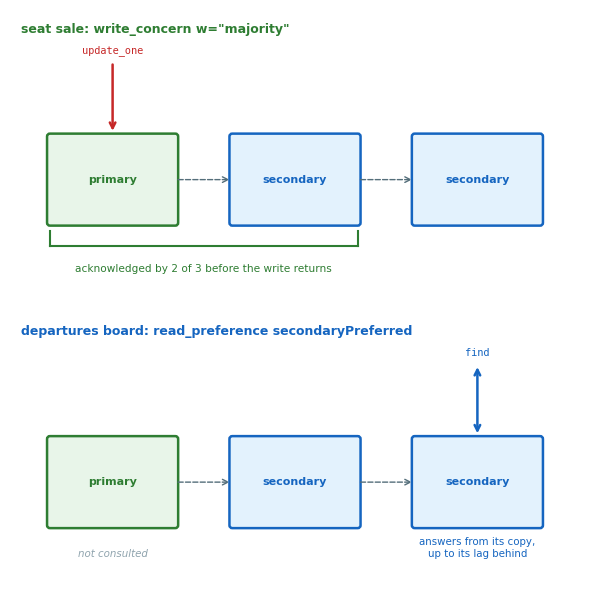
sales.update_one(...)   # waits for 2 of 3 copies
board.find({...})       # a copy a second behind
Replica set: one primary and its secondaries
- Writes to the primary, replicated to the secondaries
Write concern: copies that acknowledge before the write returns
w=1: the primary onlyw="majority": a majority of the copies
Read preference: the copy that answers
- The primary, or a secondary with its lag
One cluster serves the seat sale and the departures board at different levels, set per collection handle or per operation
Document Stores Do Not Enforce Referential Integrity
Inside one document: fields found, indexed, changed together, validated
- The store sees the structure in the document
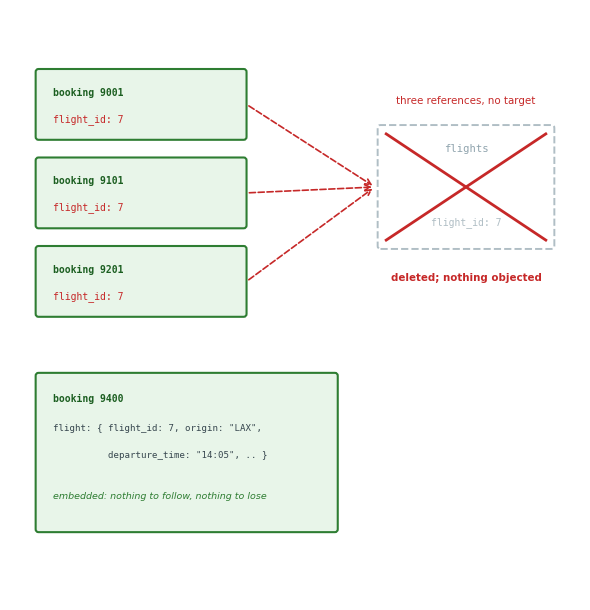
Referential integrity: none
flight_id: 7in a booking names a flight document- No constraint between them
- Inserted whether or not flight 7 exists
- The flight document deleted: every booking that names it names nothing
- The application checks, or the check is not made
Embedded flight fields: no reference to another document
- Nothing to check
- A copy to update on every schedule change
In a document store, the foreign-key check is application code or nothing
Wide-Column Tables Sort Rows Inside a Partition
Table: typed columns, as in SQL; rows found by a two-part key, never by a join
Partition key: the first part; one value, one group of rows, one server
Clustering key: the second part; the order of the rows inside the group
Partition: one key’s rows, stored sorted; read whole or as a range of the clustering key
Wide row: the original form, thousands of columns per key; in CQL, many narrow rows sorted inside it
Implementations: Cassandra and ScyllaDB; Bigtable and HBase; Keyspaces on AWS, with the Cassandra interface
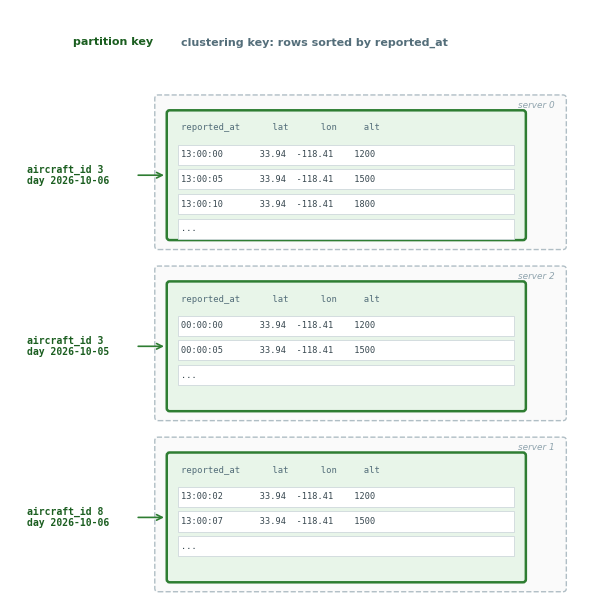
No Partition Spans Two Servers
Placement: partition key hashed to a ring position
- Stored at that position and on the next N − 1 servers
Whole: never split across servers
- One disk, one sequential read
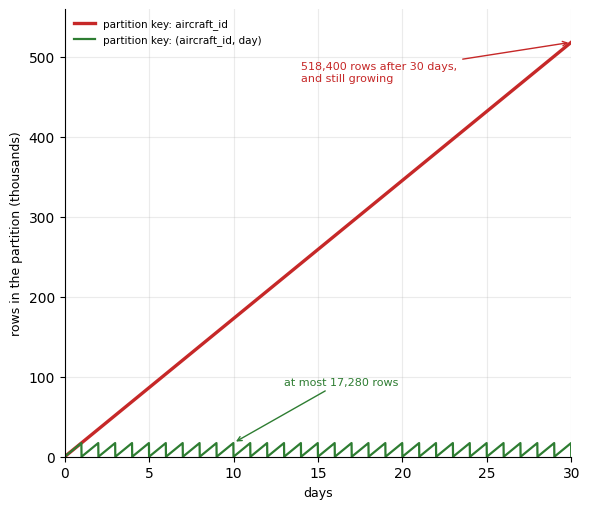
Growth: one key, one server, however many rows
- Partition per aircraft: 17,280 rows a day, forever, on one server
- Partition per aircraft and day: 17,280 rows, then a new partition at midnight
Bucketing: a time unit in the partition key bounds the partition
- A range across midnight: two partitions to read
The partition, fixed by its key before the first row, is the unit of placement, replication and reading
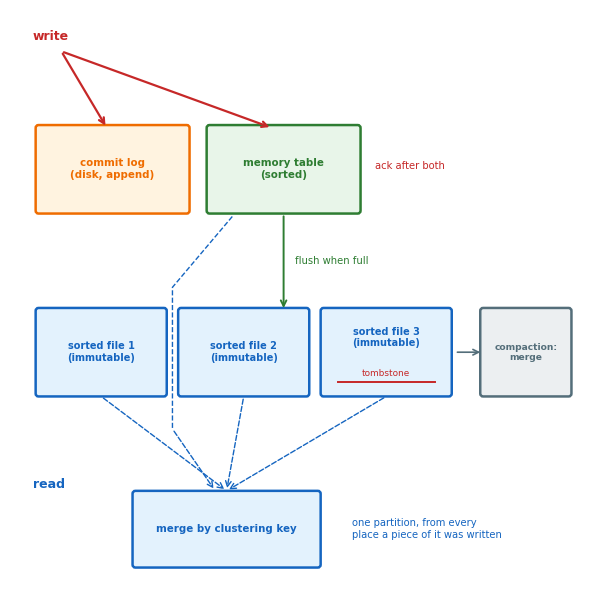
Every Write Is an Append
Write: appended to a log on disk and to a sorted table in memory, then acknowledged
- No lookup, no rewrite
- Sequential for any key
- Memory table full: written out as one sorted, immutable file
Read: the partition’s pieces, from the memory table and from every file containing one, merged by clustering key
- More files, slower reads
- Compaction merges them in the background
Delete: a tombstone appended
- Reads skip what it covers until compaction removes both
- A partition full of deletes is read through every tombstone until compaction
- Expiry,
USING TTLon the insert: a tombstone with a date
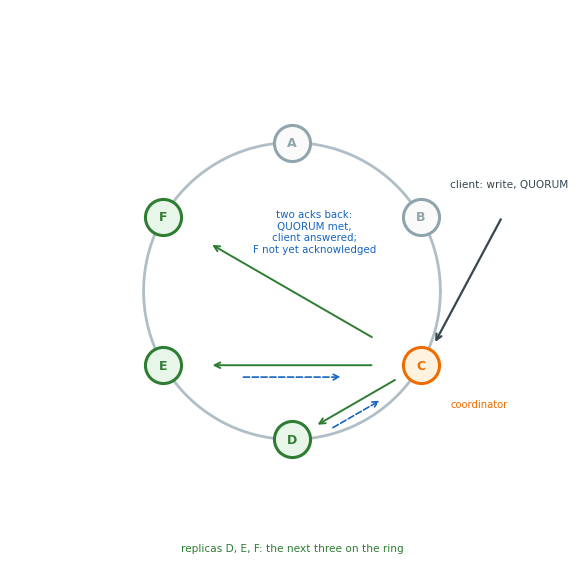
Cassandra: Any Server Coordinates a Request
No primary: every server accepts reads and writes
- The server the client connects to coordinates
Replicas: the partition on N consecutive ring positions
- N = 3 usual
Write: sent to all N, answered at the consistency level
ONE: one acknowledgementQUORUM: a majorityALL: every replica- The rest apply it later
- A server that was down is sent it on return
Read: sent to the level’s number of replicas
- The newest version among their answers returned
- Replicas that answered with an older version are sent the newest (read repair)
Newest: by the timestamp each write carries
- Within the clock skew: whichever stamp is later
The consistency level is a keyword on every statement
Bigtable: A Master Assigns Sorted Key Ranges to Servers
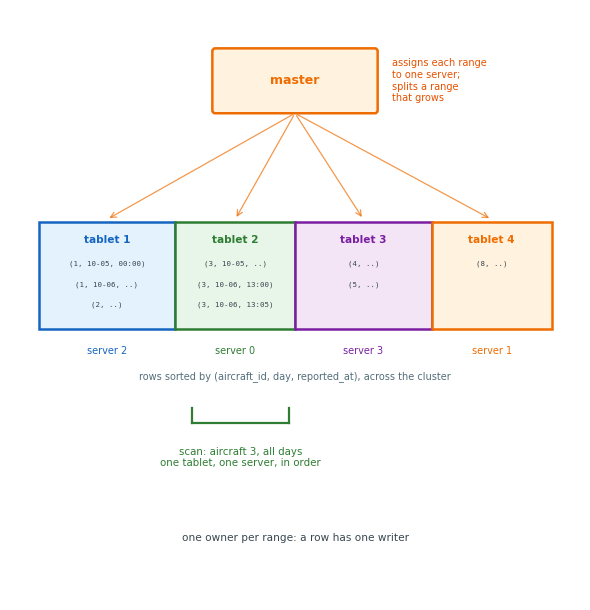
One order: every row sorted by its full key, across the cluster
Tablets: contiguous key ranges
- A master assigns each to one server
- A master splits a tablet that grows
Range scan: adjacent keys on one server up to a tablet boundary
- Aircraft 3, all days: one or two tablets, in order
Row key design: what sorts together is read together
aircraft_id, day, reported_at: one aircraft’s history adjacentreported_atfirst: every aircraft’s current minute on one server
Consistency: one owner per range
- One writer per row
- Reads return the last write
- No levels to choose
DynamoDB, on AWS, also has one owner per key range
Bigtable’s Web Table: A Row per Page, a Column per Inbound Link
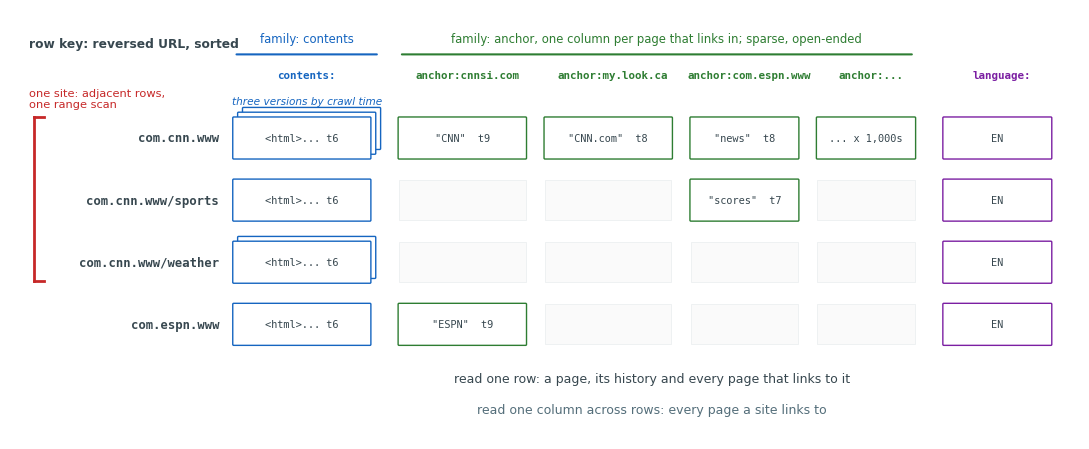
Row: one page
- Row key: the URL with its host reversed
com.cnn.wwwandcom.cnn.www/sportssort next to each other- A site: one range
Column family: contents:, anchor:, language:, declared when the table is created; the unit of storage and of access control
-
Columns inside a family: created by writing them
-
A page linked from ten thousand others: ten thousand columns
-
A page linked from none: none
Versions: each cell stores its values by timestamp
contents:: the crawl history- The inbound links in
anchor:: the input to link-based ranking
Each Table Serves One Access Pattern
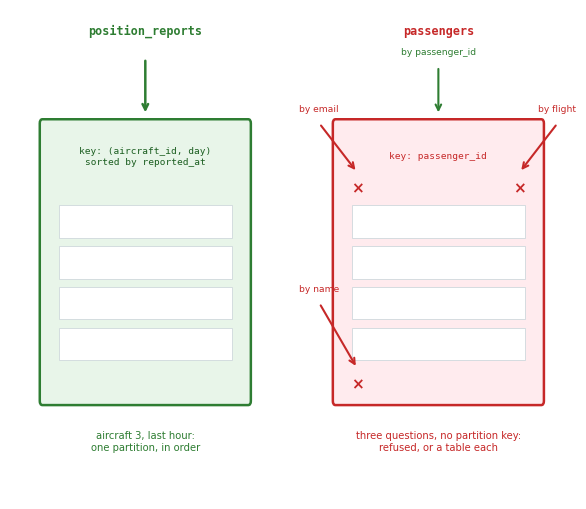
Rule: a table serves the queries that name a partition and read it in clustering order, and no others
Position reports: fit
- Written once, never updated
- Read as one aircraft’s last hour or latest report
- Partition
(aircraft_id, day), sorted by time descending: one partition, one range, newest first
Passengers: do not fit
- Read by name, by email, by booking, by flight: no one partition key
- Updated in place: each change another append, another version to merge
- A new access pattern: a second table, written in step by the application
The table is written for its query before the first row arrives
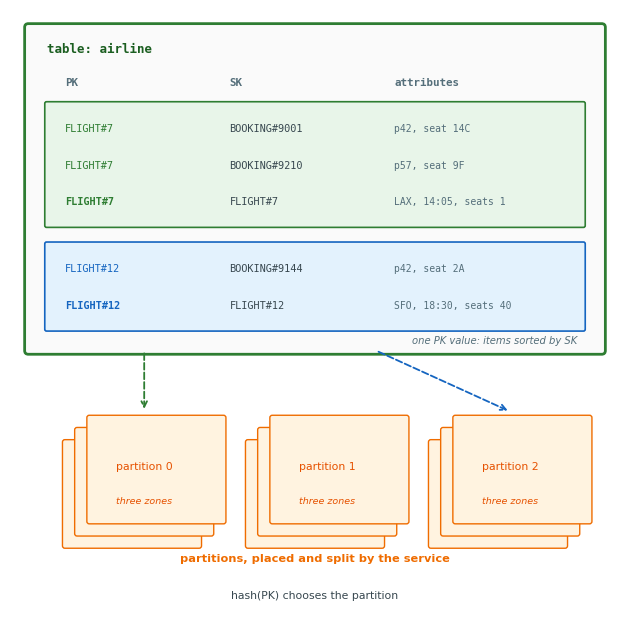
DynamoDB Stores Items by Partition Key and Sort Key
Item: one document, JSON-shaped, up to 400 KB
- Any attributes, nested
- No schema beyond the key
{ "PK": "FLIGHT#7", "SK": "BOOKING#9001",
  "passenger_id": 42, "seat": "14C",
  "fare_class": "Y" }
Key
- Partition key: hashed to a partition
- Sort key: the order inside it
- Both together: the item’s identity
Operations: the whole interface
GetItem,PutItem,UpdateItem,DeleteItem: one item, by its full key;PutItemreplaces the whole item,UpdateItemchanges attributesQuery: one partition, in sort-key orderScan: every itemBatchWriteItem,TransactWriteItems: several items
Managed service: regional
- Partitions placed, replicated to three zones and split by the service
- No servers, no connections
- Priced per request
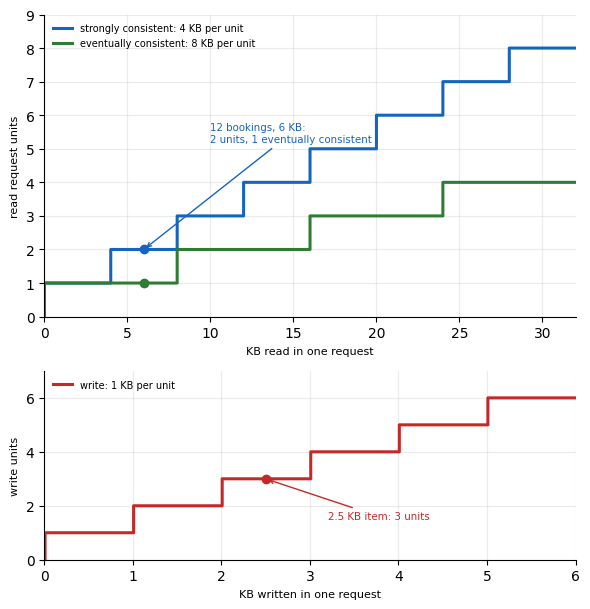
DynamoDB Bills Reads per 4 KB and Writes per 1 KB
Read request unit
- 4 KB, strongly consistent
- 8 KB, eventually consistent
ConsistentRead=Trueper request- Default: eventual, from any replica
- Rounded up per request: a 6 KB Query is 2 units
Write request unit: 1 KB, rounded up per item
- A 300-byte item: 1 unit
- A 2.5 KB item: 3
Billed quantity: bytes read or written, not items returned, not attributes named
- Twelve bookings of 0.5 KB: 6 KB; 2 units strongly consistent, 1 eventually
- Fifty thousand items scanned: 25,000 KB; 6,250 strongly consistent, 3,125 eventually
Price: on-demand, $0.125 per million read units, $0.625 per million write units
The cost of a request is computable before it is sent
Global Secondary Indexes Are Copies the Service Maintains
# the same items, keyed by passenger
table.query(
    IndexName="ByPassenger",
    KeyConditionExpression=
        Key("GSI1PK").eq("PASSENGER#42")
        & Key("GSI1SK").between(
            "2026-10-01", "2026-12-31"))
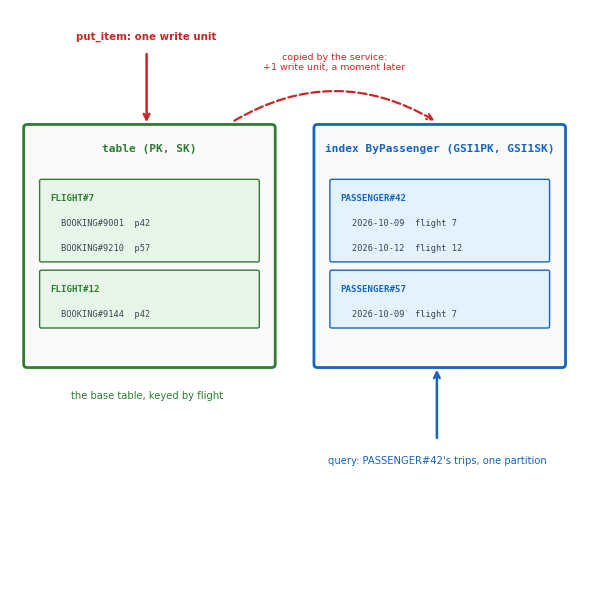
GSI: a second table, maintained from the first by the service
- Its own partition key and sort key, from any attributes
- Items without those attributes are left out
Index write: a table write that touches the index’s keys is also a write to the index
- One more write unit per index, every time
- Applied after the table write
- A query on the index may run before it
- Eventually consistent, always
Projection: the attributes the copy carries
- Keys only, some, or all
- Attributes not projected are not returned
Each Partition Has Its Own Rate Limit
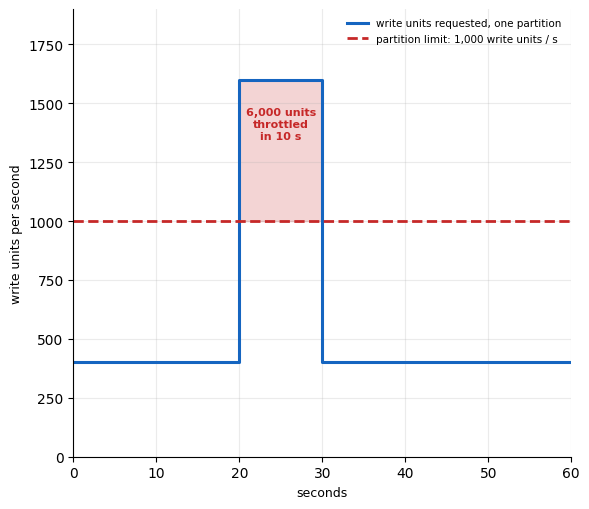
Per partition: at most 3,000 read units and 1,000 write units a second, whatever the table’s total
- A hot key: a hot partition
- Capacity on the other partitions does not apply to it
Throttled: past the rate, a request fails with ProvisionedThroughputExceededException
- The SDK retries with backoff
- The caller sees latency, then the error
On-demand: billed per request unit
- The service adds partitions behind the table as the load grows
Provisioned: a per-second rate reserved and billed for the table
- Lower cost for a steady load
- A burst above the rate: throttled
Split: a partition past its size or its rate divided in two by the service, later
- A burst on one key: throttled before the split
A table’s capacity is usable only through keys that spread the load across partitions
Request Cost Is Proportional to Bytes Read
Rule: the bill and the latency follow the bytes a request reads and the items a write touches
- The key and the indexes fix both before the request is sent
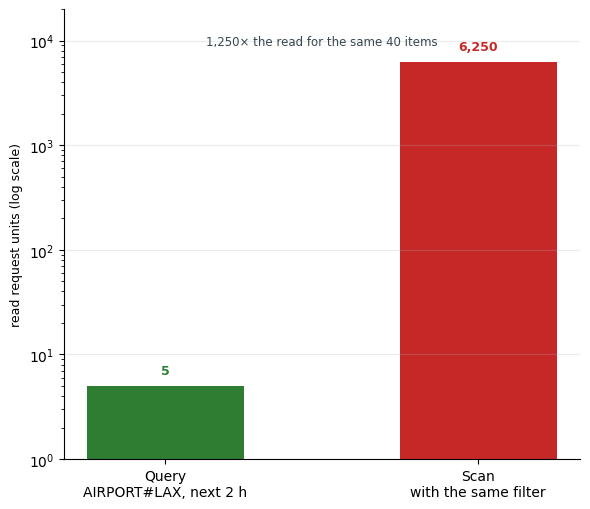
Departures board by Query: PK = AIRPORT#LAX, departure time in the sort key
- One partition, the next two hours as a range
- 40 items of 0.5 KB: 20 KB, 5 read units; 3 eventually consistent
Same board by Scan: every item, with a filter
- 50,000 items, 25,000 KB: 6,250 read units for the same 40 items
- 25 pages of 1 MB before the last one
No aggregation on the server: a sum or a count over the table is a Scan, read and billed in full
A table without a key for the access pattern is scanned, and billed for every item read
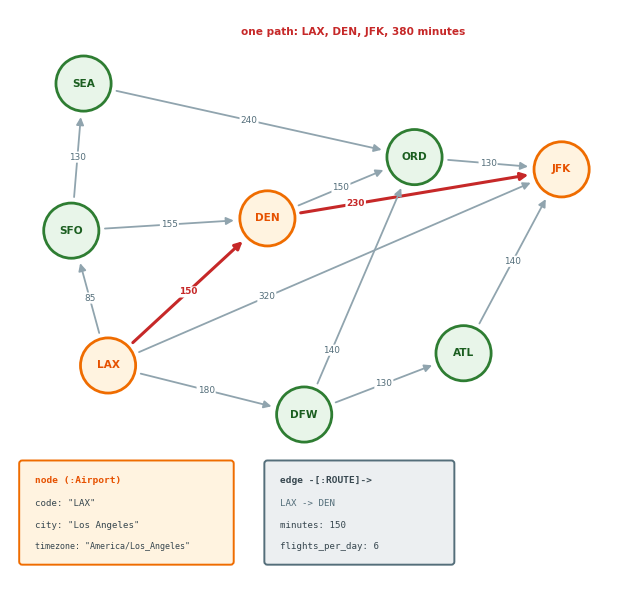
Airports and Routes Form a Graph
Node: an airport, with code, city, timezone as properties
Edge: a directed route from one airport to another, with minutes as a property
Path: a sequence of edges, such as LAX to DEN to JFK
Questions about paths
- How to get from LAX to JFK
- What is reachable in two stops
- Which airport, closed, cuts the most connections
Connections: stored as edges
- A path is read, not assembled
Instances
- Neo4j, with the Cypher query language
- Amazon Neptune, with the same language
Variable-Length Patterns Search to Any Depth
// everything within three edges of LAX
MATCH (lax:Airport {code: 'LAX'})
      -[:ROUTE*1..3]->(x:Airport)
RETURN DISTINCT x.code;
// SFO DEN DFW JFK   (1 edge)
// SEA ORD ATL       (2 edges)

// everything reachable at all
MATCH (lax:Airport {code: 'LAX'})-[:ROUTE*]->(x)
RETURN count(DISTINCT x);

// the fewest stops to SEA
MATCH p = shortestPath(
      (:Airport {code: 'LAX'})
      -[:ROUTE*]->(:Airport {code: 'SEA'}))
RETURN [n IN nodes(p) | n.code], length(p);
// ["LAX", "SFO", "SEA"], 2
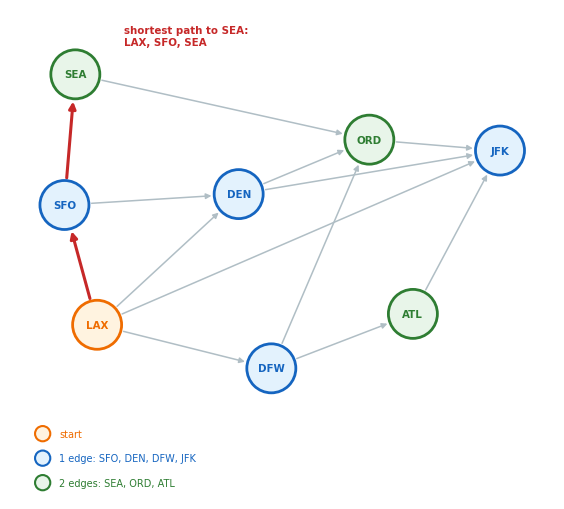
Expansion: one more edge from every node found, depth by depth
*1..3: stops at three edges*: stops at the end of the graphshortestPath: stops at the first arrival
Conditions Along the Path Prune the Search
// a connection with a legal layover: a condition
// between two consecutive edges
MATCH (lax:Airport {code: 'LAX'})
      -[f1:FLIGHT]->(via:Airport)
      -[f2:FLIGHT]->(jfk:Airport {code: 'JFK'})
WHERE f2.departs >= f1.arrives + duration({minutes: 45})
RETURN via.code, f1.number, f2.number,
       duration.between(f1.departs, f2.arrives) AS total
ORDER BY total LIMIT 3;

// any route of up to three edges that avoids ORD
MATCH p = (:Airport {code: 'LAX'})
          -[:ROUTE*1..3]->(:Airport {code: 'JFK'})
WHERE NONE(n IN nodes(p) WHERE n.code = 'ORD')
RETURN [n IN nodes(p) | n.code];
// ["LAX", "JFK"]
// ["LAX", "DEN", "JFK"]
// ["LAX", "SFO", "DEN", "JFK"]
// ["LAX", "DFW", "ATL", "JFK"]
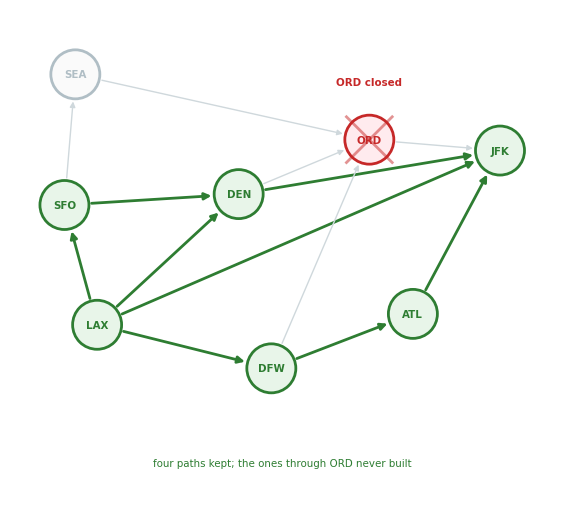
Condition: between consecutive edges, or on every node of the path
- Checked as the pattern expands
- A failing path dropped before it grows
- In SQL: the whole path carried in a column by the recursion
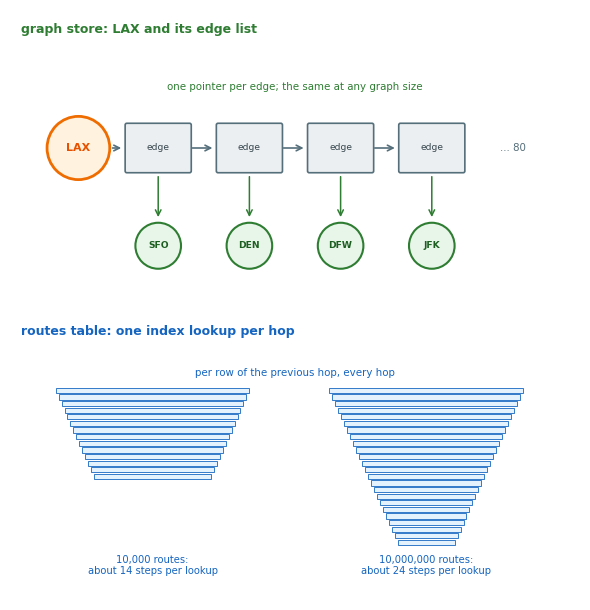
Hop Cost Does Not Grow With the Graph
Index-free adjacency
- Each node stores the list of its edges
- Each edge stores the two nodes it joins
- Following an edge is following a pointer
One hop: one read of the node’s edge list
- 80 routes from LAX: 80 pointers, in a graph of 10,000 routes or 10 million
Index lookup: once, for the starting node by code, then pointers only
Cost of a traversal: the edges touched, not the size of the graph
Cost of a join: an index lookup per row per hop
- Each lookup against the whole table
- The same hop costs more as the table grows
Joins are stored as pointers in a graph and recomputed on every read from a table
Reverse Traversals Return Every Dependent Service
// the services of the airline application
CREATE (web:Service {name: 'web'}),
       (api:Service {name: 'booking-api'}),
       (auth:Service {name: 'auth'}),
       (pay:Service {name: 'payments'}),
       (db:Service {name: 'postgres'}),
       (cache:Service {name: 'redis'}),
       (web)-[:DEPENDS_ON]->(api),
       (api)-[:DEPENDS_ON]->(auth),
       (api)-[:DEPENDS_ON]->(pay),
       (api)-[:DEPENDS_ON]->(db),
       (auth)-[:DEPENDS_ON]->(cache),
       (pay)-[:DEPENDS_ON]->(db);

// everything that stops if auth stops
MATCH (:Service {name: 'auth'})
      <-[:DEPENDS_ON*1..]-(d:Service)
RETURN DISTINCT d.name;
// booking-api, web

// the service most others depend on
MATCH (s:Service)<-[:DEPENDS_ON*1..]-(d)
RETURN s.name, count(DISTINCT d) AS dependents
ORDER BY dependents DESC LIMIT 1;
// postgres, 3
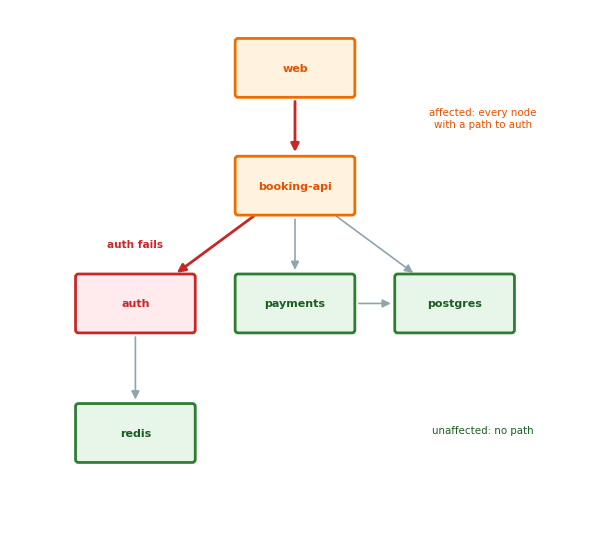
Reverse traversal: <-[:DEPENDS_ON*1..]-
- The same edges, against their direction
- Depth not known in advance
- Same query shape: the upstream steps of a pipeline step
Traversals Through a Hub Read All of Its Edges
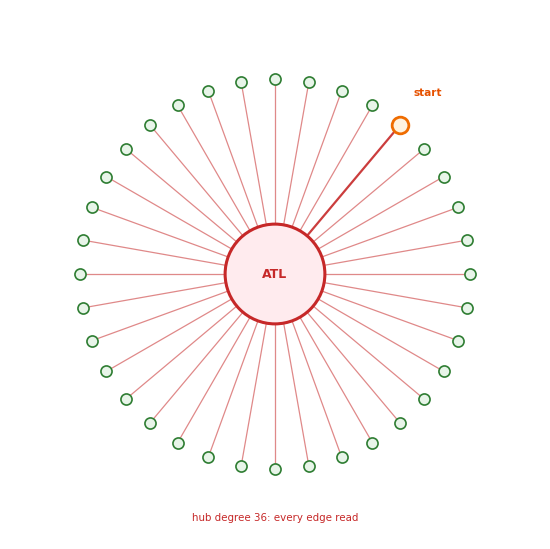
Hub: a node with far more edges than the rest
- ATL in a route graph,
postgresin a dependency graph - A two-stop search from any neighbor: one edge to the hub, then all of its edges
- A pattern through the hub enumerates every path through it
Pruning: checked as the pattern expands
- A depth limit,
*1..3 - A condition on the way,
WHERE r.minutes < 200
Writes
- An edge is a write to both of its nodes’ lists
- Property indexes updated on every change
Sharding: an edge across two servers makes every traversal over it a network round trip
- Graph stores replicate the whole graph and scale the reads
- The graph is not split by key
The limit is the hub, not the size of the graph
Graph Stores Answer Questions About Paths
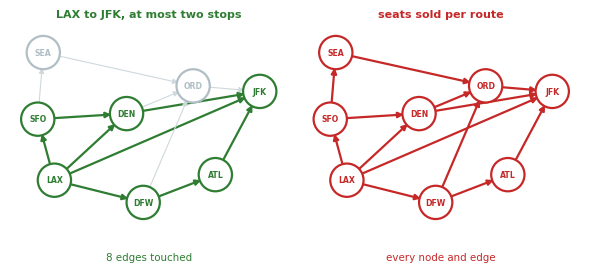
Rule
- A path of unknown depth: the graph
- A sum or a count over everything: the table
LAX to JFK, two stops, not via ORD: the graph
- Depth and condition in the pattern
- A corner of the graph touched, however large the rest
Seats sold per route this month: the table
- Every booking read and summed
- One aggregate over an index
Both stores
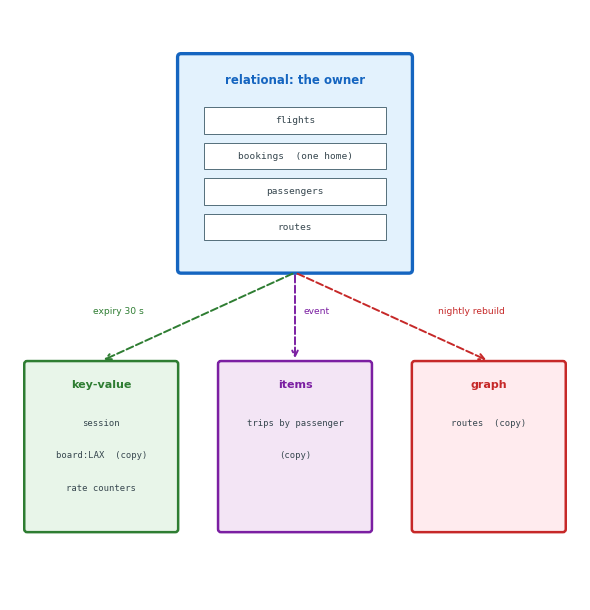
- Routes as a graph, rebuilt from the routes table when it changes
- Flights and bookings as tables
The traversal is the one operation a graph store does better than a table
One Request Reads From Several Databases
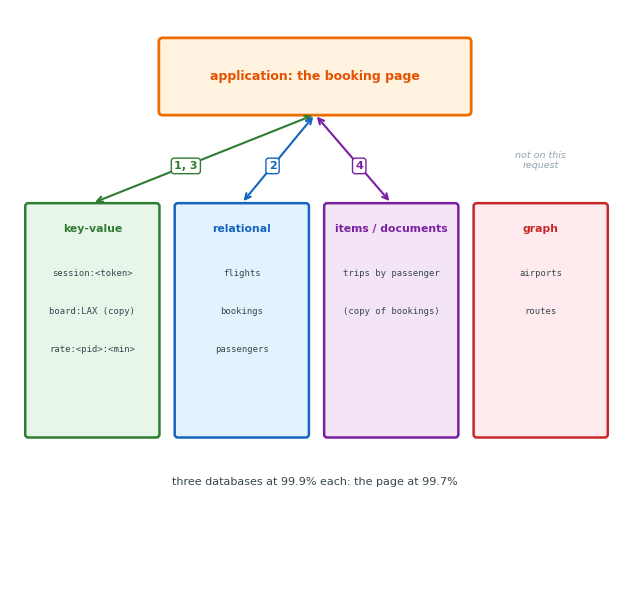
The booking page: one request, four reads
- The session, by token: the key-value store
- The flight and its seat count: the relational database
- The departures board for the origin: the cached copy
- The passenger’s other trips: the trips copy, by passenger
Three databases: four round trips
- The page waits for the slowest
Three failure modes: any database down, the page down
- Three databases at 99.9%: the page at 99.7%
Three to operate: a connection, a credential, a backup, a failover for each
Different Databases Serve the Same Read
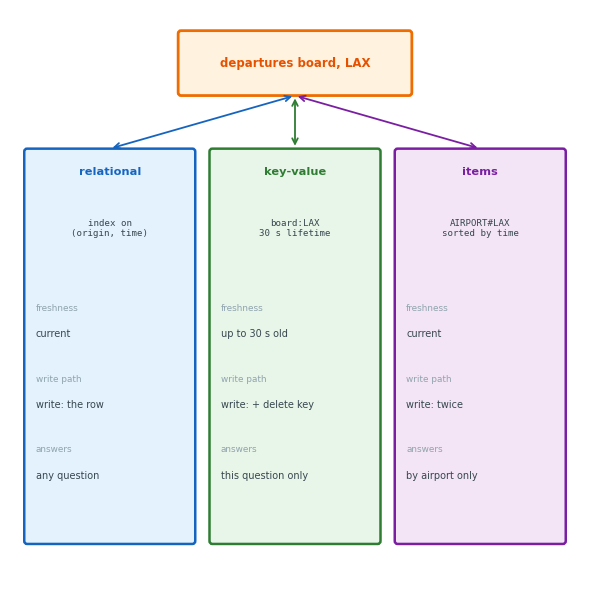
The departures board: one airport’s flights in the next hours
- Read far more than written
In the relational database: a query on an index
- Always current
- Nothing extra to write
In the key-value store: a cached copy per airport, 30 s lifetime
- One get
- Up to 30 s old
- A key to delete on every schedule change
In DynamoDB: an item per flight under AIRPORT#LAX
- One Query
- Current
- Every flight written twice
The three differ in the board’s maximum age and in the cost of each write
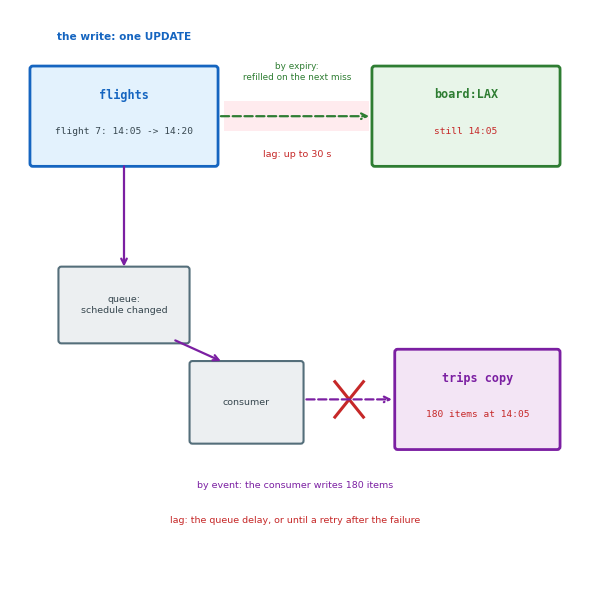
Copies Are Stale Until Rewritten
Original: the departure time in flights
Copies: the same value in board:LAX and in 180 trips items
No transaction across databases: the copy is written after the original, by a second write
- Until then, the copy is old
- A failure between the two: the copy stays old until a repair rewrites it
Copy writes
- By the request: the application writes both, with the second write as the lag
- By expiry: the copy dropped and refilled, with the lifetime as the lag
- By an event: a consumer of the write’s message writes the copy, with the queue delay as the lag
Lag: the copy’s age at worst, plus whatever a failure leaves undone
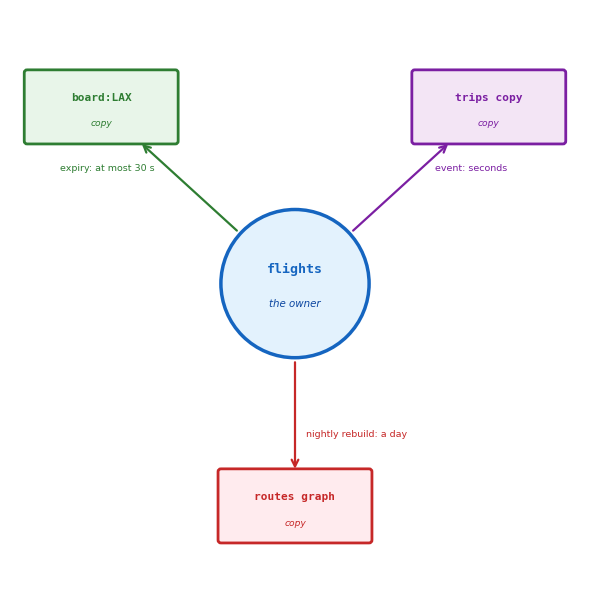
Every Fact Has One Owner
Owner: the one database whose value of the fact is the truth
- Departure time:
flights
Copy: the value in any other database
- Rebuilt from the owner, never the other way
Path: how each copy is refreshed, and its lag
- Board copy: by expiry, 30 s
- Trips copy: by event, seconds
- Routes graph: rebuilt nightly, a day
Rebuild: a wrong or lost copy is deleted and rebuilt from the owner
Two owners: the same fact written on its own in two databases
- Each is the truth to its readers
- Every change makes two versions
Every Design Is a Trade
Rule
- One owner per fact
- One database per access pattern, chosen at the load
- One path per copy
The booking: one database
- Sold with the seat count in one transaction
- Read by passenger, flight and date
- The relational database, with no copy until a read outgrows it
The departures board: any of three
- The query, the cached copy, or the DynamoDB partition
- Chosen by the extra write per schedule change: none, a delete, or a second write
Unneeded additions
- A document store for one JSON column
- A graph store for two joins
- A queue service for one locked
UPDATE
No design makes every operation a single round trip