Cloud Infrastructure
EE 547 - Unit 3
Dr. Brandon Franzke
Fall 2026
Outline
AWS Foundations
- Regions, availability zones, and global footprint
- Service endpoints and the API model
- Virtual machines on demand
- Instance types, AMIs, and lifecycle
- Security groups as stateful firewalls
Identity and Access Management
- Principals, policies, and ARNs
- Roles and temporary credentials
- Instance profiles for EC2
- Object storage vs block storage
- Buckets, keys, and the flat namespace
Networking, Services, and ML Design
- VPCs, subnets, and route tables
- Public vs private subnets
- Security groups and load balancers
- Managed databases, queues, and serverless
- Pay-per-use economics and cost awareness
- Durable storage, ephemeral compute
- Checkpointing and cost-aware design
- boto3 patterns and failure handling
Cloud Infrastructure
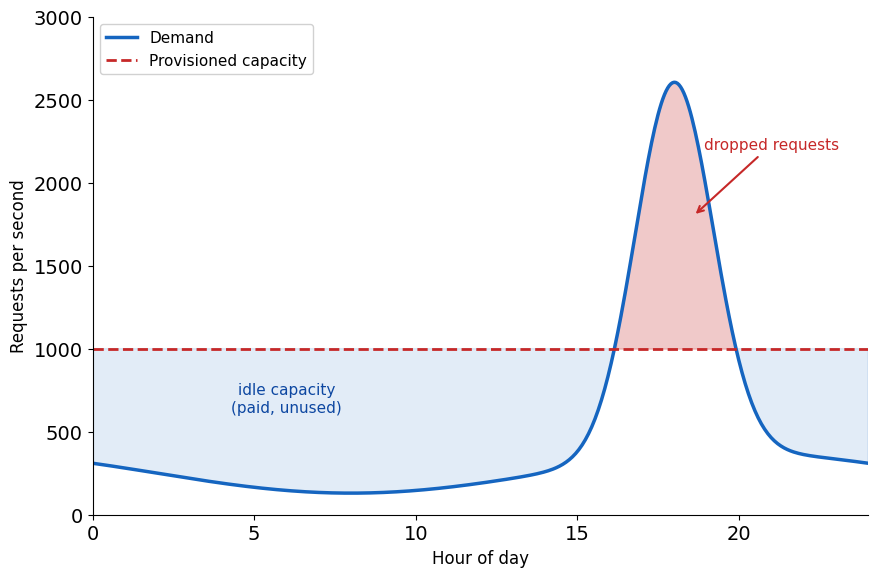
One Machine Cannot Serve Production Demand
A development machine runs the full stack. Four limits keep it out of production.
Scale - the dataset exceeds memory, the model exceeds GPU capacity; no larger machine exists
Reliability - hardware fails, power drops, updates restart the OS; one machine is one failure domain
Geography - Tokyo to a Los Angeles server is ~100 ms round-trip; distance sets the floor
Elasticity - demand moves 10× in hours; new hardware takes weeks
Whatever capacity is bought is wrong twice: idle at baseline, saturated at peak.
Fixed Costs Make Infrastructure Rentable
Operating infrastructure requires
- Physical hardware: servers, storage, networking
- Facilities: power, cooling, physical security
- Staff: installation, maintenance, monitoring
- Capacity planning with lead times of weeks to months
These costs are largely fixed: a datacenter serving 100 users costs nearly as much as one serving 10,000.
The rental model
- Providers run infrastructure at scale and amortize the fixed costs across many customers
- Capacity is metered, appears on demand, and bills by use
Providers
- Amazon Web Services, Microsoft Azure, Google Cloud Platform
- One underlying model, different APIs
Pooling Many Customers Keeps Servers Busy
Provisioning for peak strands capacity
- Retail sizes for Black Friday: 10× normal load
- Tax software sizes for April: 50×
- Measured enterprise utilization averages 15-25%
- A 3-5 year hardware lifecycle locks the surplus in
Staffing has a floor
- Network, storage, security, and database specialists at $150K-$300K salaries, plus on-call coverage
- A 50-person company cannot staff a 10-person infrastructure team
Pooled peaks average out
- Peak times differ by customer; the pooled load is smoother than any single customer’s
- Pooled utilization reaches 60-70% against the enterprise 15-25%
Scale lowers unit costs
- Bulk purchasing: hundreds of thousands of servers a year
- Custom hardware and industrial power rates
- Automation and specialist staff amortized across millions of customers
Pay-per-Use Changes Financial Risk
CapEx: locked in upfront
- Servers cost $5K-$50K each; a modest deployment runs $500K-$5M before the first customer
- Depreciates over 3-5 years regardless of use
- Lead time of weeks to months
- A wrong forecast leaves stranded capital or lost customers
OpEx: scales with usage
- Starts at $0; billed per hour, second, or request
- Stopped resources stop billing
- Capacity adjusts in minutes
- Experiments are cheap to try and discard
| Scenario | CapEx | OpEx |
|---|---|---|
| Bought 50, need 20 | Pay for 50 | Pay for 20 |
| Bought 50, need 100 | Cannot serve | Scale to 100 |
| Project canceled | Stranded asset | Stop paying |
AWS Is the Most Established Provider
Market position
- Roughly a third of the market, the largest share; Azure and GCP follow
- First mover: S3 launched March 2006, EC2 August 2006
- 20 years of continuous production operation
API stability
- 200+ services across compute, storage, networking, ML
- APIs versioned by date: S3 requests still accept version
2006-03-01 - Code written against old versions keeps running
Azure and GCP offer the same concepts under different names.
Every Capability Is a Separate Service
AWS packages each infrastructure capability as a service with its own API:
| Service | Capability |
|---|---|
| EC2 | Virtual machines |
| S3 | Object storage |
| EBS | Block storage (virtual disks) |
| VPC | Virtual networks |
| IAM | Identity and access control |
| RDS | Managed relational databases |
| DynamoDB | Key-value database |
| Lambda | Function execution |
| SQS | Message queues |
About 200 services share three patterns: API access, regional deployment, metered billing.
Every AWS Operation Is an HTTP Request
Creating an EC2 instance:
POST / HTTP/1.1
Host: ec2.us-east-1.amazonaws.com
Authorization: AWS4-HMAC-SHA256 ...

Action=RunInstances
&ImageId=ami-0abcdef1234567890
&InstanceType=t3.micro
&MinCount=1&MaxCount=1
The response contains an instance ID - a handle to a running VM in AWS infrastructure.
Three interfaces construct the same request:
Console - web UI
CLI - command-line tool
SDK - library (Python, Go, etc.)
The Console suits exploration; the CLI and SDK enable automation. Anything the Console does, code can do.
Each Region Is an Independent Deployment
AWS deploys infrastructure in geographic locations called regions.
| Code | Location |
|---|---|
us-east-1 |
N. Virginia |
us-east-2 |
Ohio |
us-west-2 |
Oregon |
eu-west-1 |
Ireland |
eu-central-1 |
Frankfurt |
ap-northeast-1 |
Tokyo |
ap-southeast-1 |
Singapore |
sa-east-1 |
São Paulo |
Scale (2026):
- 39 regions, 124 availability zones
- Every region: minimum 3 AZs
- 100+ Tbps network backbone capacity
Each region has its own:
- Compute and storage infrastructure
- Control plane (API endpoints)
- Network connectivity
Resources created in us-east-1 do not exist in eu-west-1. An outage in one region does not directly affect others.
Region selection determines:
- Physical location of data and compute
- Latency to end users
- Applicable legal jurisdiction (e.g., GDPR)
- Available services (varies by region)
- Pricing (varies ~10-20%)
Availability Zones Isolate Facility Failures
Each region contains multiple Availability Zones (AZs) - physically separate datacenter facilities.
us-east-1 contains six AZs:
us-east-1a through us-east-1f
Physical characteristics:
- Separate buildings, miles apart
- Independent power (different substations)
- Independent cooling
- Independent network paths
Interconnected:
- Dedicated high-bandwidth fiber
- Single-digit millisecond latency between AZs
Failure isolation
- Datacenter failures happen: power outages, cooling failures, network cuts, fires
- AZs are engineered so a failure in one facility does not spread to the others; if
us-east-1aloses power,us-east-1bthroughus-east-1fcontinue operating - The isolation is strong but not absolute
AZ names are per-account:
- An account’s
us-east-1amay map to a different physical facility than another account’s - AWS randomizes the mapping to spread load across facilities
- Cross-account coordination uses AZ IDs:
use1-az1,use1-az2, etc.
Region Selection Happens on Every Request
Each service exposes an endpoint per region.
{service}.{region}.amazonaws.com
| Service | Region | Endpoint |
|---|---|---|
| EC2 | N. Virginia | ec2.us-east-1.amazonaws.com |
| EC2 | Ireland | ec2.eu-west-1.amazonaws.com |
| S3 | N. Virginia | s3.us-east-1.amazonaws.com |
| IAM | (global) | iam.amazonaws.com |
A request is processed in the region its endpoint names, and resources are created there. There is no account-wide region setting: a client configured for a different region addresses a different, independent deployment. Global services (IAM) are the exception, with a single endpoint and no region component.
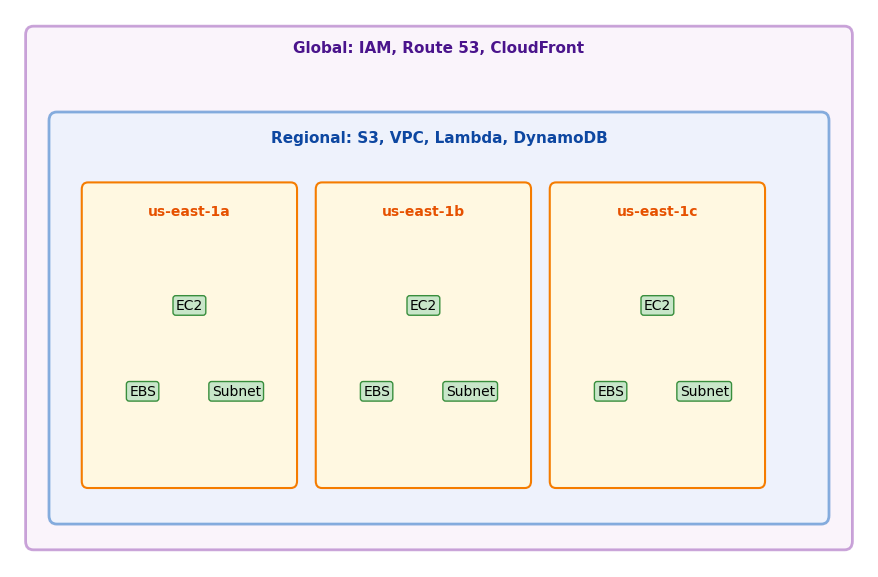
Scope Determines Where Resources Can Be Used
Global - exist once, no region
- IAM users and roles, Route 53 zones, CloudFront distributions
- IAM policies apply across all regions
Regional - one region, span its AZs
- S3 buckets, VPCs, Lambda functions, DynamoDB tables
- Data replicated across AZs for durability
Per-AZ - hardware in one facility
- EC2 instances, EBS volumes, subnets
The attachment constraint
- Per-AZ resources attach only within their AZ
- An EBS volume in
us-east-1acannot attach to an instance inus-east-1b
Physical Constraints Survive the Abstraction
An API call describes desired state; AWS materializes it on physical hardware it selects.
Specified in the request
- A virtual machine with 2 CPUs and 8 GB RAM
- A storage bucket for objects
- A PostgreSQL database with 100 GB
Decided by AWS
- Which physical server hosts the VM
- Which storage arrays hold the data
- When workloads migrate for maintenance
RunInstances     → VM running on some server
CreateBucket     → storage on some drives
CreateDBInstance → database on some hardware
Latency
- Data travels at finite speed
- Virginia to Tokyo ≈ 150 ms round-trip; fiber sets a floor near 110 ms
Jurisdiction
- Data stored in
eu-west-1physically resides in Ireland, subject to EU law
Failure
- Hardware fails; AWS absorbs many failure modes, and some propagate to applications
The abstraction hides operational complexity, not physical reality.
Round Trips Cost More than Queries
Orders of magnitude
| Operation | Latency |
|---|---|
| Memory access | 0.0001 ms |
| SSD random read | 0.1 ms |
| Same-AZ network | <1 ms |
| Cross-AZ network | 1-2 ms |
| Cross-region | 50-200 ms |
Local operations measure in nanoseconds to microseconds; network operations in milliseconds - a factor of 10⁴ to 10⁶.
A web request making 10 database queries
- Local SQLite: 10 × 0.1 ms = 1 ms
- Same-AZ RDS: 10 × 3 ms = 30 ms (round trip plus query execution)
- Cross-region: 10 × 100 ms = 1 s
The algorithm is unchanged; the environment multiplies its cost.
Design responses:
- Batch operations (1 query returning 100 rows, not 100 queries)
- Cache aggressively (avoid repeated network calls)
- Co-locate data and compute (same AZ when possible)
Partial Failures Are Normal
On a single machine, programs work or fail. Distributed systems partially work.
Local failure model
- A crash stops everything; out of memory kills the process; a full disk fails every write
- Failure is total and obvious: fix and restart
Distributed failure model
- A database responds, but in 2 s instead of 20 ms
- S3 returns errors for some requests, not all
- One of five servers is unreachable
- The network drops 0.1% of packets
Failure is partial and subtle: the system keeps running, incorrectly.
Example: uploading a file
# Local: works or throws
with open('output.csv', 'w') as f:
    f.write(data)

# S3: the network can drop mid-upload
s3.put_object(Bucket='b', Key='output.csv', Body=data)
# Succeeded? Partially? Retry?
Required patterns
- Timeouts - bound every wait
- Retries with backoff - retry transient failures without hammering the service
- Idempotency - make retries safe to repeat
- Health checks - detect degraded components
At scale these are continuous operation, not edge cases.
Services Call Each Other as API Clients
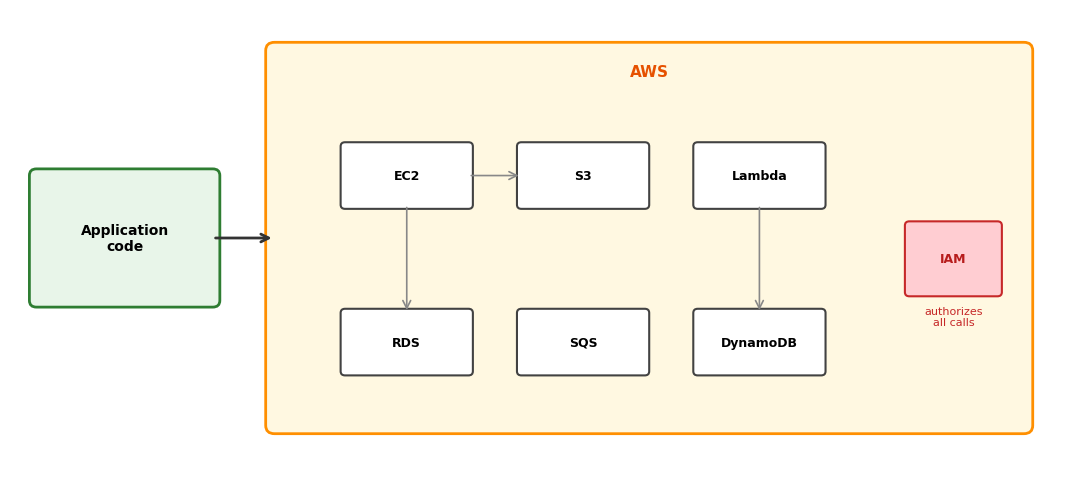
An application calls AWS services through their APIs. Services make the same calls to each other - an EC2 instance reading from S3, a Lambda function writing to DynamoDB. Every call, from either source, is authenticated and authorized through IAM.
Compute: EC2
EC2 Provides Virtual Machines on Shared Hardware
EC2 (Elastic Compute Cloud) provides virtual machines.
A physical server in an AWS datacenter runs a hypervisor. The hypervisor partitions hardware resources - CPU cores, memory, network bandwidth - and presents them to multiple virtual machines as if each had dedicated hardware.
What the instance receives:
- Virtualized CPU cores
- Allocated memory
- Virtual network interface
- Block device for storage
From inside the VM, this looks like a physical machine. The OS sees CPUs, RAM, disks, network interfaces.
What stays with AWS:
- Physical server selection and placement
- Hypervisor operation
- Hardware failure handling
- Physical network infrastructure
- Datacenter operations
The request specifies resources; AWS selects the physical server that provides them.
An Instance Cannot See Its Neighbors
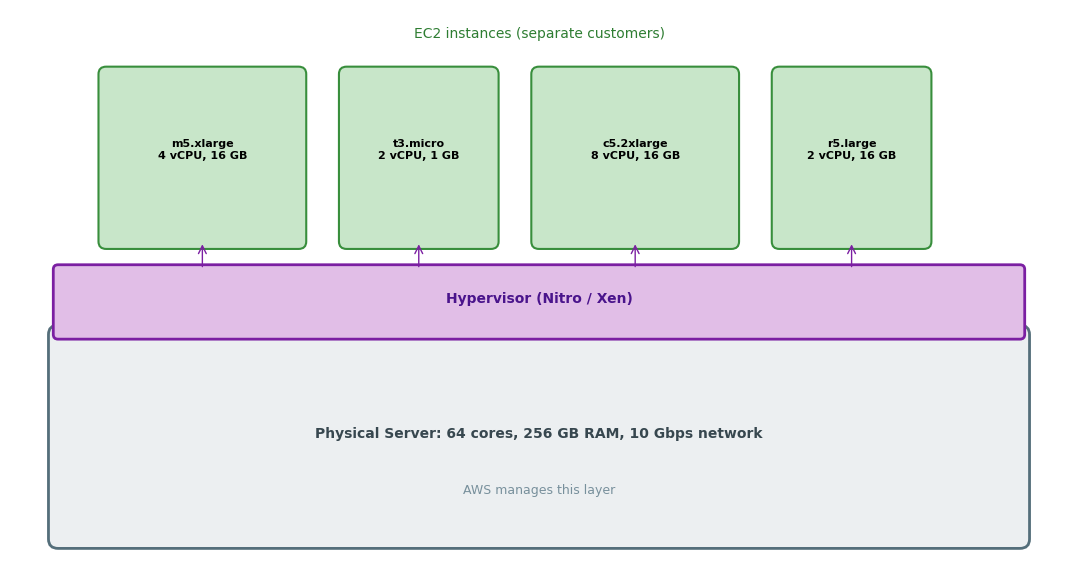
Multiple EC2 instances share a physical server. The hypervisor enforces isolation - one instance cannot access another’s memory or observe its network traffic. From each instance’s perspective, it has dedicated hardware.
The Type Name Describes the Hardware
EC2 offers many instance types - fixed allocations of CPU, memory, storage, and network.
Naming convention: {family}{generation}.{size}
- Family: optimized for a workload category
- Generation: hardware revision (higher is newer)
- Size: scale within the family
| Type | vCPUs | Memory | Network | Use Case |
|---|---|---|---|---|
| t3.micro | 2 | 1 GB | Low | Development, light workloads |
| t3.large | 2 | 8 GB | Low-Mod | Small applications |
| m5.large | 2 | 8 GB | Moderate | Balanced workloads |
| m5.4xlarge | 16 | 64 GB | High | Larger applications |
| c5.4xlarge | 16 | 32 GB | High | Compute-intensive |
| r5.4xlarge | 16 | 128 GB | High | Memory-intensive |
Families Differ in CPU-to-Memory Ratio
General purpose (t3, m5):
Balanced CPU-to-memory ratio. Suitable for most workloads without extreme requirements in either dimension.
- m5: consistent performance
- t3: burstable (accumulates CPU credits when idle)
Compute optimized (c5):
High CPU-to-memory ratio. For CPU-bound workloads: batch processing, scientific modeling, video encoding.
c5.4xlarge: 16 vCPUs, 32 GB memory (2:1 ratio)
Memory optimized (r5, x1):
High memory-to-CPU ratio. For workloads that keep large datasets in memory: in-memory databases, caching, analytics.
r5.4xlarge: 16 vCPUs, 128 GB memory (1:8 ratio)
GPU instances (p3, g4):
Include NVIDIA GPUs. For ML training, inference, graphics rendering.
p3.2xlarge: 8 vCPUs, 61 GB, 1× V100 GPU
Storage optimized (i3, d2):
High sequential I/O. For data warehousing, distributed filesystems.
t3 Instances Earn Credits While Idle
The t3 family uses a CPU credit model.
How it works:
- Each t3 size has a baseline CPU utilization
- Below baseline, the instance accumulates credits
- Above baseline, the instance spends credits
- Exhausted credits throttle the instance to baseline
| Type | Baseline | Credits/hour |
|---|---|---|
| t3.micro | 10% | 12 |
| t3.small | 20% | 24 |
| t3.medium | 20% | 24 |
| t3.large | 30% | 36 |
t3.micro can burst to 100% CPU, but sustained usage above 10% depletes credits.
Implications:
Good for:
- Variable workloads with idle periods
- Development and testing
- Small services with occasional spikes
Not good for:
- Sustained high CPU usage
- Predictable heavy computation
- Latency-sensitive services under load
For sustained workloads, m5 or c5 provide consistent performance without the credit system.
An Instance Is Assembled at Launch
Launching an EC2 instance combines named configuration components:
| Component | Determines | After launch |
|---|---|---|
| AMI | Operating system, pre-installed software | Fixed |
| Instance type | CPU, memory, network capacity | Change while stopped |
| Key pair | SSH authentication | Fixed |
| Security group | Allowed inbound/outbound traffic | Modifiable |
| Subnet | VPC, Availability Zone, IP range | Fixed |
| IAM role | Permissions for AWS API calls | Changeable |
| EBS volumes | Persistent storage | Attach or detach |
AMI (Amazon Machine Image):
Template containing OS and software. AWS provides Amazon Linux, Ubuntu, Windows. AMI IDs are region-specific - the same Ubuntu version has different IDs in different regions.
Resource IDs Start with Their Type
AWS generates unique identifiers for resources. The prefix indicates the resource type.
AWS-generated IDs
| Prefix | Resource Type |
|---|---|
i- |
EC2 instance |
vol- |
EBS volume |
sg- |
Security group |
vpc- |
VPC |
subnet- |
Subnet |
ami- |
Machine image |
snap- |
EBS snapshot |
Example: i-0abcd1234efgh5678
IDs are immutable - an instance keeps its ID through stop/start cycles - and region-scoped.
User-defined names
Some resources take user-chosen names:
- S3 buckets: globally unique (
my-company-data-2025) - IAM users/roles: account-scoped (
EC2-S3-Reader) - Tags: key-value metadata on any resource
{
  "Name": "training-server",
  "Environment": "dev",
  "Project": "ml-pipeline"
}
Tags never affect behavior - they exist for organization, billing attribution, and automation (e.g., “terminate all instances tagged Environment=dev”).
Nothing Reaches an Instance by Default
A security group is a stateful firewall applied to instances.
Inbound rules specify what traffic can reach the instance:
Type        Port    Source
─────────────────────────────
SSH         22      0.0.0.0/0
HTTP        80      0.0.0.0/0
HTTPS       443     0.0.0.0/0
PostgreSQL  5432    10.0.0.0/16
Custom      8080    sg-0abc1234
Each rule: protocol, port range, source (CIDR or security group).
Default inbound: deny all
Outbound rules specify what traffic the instance can send:
Type        Port    Destination
─────────────────────────────────
All         All     0.0.0.0/0
Default outbound: allow all
Stateful behavior:
- An allowed inbound request (HTTP on port 80) gets its response out automatically - no outbound rule needed
- An allowed outbound request gets its response back in the same way
Security Groups Drop Unmatched Traffic
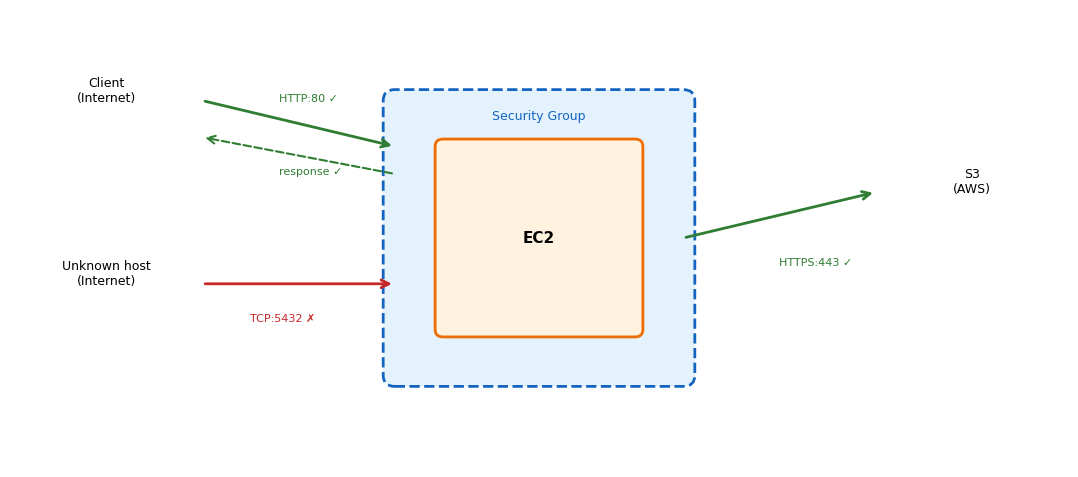
Rules are evaluated per-packet. Traffic no rule allows is dropped (default deny). Multiple security groups can attach to one instance - the rules combine as a union.
A Stopped Instance Keeps Its Volumes
An EC2 instance moves through states:
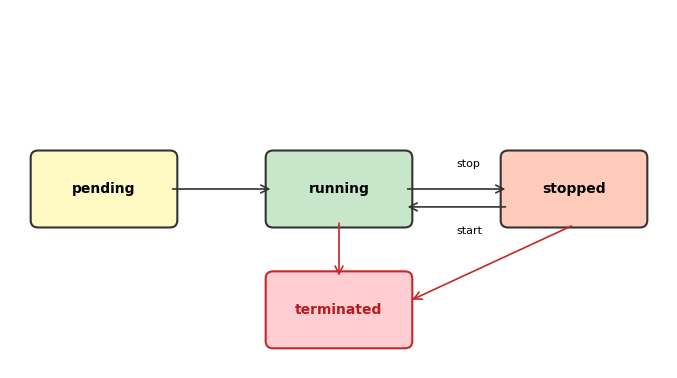
| State | Instance | Root volume |
|---|---|---|
| pending | Starting | - |
| running | On a physical host | Attached |
| stopped | Definition kept, host released | Persists |
| terminated | Gone | Deleted by default |
Stop preserves the instance: EBS volumes remain, the private IP is kept, and a later start may land on a different physical host.
Terminate destroys the instance permanently. There is no recovery.
Compute bills only while running; storage bills as long as volumes exist.
Committed or Interruptible Usage Costs Less
On-Demand
- Pay by the second, no commitment
- Full price, maximum flexibility
- Default for most workloads
Reserved / Savings Plans
- Commit to 1 or 3 years of usage
- Up to 72% discount (3-year, all upfront)
- Predictable workloads: web servers, databases
- Savings Plans: more flexible than Reserved Instances
| Commitment | Typical Discount |
|---|---|
| 1 year | 30-40% |
| 3 year | 60-72% |
Spot Instances
- Spare EC2 capacity at up to 90% discount
- AWS can reclaim with 2-minute warning
- Historically <5% of instances interrupted per month (varies by type)
Spot for ML training
- p3.2xlarge (1× V100): $3.06/hr on-demand, ~$1/hr spot
- Training is interruptible - checkpoint to S3, resume on a new instance
EBS Volumes Outlive Their Instances
EBS (Elastic Block Store) provides persistent storage for EC2 instances.
Characteristics:
- Network-attached, not a local disk
- Persists independently of instance lifecycle
- Detaches and reattaches to different instances
- Replicated within its AZ for durability
Volume types:
| Type | Performance | Use Case |
|---|---|---|
| gp3 | Balanced SSD | General purpose |
| io2 | High IOPS SSD | Databases |
| st1 | Throughput HDD | Big data |
| sc1 | Cold HDD | Infrequent access |
The AZ constraint:
Volumes attach only within their AZ - the data lives on drives in that facility. A volume in us-east-1a attaches only to instances in us-east-1a.
Snapshots:
Point-in-time backup stored in S3 (regionally). New volumes can be created from a snapshot in any AZ within the region.
Data Volumes Survive Termination
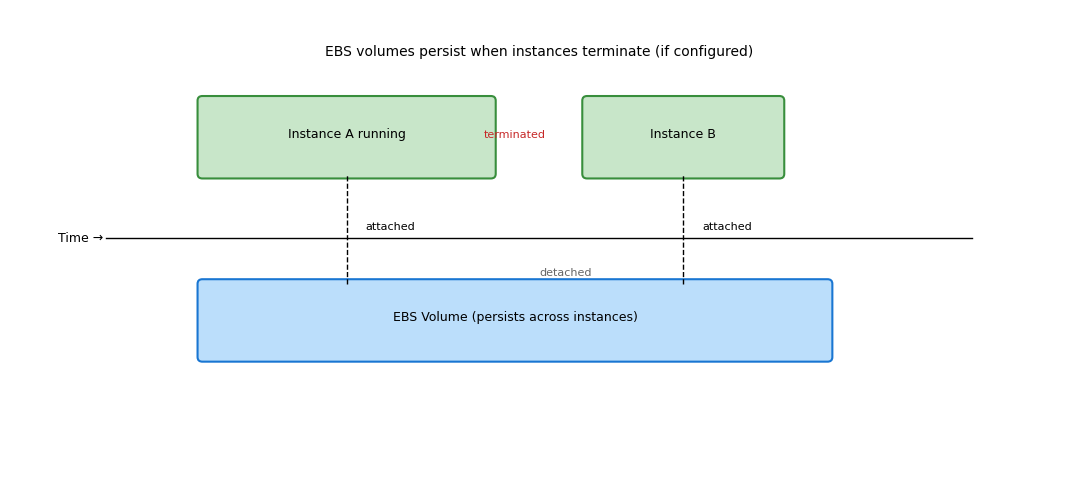
By default, root volumes are deleted on termination. Additional volumes persist unless explicitly deleted. Data survives instance replacement.
SSH Requires a Path and a Key
To reach an EC2 instance:
A network path must exist:
- The instance has a public IP (or the client is inside the VPC)
- The security group allows traffic on the port (22 for SSH)
- Network ACLs permit the traffic (usually default-allow)
- Route tables direct the traffic appropriately
Authentication must succeed:
- SSH: private key matching the instance’s key pair
- Instance metadata can provide temporary credentials for AWS API access
ssh -i my-key.pem ec2-user@54.xxx.xxx.xxx
The username depends on the AMI: ec2-user (Amazon Linux), ubuntu (Ubuntu), Administrator (Windows).
Every Instance Can Query Its Own Metadata
http://169.254.169.254/latest/meta-data/
This link-local address is routed to the instance metadata service, accessible only from within the instance; requests require an IMDSv2 token.
Available information:
| Path | Returns |
|---|---|
/instance-id |
i-0123456789abcdef0 |
/instance-type |
t3.micro |
/ami-id |
ami-0abcdef1234567890 |
/local-ipv4 |
172.31.16.42 |
/public-ipv4 |
54.xxx.xxx.xxx |
/placement/availability-zone |
us-east-1a |
/iam/security-credentials/{role} |
Temporary credentials JSON |
The SDKs use this endpoint to obtain IAM role credentials automatically when running on EC2 - no access keys in code.
Identity and Access Management
EC2 Needs to Call AWS APIs
Code on an EC2 instance calls other AWS services:
- Read training data from S3
- Write results to S3
- Send messages to SQS
- Query DynamoDB
Each of these is an API call. S3 receives an HTTPS request and nothing more; before acting, it must establish who sent the request and whether that identity is permitted to act.
The request arrives at S3:
PUT /my-bucket/results.json HTTP/1.1
Host: s3.us-east-1.amazonaws.com
Authorization: ???
Content-Type: application/json

{"accuracy": 0.94, ...}
S3 must establish:
- Who sent this request?
- May that identity write to this bucket?
Without proof of both, S3 rejects the request.
IAM provides both.
Every Call Is Authenticated, Then Authorized
Authentication: who sent this request?
- Requests are signed with credentials
- AWS verifies the signature matches a known identity
- The identity is a principal: user, role, or service
Authorization: may this principal perform this action?
- Permissions are defined in policies
- A policy specifies: this principal can do these actions on these resources
- AWS evaluates the policies and returns allow or deny
Every AWS API call - from any source - goes through this evaluation. No exceptions.
Requests Come from Users, Roles, or Services
A principal is an identity that can make AWS API requests.
IAM User - a human operator
- Long-term credentials: password for the console, access keys for the API
- Created per person, account-scoped
IAM Role - an assumable identity
- No permanent credentials
- Trusted entities assume it and receive temporary credentials
AWS Service - services act as principals too
ec2.amazonaws.comcan appear as a principal, e.g. when EC2 assumes a role on an instance’s behalf
Root account - full access to everything
- Used for account setup and billing
- Day-to-day work happens as IAM identities, never as root
Policies Name Resources by ARN
Every AWS resource and principal has an Amazon Resource Name (ARN):
arn:aws:service:region:account:resource
| Component | Example | Notes |
|---|---|---|
| Partition | aws |
Usually aws; aws-cn for China |
| Service | iam, s3, ec2 |
The AWS service |
| Region | us-east-1 |
Empty for global services (IAM) |
| Account | 123456789012 |
12-digit AWS account ID |
| Resource | user/alice, role/MyRole |
Service-specific format |
Examples:
arn:aws:iam::123456789012:user/alice
arn:aws:iam::123456789012:role/EC2-S3-Reader
arn:aws:s3:::my-bucket
arn:aws:s3:::my-bucket/data/*
arn:aws:ec2:us-east-1:123456789012:instance/i-0abc123
ARNs uniquely identify resources across all of AWS. Policies reference ARNs to specify who can do what to which resources.
Short-Lived Credentials Limit Damage
API requests must be signed with credentials. AWS verifies the signature to authenticate the caller.
Long-term credentials:
- Access Key ID + Secret Access Key
- Created for IAM users
- Valid until explicitly revoked
- Stored in
~/.aws/credentialsor environment variables
# ~/.aws/credentials
[default]
aws_access_key_id = AKIAIOSFODNN7EXAMPLE
aws_secret_access_key = wJalrXUtnFE...
Risk: a leaked key grants access until someone notices and revokes it.
Short-term credentials:
- Access Key ID + Secret Access Key + Session Token
- Obtained from STS (Security Token Service)
- Expire automatically (15 minutes to 12 hours)
- Not individually revocable - expiration is the mechanism
{
  "AccessKeyId": "ASIAXXX...",
  "SecretAccessKey": "xxx...",
  "SessionToken": "FwoGZX...",
  "Expiration": "2026-09-08T14:30:00Z"
}
Benefit: a leaked credential expires on its own.
Secrets Never Leave the Client
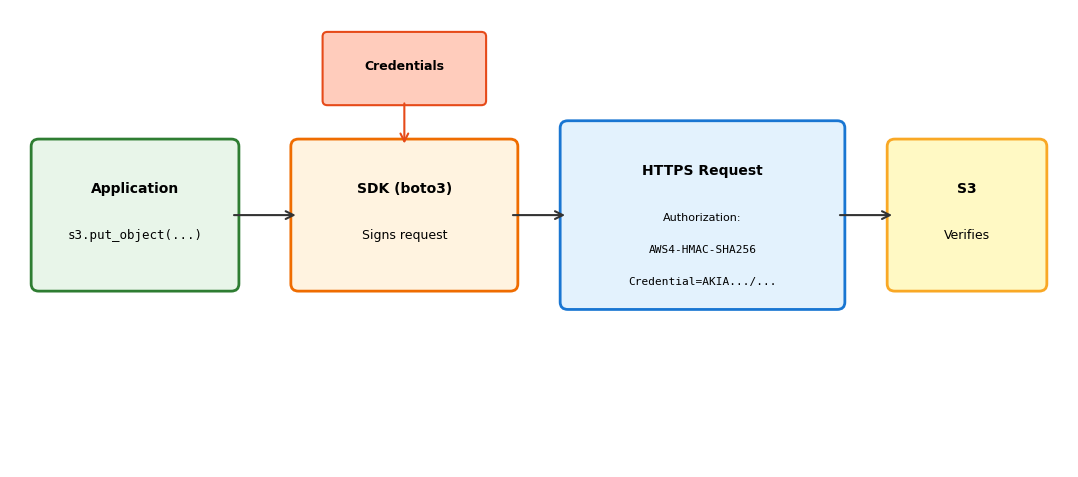
The SDK signs each request with the secret key and sends only the signature in the Authorization header. AWS verifies by recomputing the signature with its copy of the same secret. The secret itself is never transmitted.
A Policy Grants Actions on Resources
Permissions are defined in policy documents - JSON that specifies what is allowed or denied.
{
  "Version": "2012-10-17",
  "Statement": [
    {
      "Effect": "Allow",
      "Action": [
        "s3:GetObject",
        "s3:PutObject"
      ],
      "Resource": "arn:aws:s3:::my-bucket/*"
    }
  ]
}
| Field | Purpose | Values |
|---|---|---|
Version |
Policy language version | Always "2012-10-17" |
Statement |
Array of permission rules | One or more statements |
Effect |
Allow or deny | "Allow" or "Deny" |
Action |
API operations | "s3:GetObject", "ec2:*", etc. |
Resource |
What the action applies to | ARN or ARN pattern |
Most Policies Need More than One Statement
Actions and resources take patterns:
s3:GetObject        # One operation
s3:*                # All S3 actions
ec2:Describe*       # All Describe actions
*                   # Everything (dangerous)
arn:aws:s3:::my-bucket/data/*   # One prefix
arn:aws:s3:::my-bucket/*        # All objects
arn:aws:s3:::*                  # All buckets
*                               # Everything
Broad patterns are rarely appropriate; the widest ones are dangerous.
Different actions need different resources:
{
  "Version": "2012-10-17",
  "Statement": [
    {
      "Sid": "ListBucket",
      "Effect": "Allow",
      "Action": "s3:ListBucket",
      "Resource": "arn:aws:s3:::my-bucket"
    },
    {
      "Sid": "ReadWriteObjects",
      "Effect": "Allow",
      "Action": ["s3:GetObject", "s3:PutObject"],
      "Resource": "arn:aws:s3:::my-bucket/*"
    }
  ]
}
s3:ListBucket authorizes against the bucket ARN; object operations authorize against /* - a distinction developed with S3.
Sid (statement ID) is optional - useful for documentation and debugging.
Explicit Deny Beats Every Allow
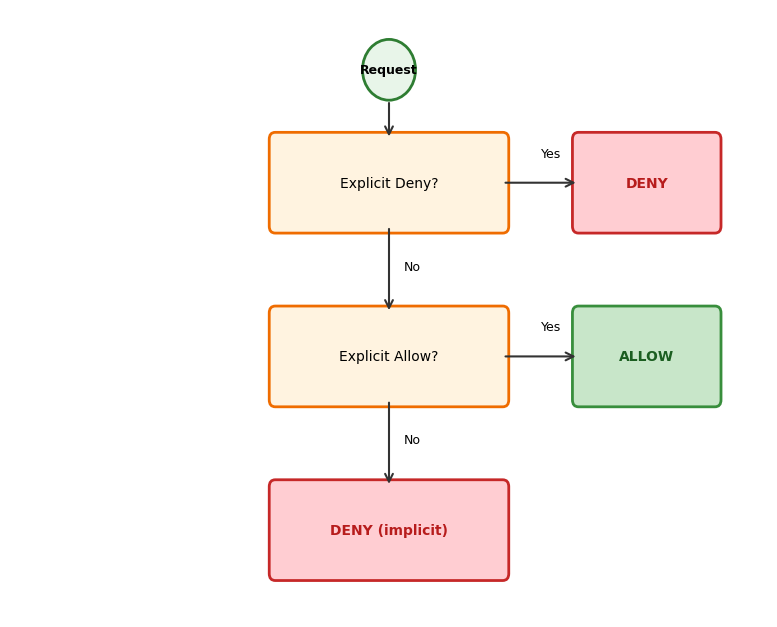
| Rule | Meaning |
|---|---|
| Default deny | An action no policy mentions is denied |
| Explicit deny wins | A "Deny" statement overrides any "Allow" |
| Explicit allow grants | An "Allow" statement permits the action, unless denied |
{
  "Statement": [
    {"Effect": "Allow", "Action": "s3:*",
     "Resource": "*"},
    {"Effect": "Deny", "Action": "s3:DeleteBucket",
     "Resource": "*"}
  ]
}
This allows all S3 actions except DeleteBucket. The deny wins.
Least privilege follows directly: start with nothing, add only what is needed.
Policies Attach to Identities or Resources
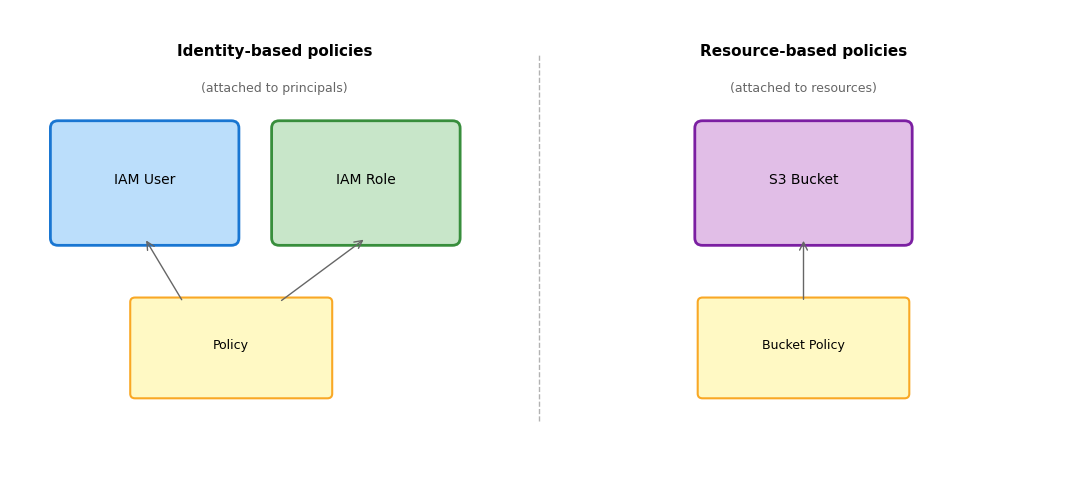
Identity-based: “this user/role can do X to Y”
Resource-based: “this resource allows X from Y” (includes a Principal field)
Both are evaluated. For same-account access, either can grant. Identity-based policies are the more common form.
Access Keys Leak and Never Expire
Returning to to EC2 accessing S3 example. One approach: create an IAM user, generate access keys, embed them in code.
import boto3

s3 = boto3.client(
    's3',
    aws_access_key_id='AKIAIOSFODNN7EXAMPLE',
    aws_secret_access_key='wJalrXUtnFEMI/K7MDENG/bPxRfiCYEXAMPLEKEY'
)

s3.get_object(Bucket='my-bucket', Key='data.json')
Problems:
| Issue | Consequence |
|---|---|
| Keys in code | Checked into git, visible in the repository |
| Keys on disk | Anyone with instance access can read them |
| Keys never expire | A leaked key grants indefinite access |
| Keys per application | Managing many keys is error-prone |
| Key rotation | Manual process, often neglected |
This is how credentials get leaked. Public GitHub repositories are scanned constantly for AWS keys.
Roles Have No Permanent Credentials
A role is an IAM identity that:
- Has permissions (via attached policies)
- Has no permanent credentials
- Can be assumed by trusted entities
- Issues temporary credentials when assumed
Trust policy - who can assume this role:
{
  "Version": "2012-10-17",
  "Statement": [{
    "Effect": "Allow",
    "Principal": {
      "Service": "ec2.amazonaws.com"
    },
    "Action": "sts:AssumeRole"
  }]
}
This says: the EC2 service can assume this role.
Permissions policy - what the role can do:
{
  "Version": "2012-10-17",
  "Statement": [{
    "Effect": "Allow",
    "Action": [
      "s3:GetObject",
      "s3:PutObject"
    ],
    "Resource": "arn:aws:s3:::my-bucket/*"
  }]
}
This says: read and write objects in my-bucket.
Assuming a Role Returns Temporary Credentials
When an entity assumes a role, AWS STS (Security Token Service) issues temporary credentials:
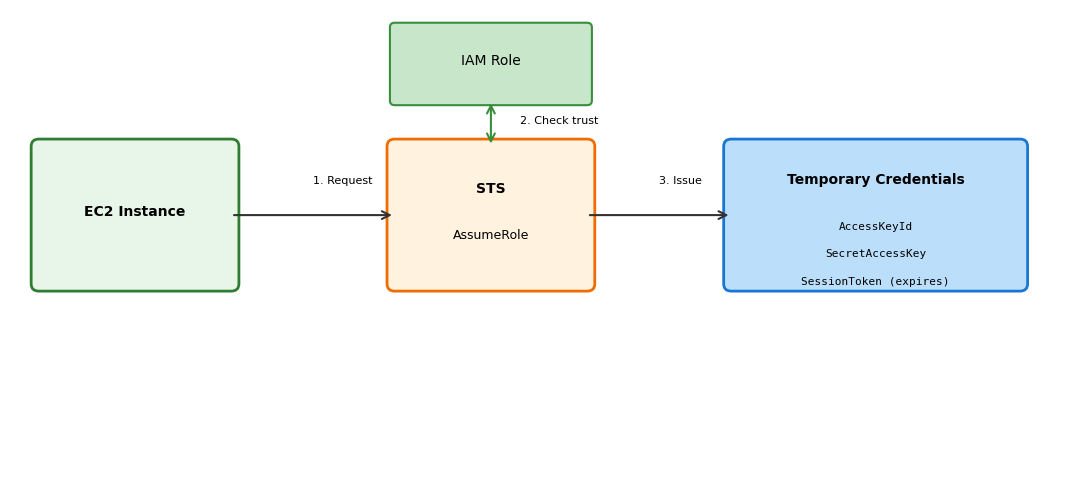
Credentials expire (default 1 hour, configurable). After expiry, the role is assumed again for new ones.
Instance Profiles Put Roles on EC2
EC2 instances assume roles through instance profiles.
Instance profile = container that holds an IAM role
When an instance launches with an instance profile:
- The EC2 service assumes the role on the instance’s behalf
- Temporary credentials are made available inside the instance
- Credentials are served at the metadata endpoint (IMDSv2 token required)
http://169.254.169.254/latest/meta-data/iam/security-credentials/MyRole
The response is the expiring-credential JSON: AccessKeyId, SecretAccessKey, Token, Expiration.
SDKs handle this automatically.
Application code:
import boto3

s3 = boto3.client('s3')
s3.get_object(
    Bucket='my-bucket',
    Key='data.json'
)
boto3 queries the metadata endpoint, retrieves credentials, signs the request. No credentials in code.
Credentials refresh automatically before expiration.
The SDK Fetches Credentials Automatically
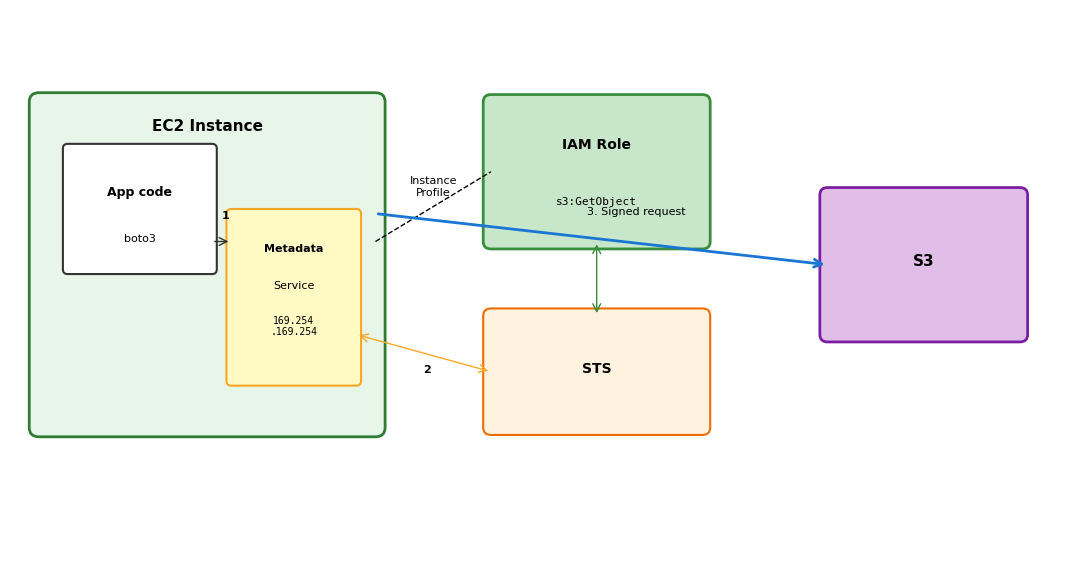
- boto3 queries the metadata service for credentials
- The metadata service obtains temporary credentials from STS using the instance profile’s role
- boto3 signs the S3 request with those credentials
Two Policies Give EC2 Its Access
1. Create an IAM role with a trust policy:
{
  "Version": "2012-10-17",
  "Statement": [{
    "Effect": "Allow",
    "Principal": {"Service": "ec2.amazonaws.com"},
    "Action": "sts:AssumeRole"
  }]
}
2. Attach a permissions policy to the role:
{
  "Version": "2012-10-17",
  "Statement": [{
    "Effect": "Allow",
    "Action": ["s3:GetObject", "s3:ListBucket"],
    "Resource": [
      "arn:aws:s3:::training-data-bucket",
      "arn:aws:s3:::training-data-bucket/*"
    ]
  }]
}
The Instance Launches with the Role Attached
3. Create an instance profile and attach the role:
aws iam create-instance-profile --instance-profile-name EC2-S3-Reader
aws iam add-role-to-instance-profile \
    --instance-profile-name EC2-S3-Reader \
    --role-name EC2-S3-Reader-Role
4. Launch EC2 with the instance profile:
aws ec2 run-instances \
    --image-id ami-0c55b159cbfafe1f0 \
    --instance-type t3.micro \
    --iam-instance-profile Name=EC2-S3-Reader \
    --key-name my-key
5. Code on the instance:
import boto3

s3 = boto3.client('s3')  # No credentials specified
data = s3.get_object(Bucket='training-data-bucket', Key='dataset.csv')
# Works because the instance's role grants s3:GetObject
Temporary Credentials Beat Stored Keys
| With access keys | With IAM roles |
|---|---|
| Keys in code or config files | No keys to leak |
| Keys valid indefinitely | Credentials expire automatically |
| Manual rotation required | Automatic rotation |
| Keys can be copied anywhere | Credentials tied to the instance |
| Compromised key: long-term access | Compromised instance: temporary access |
Instance compromise is still serious - the attacker gets whatever permissions the role has. But no permanent credentials leave with them; access ends with the instance.
Least privilege: give roles only the permissions they need. s3:GetObject on one bucket, not s3:* on *.
Storage: S3
S3 Is Not a Filesystem
EBS provides block storage - raw disk that an OS formats and manages as a filesystem. S3 provides object storage - a different abstraction entirely.
Block storage (EBS):
- Raw blocks, OS manages the filesystem
- Attached to one instance
- POSIX semantics: open, read, write, seek, close
- Directories, permissions, links
- Mutable: change byte 1000 without touching the rest
The model local code assumes.
Object storage (S3):
- Key-value store over HTTP
- Accessible from anywhere
- HTTP semantics: PUT, GET, DELETE
- No directories, no permission bits
- Immutable: replace the entire object or nothing
A different model optimized for different access patterns.
S3 is not a mounted filesystem; it is a service called over HTTP.
A Bucket and a Key Address Everything
S3 organizes data into buckets containing objects.
Bucket: a container with a globally unique name
training-data-2025- once claimed, no other account can use the name- Exists in one region (data stored there)
- Holds any number of objects
Object: a key-value pair
- Key: a string identifying the object (
models/v1/weights.pt) - Value: bytes (the actual data, up to 5 TB)
- Metadata: key-value pairs describing the object
Nothing else exists - no volumes, no directories, no hierarchy. Two coordinates, bucket and key, address every byte in S3.
Keys Only Look Like Paths
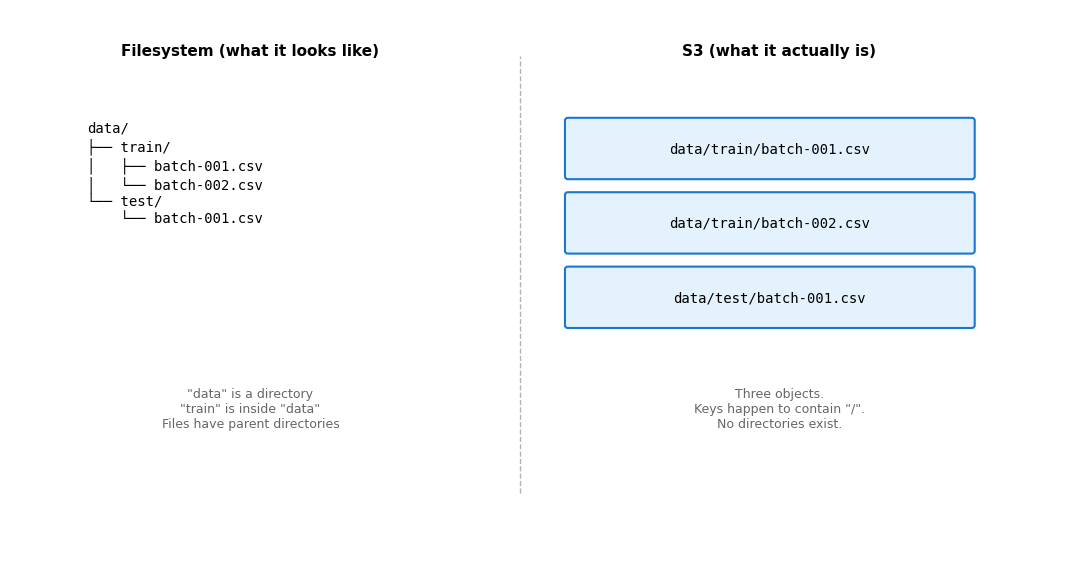
S3 Simulates Folders at List Time
The AWS Console and CLI show a folder-like view. This is a UI convenience, not reality.
# Three separate objects with no relationship:
data/train/batch-001.csv
data/train/batch-002.csv
data/test/batch-001.csv

# There is no "data" directory
# There is no "data/train" directory
# No "cd" - there is nothing to enter
# No "ls" of a directory - listing filters by prefix
What “listing a directory” actually does:
aws s3 ls s3://my-bucket/data/train/
This calls ListObjectsV2 with Prefix="data/train/" and Delimiter="/". S3 returns objects whose keys start with that prefix. The slash delimiter groups results to simulate folders.
No directory was traversed. A string filter was applied.
Simple File Operations Become Expensive Copies
The flat namespace and immutable objects have consequences:
No rename
Renaming old-name.csv to new-name.csv requires:
- Copy the object to the new key
- Delete the object at the old key
For a 5 GB file, that copies 5 GB (within S3, but still a copy).
Filesystems rename by changing a pointer. S3 has no pointers.
No move
Same as rename - copy, then delete.
No append
Adding 100 bytes to a 5 GB file requires:
- Download 5 GB
- Append 100 bytes locally
- Upload 5.000000095 GB
Or: store separate objects and concatenate at read time.
Filesystems append by extending an allocation. S3 objects are immutable blobs.
No partial update
Changing byte 1000 requires replacing the entire object.
Objects Are Immutable
Once written, an object cannot be modified - only replaced entirely.
# Overwrites - no append
s3.put_object(
    Bucket='my-bucket',
    Key='log.txt',
    Body='new content'  # Replaces everything
)
Design implications:
- Logs: write each entry as a separate object, or batch and write periodically
- Large datasets: partition into multiple objects
- Results: write once when complete, not incrementally
Immutability is a model to design for, not a defect to work around. Many distributed systems work well with immutable data.
HTTP Explains the Missing Operations
S3 is an HTTP API. Every operation is an HTTP request.
| Operation | HTTP Method | What It Does |
|---|---|---|
PutObject |
PUT | Create/replace object |
GetObject |
GET | Retrieve object (or byte range) |
DeleteObject |
DELETE | Remove object |
HeadObject |
HEAD | Get metadata without body |
ListObjectsV2 |
GET on bucket | List keys matching prefix |
PUT /my-bucket/data/file.csv HTTP/1.1
Host: s3.us-east-1.amazonaws.com
Content-Length: 1048576
Authorization: AWS4-HMAC-SHA256 ...

<file bytes>
The CLI and SDK construct these requests. The operation set follows from HTTP, which has no append or rename either.
Working with S3: CLI
# Create bucket (name must be globally unique)
aws s3 mb s3://my-bucket-unique-name-12345

# Upload file
aws s3 cp ./local-file.csv s3://my-bucket/data/file.csv

# Download file
aws s3 cp s3://my-bucket/data/file.csv ./local-file.csv

# List objects (prefix filter, not directory listing)
aws s3 ls s3://my-bucket/data/

# Sync local directory to S3 (uploads new/changed files)
aws s3 sync ./local-dir/ s3://my-bucket/data/

# Delete object
aws s3 rm s3://my-bucket/data/file.csv

# Delete all objects with prefix
aws s3 rm s3://my-bucket/data/ --recursive
aws s3 commands are high-level conveniences. aws s3api exposes the raw API operations.
Working with S3: SDK
import boto3
import json

s3 = boto3.client('s3')

# Upload object
s3.put_object(
    Bucket='my-bucket',
    Key='results/experiment-001.json',
    Body=json.dumps({'accuracy': 0.94, 'loss': 0.23}),
    ContentType='application/json'
)

# Download object
response = s3.get_object(Bucket='my-bucket', Key='results/experiment-001.json')
data = json.loads(response['Body'].read())

# List objects with prefix
response = s3.list_objects_v2(Bucket='my-bucket', Prefix='results/')
for obj in response.get('Contents', []):
    print(f"{obj['Key']}: {obj['Size']} bytes")
Object Permissions Do Not Cover the Bucket
A common permissions mistake: the policy grants object access and nothing else.
{
  "Action": "s3:GetObject",
  "Resource": "arn:aws:s3:::my-bucket/*"
}
This allows downloading objects. But listing the bucket:
aws s3 ls s3://my-bucket/
# AccessDenied
ListBucket is a bucket operation, not an object operation. It needs the bucket ARN:
{
  "Statement": [
    {
      "Action": "s3:ListBucket",
      "Resource": "arn:aws:s3:::my-bucket"
    },
    {
      "Action": ["s3:GetObject", "s3:PutObject"],
      "Resource": "arn:aws:s3:::my-bucket/*"
    }
  ]
}
| ARN | Applies To |
|---|---|
arn:aws:s3:::my-bucket |
ListBucket, bucket operations |
arn:aws:s3:::my-bucket/* |
GetObject, PutObject, object operations |
arn:aws:s3:::my-bucket/data/* |
Object operations under the prefix data/ |
Durability and Availability Are Independent
Two different guarantees:
Durability: probability data survives
S3 Standard: 99.999999999% (11 nines)
S3 stores copies across multiple facilities in the region, designed to sustain simultaneous loss of two facilities.
10 million objects: expect to lose 1 every 10,000 years.
A successful PUT means the data is safe.
Availability: probability of successful access
S3 Standard: designed for 99.99%
About 53 minutes/year of potential unavailability.
Availability failures are transient - a retry succeeds. Data is not lost, only temporarily unreachable.
A GET may fail occasionally; the data is still there.
High durability does not guarantee high availability. A design that retries handles the difference; a design that conflates them loses either data or uptime.
S3 Persists While Compute Comes and Goes
S3 serves as durable storage accessible from any compute resource:
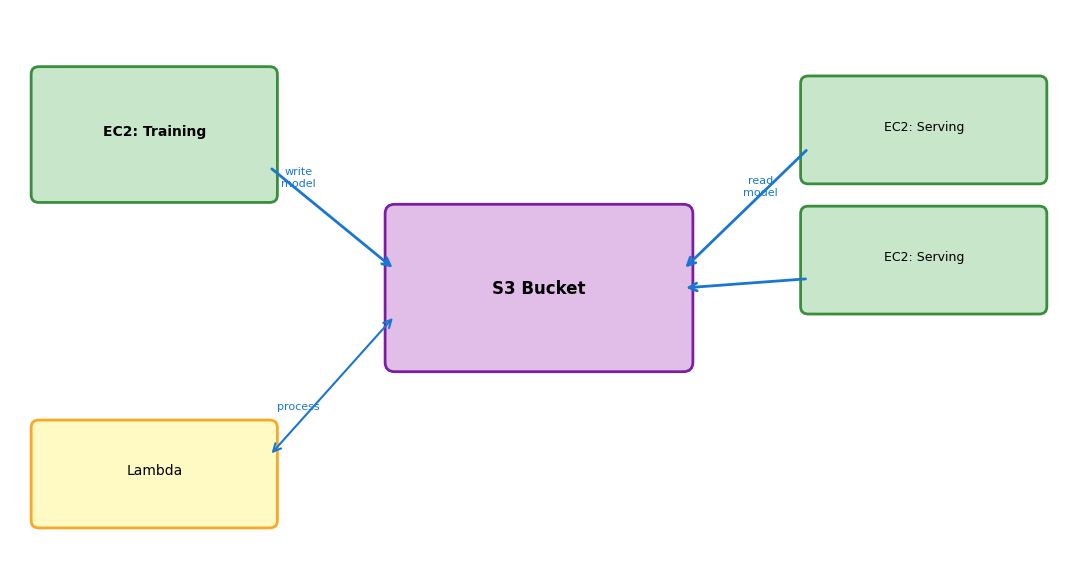
Training runs, writes the model to S3, terminates. Serving instances start and read the model from S3. Lambda processes uploads. All access the same data. S3 persists regardless of which compute resources exist.
Networking
Every Instance Launches into a Private Network
An EC2 instance needs a network: an IP address, routing, connectivity to other instances and the internet.
AWS does not place instances on a shared public network. Every instance lands in a VPC - a Virtual Private Cloud belonging to one account.
VPC properties:
- Isolated network within AWS
- The account defines the IP address range
- Spans all AZs in a region
Other accounts cannot see into a VPC. Traffic between VPCs is isolated by default.
Default VPC:
Every region has a default VPC created automatically. An instance launched without networking configuration goes there.
The default VPC suffices for simple deployments. Production environments typically use custom VPCs with deliberate network design.
The VPC Owns a Private Address Range
A VPC has a CIDR block - the range of private IP addresses available within it.
10.0.0.0/16
This notation specifies a range:
10.0.0.0- starting address/16- first 16 bits fixed, remaining 16 bits vary
10.0.0.0/16 includes 10.0.0.0 through 10.0.255.255 - 65,536 addresses.
| CIDR | Range | Addresses |
|---|---|---|
10.0.0.0/16 |
10.0.0.0 - 10.0.255.255 | 65,536 |
10.0.0.0/24 |
10.0.0.0 - 10.0.0.255 | 256 |
10.0.1.0/24 |
10.0.1.0 - 10.0.1.255 | 256 |
These are private addresses - not routable on the public internet. Within the VPC, instances communicate with them directly.
Reaching the internet requires either:
- A public IP (mapped to the private IP)
- NAT (translates private to public)
Subnets Partition the VPC
A VPC spans an entire region. Subnets divide it into segments, each in a specific AZ.
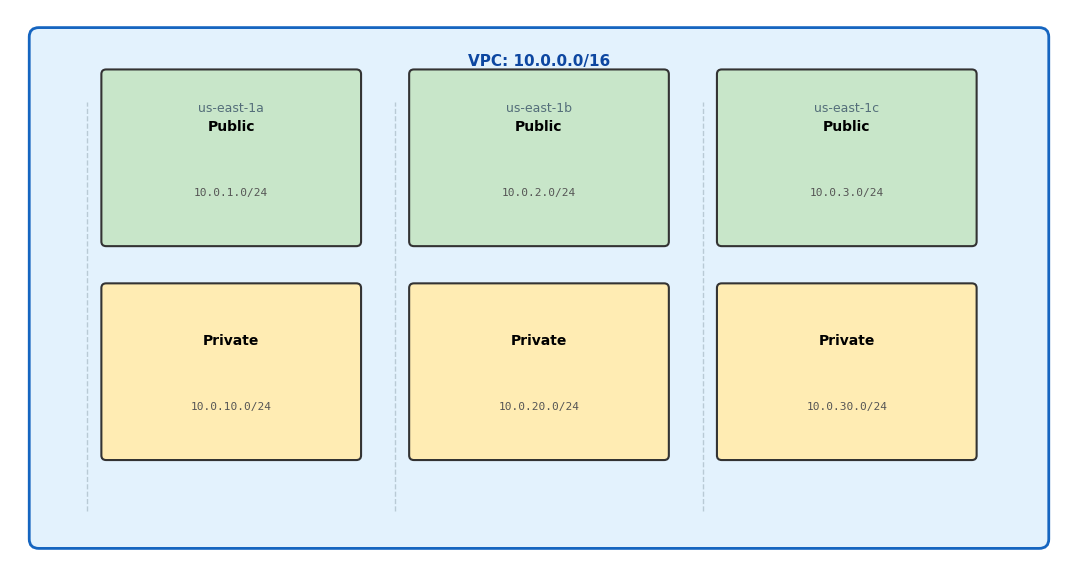
Choosing a Subnet Chooses the AZ
Each subnet:
| Property | Implication |
|---|---|
| Exists in one AZ | Instances in this subnet run in this AZ |
| Has a CIDR block | Subset of the VPC’s range (e.g., 10.0.1.0/24 within 10.0.0.0/16) |
| Has a route table | Determines where traffic goes |
| Is public or private | Based on routing, not a flag |
The AZ constraint, mechanized:
Launching an instance means specifying a subnet. The subnet fixes the AZ. This is why EBS volumes must match - volume and instance must share an AZ, and subnet selection is where the instance’s AZ gets decided.
aws ec2 run-instances \
    --subnet-id subnet-abc123 \  # This determines AZ
    --image-id ami-xxx \
    --instance-type t3.micro
A Route Makes a Subnet Public
“Public” and “private” describe routing behavior, not a setting.
Public subnet:
Route table includes:
Destination     Target
10.0.0.0/16     local
0.0.0.0/0       igw-xxx  ← Internet Gateway
Traffic to addresses outside the VPC routes to the Internet Gateway. Instances with public IPs can receive inbound traffic from the internet.
Private subnet:
Route table includes:
Destination     Target
10.0.0.0/16     local
No route to the internet. Traffic to external addresses has nowhere to go.
Instances here cannot be reached from the internet - no inbound path exists.
A subnet becomes public by having a route to an Internet Gateway. Remove that route and it becomes private.
All Internet Traffic Crosses One Gateway
An Internet Gateway (IGW) connects the VPC to the public internet.
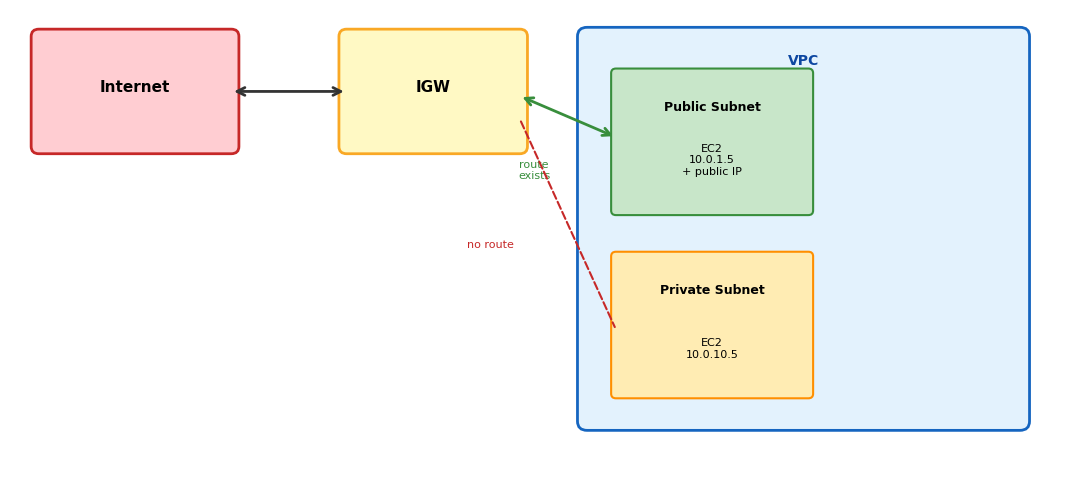
The IGW is AWS-managed, with no capacity to provision. It attaches to the VPC and handles the translation between public and private IPs.
Public IPs Change Unless Pinned
An instance in a public subnet still needs a public IP to be reachable from the internet.
Auto-assigned public IP:
- Assigned at launch from AWS’s pool
- Released when the instance stops
- New IP on restart
- $0.005/hour (~$3.65/month)
aws ec2 run-instances \
    --associate-public-ip-address \
    ...
Elastic IP:
- Static public IP allocated to the account
- Persists until released
- Can move between instances
- Same $0.005/hour, attached or not
Needed when the address must stay fixed: DNS records, firewall whitelists.
The mapping:
An instance has private IP 10.0.1.5 and public IP 54.x.x.x. The IGW translates - outbound traffic appears from 54.x.x.x, inbound traffic to 54.x.x.x routes to 10.0.1.5.
NAT Allows Outbound without Inbound
Instances in private subnets often need outbound internet access - downloading packages, calling external APIs - without being reachable from the internet.
NAT Gateway provides exactly this:
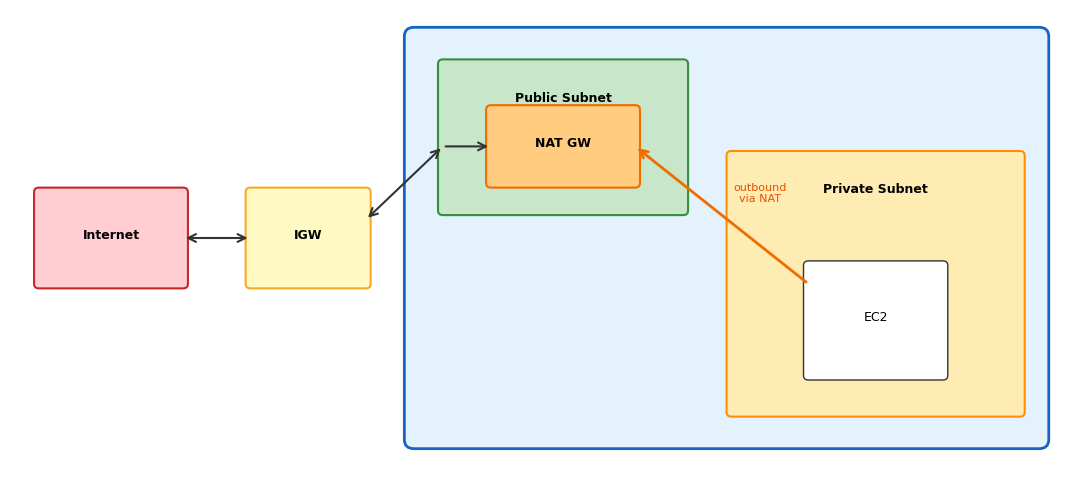
Private subnet route table: 0.0.0.0/0 → nat-xxx. Outbound traffic goes to the NAT Gateway (in a public subnet), which forwards through the IGW. Inbound from the internet still has no path to private instances.
NAT Gateways Cost Money While Idle
NAT Gateway is a managed service with meaningful cost:
| Component | Price |
|---|---|
| Hourly charge | ~$0.045/hour (~$32/month) |
| Data processing | $0.045/GB |
A NAT Gateway running continuously with moderate traffic can cost $50-100/month. Alternatives for development:
- NAT Instance (an EC2 instance doing NAT - cheaper, more management)
- Create the NAT Gateway only when needed
- VPC Endpoints for AWS service traffic (avoids NAT entirely)
Production typically uses NAT Gateway for reliability. Development often skips it or uses alternatives.
Three Layers Must All Allow Traffic
A request from the internet reaching an instance traverses multiple layers:
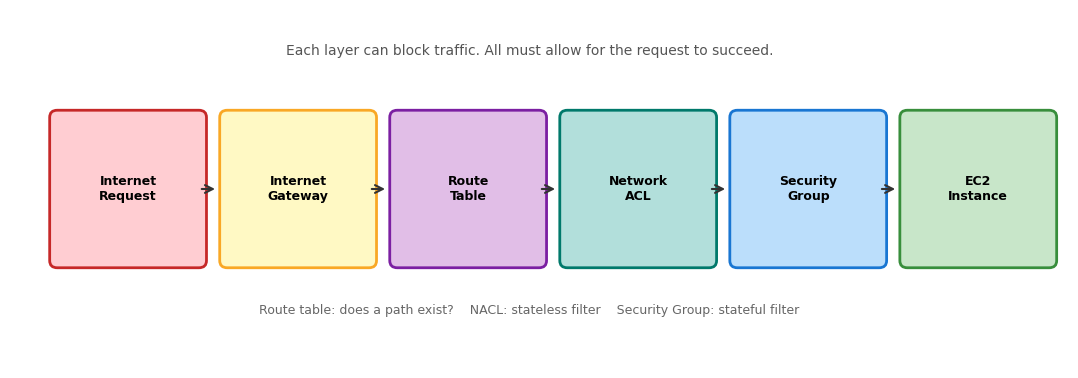
For traffic to reach an instance:
- A route must exist (public subnet with an IGW route)
- The network ACL must allow (default allows all)
- The security group must allow (configured per deployment)
Rules Can Name Groups Instead of Addresses
Security groups can reference other security groups, not just IP ranges:
Type        Port    Source
────────────────────────────
HTTP        80      sg-loadbalancer
PostgreSQL  5432    sg-appserver
“Allow traffic from instances in security group sg-loadbalancer” - even as their IPs change.
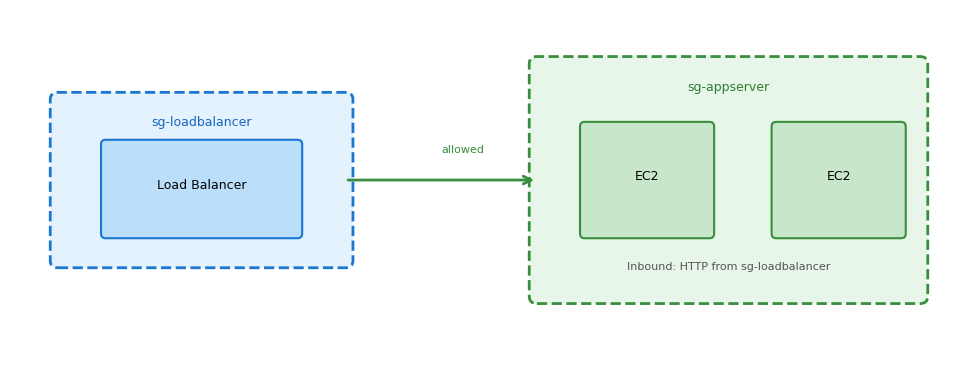
App servers accept HTTP only from the load balancer, regardless of IP changes. The database accepts connections only from app servers.
AWS Traffic Can Skip the Internet Entirely
S3, DynamoDB, and other AWS services live outside the VPC. By default, traffic to them goes over the public internet path (through the IGW or NAT).
VPC Endpoints provide private connectivity:
Gateway Endpoints (S3, DynamoDB):
- A route table entry directs the traffic
- No NAT, no IGW for this traffic
- Free
- Traffic stays on the AWS network
Destination          Target
pl-xxx (S3 prefix)   vpce-xxx
Interface Endpoints (most other services):
- An ENI in the subnet with a private IP
- The service becomes reachable at that IP
- Hourly charge plus data processing
- Used by private subnets that call AWS APIs
For private subnets that need S3 access, a Gateway Endpoint avoids NAT Gateway costs and keeps traffic private.
One Address Fronts Many Instances
Application Load Balancer (ALB):
- Operates at the HTTP layer (Layer 7)
- Routes based on path, host, headers
- Health-checks instances
- Single DNS endpoint, multiple backends
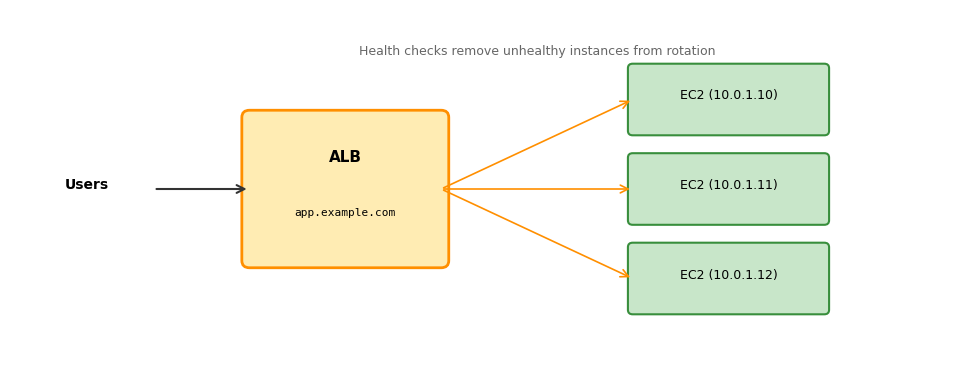
Users hit one DNS name. The ALB distributes requests. An instance that fails health checks stops receiving traffic.
Only a Public Subnet Faces the Internet
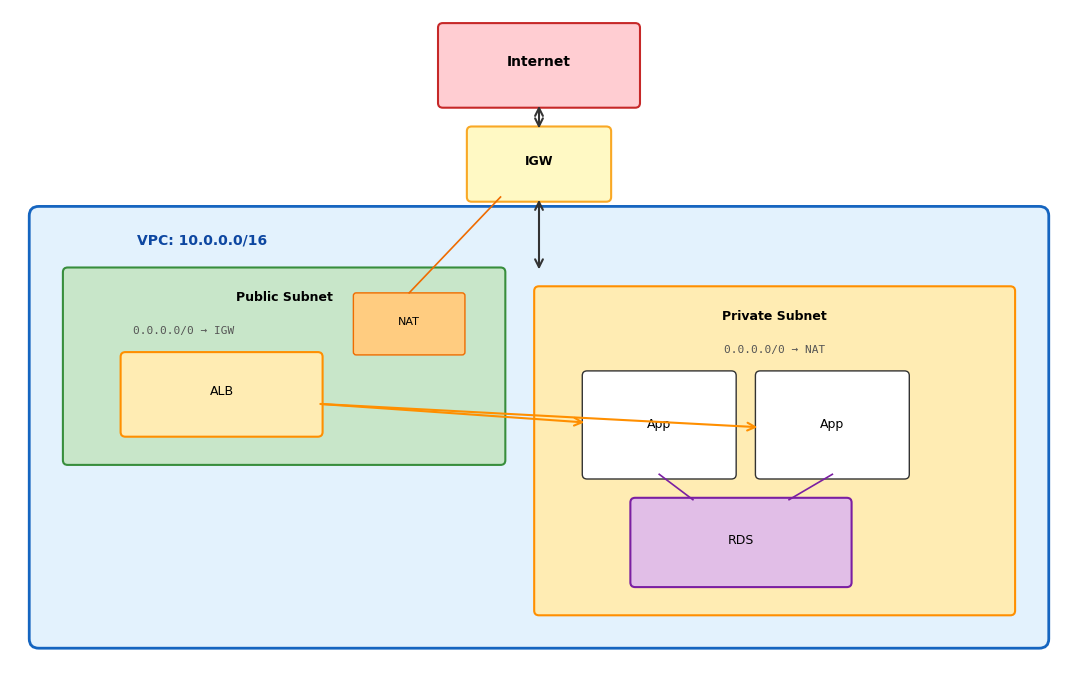
Public subnet - internet-facing components
- Load balancer (receives user traffic)
- NAT gateway (enables private outbound)
- Bastion host if needed (SSH jump box)
Private subnet - internal components
- Application servers (behind the load balancer)
- Databases (no internet exposure)
- Outbound via NAT (updates, external APIs)
Service Survey
Applications Need More than Compute and Storage
EC2 provides virtual machines. S3 provides object storage. Building an application takes more.
Computation beyond VMs:
- Lambda - event-driven functions without servers
- SQS/SNS - asynchronous communication between components
Persistence beyond objects:
- RDS - managed relational databases (PostgreSQL, MySQL)
- DynamoDB - managed key-value/document store
For each service: what it provides, its constraints, and the selection rule.
Lambda Runs Code Only When Triggered
Lambda provides functions as a service. EC2 requires provisioned instances that run and bill continuously; Lambda takes code and runs it when triggered.
The model:
- A function (Python, Node.js, etc.) is uploaded to Lambda
- An event triggers it: an HTTP request, an S3 upload, a schedule
- Lambda runs the function and bills for the execution time
- Between invocations, nothing runs and nothing bills
No instances to manage. No servers to patch. Code runs, then nothing exists until the next trigger.
# Lambda function
def handler(event, context):
    # event contains trigger data
    # (HTTP request body, S3 event, etc.)

    name = event.get('name', 'World')

    return {
        'statusCode': 200,
        'body': f'Hello, {name}!'
    }
This function runs only when invoked. Between invocations, no charge accrues.
Events from Other Services Invoke Functions
| Trigger | Example Use |
|---|---|
| API Gateway | HTTP endpoint calls Lambda |
| S3 | Object uploaded, process it |
| Schedule | Run every hour (cron-like) |
| SQS | Message arrives, process it |
| DynamoDB | Record changes, react |
Common patterns:
- Resize images when uploaded to S3
- Process webhook callbacks
- Run periodic cleanup tasks
- Handle API requests without running a server
Lambda suits workloads that are event-driven, short-lived, and stateless between invocations.
Lambda Fits Short, Stateless Work
Lambda trades flexibility for simplicity. Constraints to know:
| Constraint | Limit |
|---|---|
| Execution timeout | 15 minutes maximum |
| Memory | 128 MB to 10 GB |
| Deployment package | 250 MB (unzipped) |
| Concurrency | 1000 default (can request increase) |
| Stateless | No persistent local storage between invocations |
Cold starts: the first invocation (or the first after an idle period) takes longer - Lambda must initialize the code. Subsequent invocations reuse the warm environment. Latency-sensitive applications notice this delay.
Lambda is not an EC2 replacement. Long-running processes, persistent connections, or large memory requirements need EC2.
Idle Functions Cost Nothing
Pay for what executes:
| Component | Price |
|---|---|
| Requests | $0.20 per million |
| Duration | $0.0000166667 per GB-second |
A function using 512 MB running for 200 ms:
- 0.5 GB × 0.2 seconds = 0.1 GB-seconds
- 0.1 × $0.0000166667 ≈ $0.0000017 per invocation
1 million invocations at this configuration ≈ $2.
Contrast with EC2: a t3.micro running continuously costs ~$7.59/month whether or not it is doing work. Lambda costs nothing when idle.
A Queue Separates Producers from Consumers
SQS (Simple Queue Service) provides message queues - a way for one component to send work to another without a direct connection.
A queue holds messages between components.
- Producers put messages in
- Consumers take messages out and process them
- Producer and consumer never communicate directly
# Producer: send message
sqs.send_message(
    QueueUrl='https://sqs.../my-queue',
    MessageBody='{"task": "process", "id": 123}'
)

# Consumer: receive and process
messages = sqs.receive_message(QueueUrl='...')
for msg in messages.get('Messages', []):
    process(msg['Body'])
    sqs.delete_message(...)  # Acknowledge
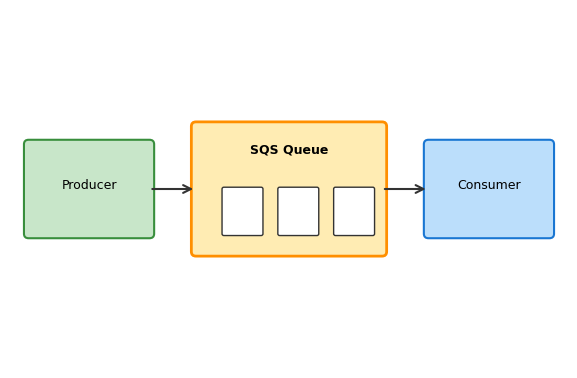
Queued Work Survives a Crashed Consumer
Decoupling in time
- The producer sends and continues - it does not wait
- The consumer processes when ready
- A slow consumer means messages accumulate
- A crashed consumer means work waits instead of vanishing
Decoupling in scale
- One producer, many consumers
- Add consumers to process faster
- Remove consumers when load drops
Decoupling in deployment
- Producer and consumer deploy independently
- Different codebases, different release schedules
- The only agreement is the message format
Failure isolation
- A consumer crash does not affect the producer
- A producer crash does not lose queued work
- Failed messages retry without a new request
SNS Delivers One Message to Many Subscribers
SNS (Simple Notification Service) provides publish/subscribe delivery.
The concept:
A topic is a channel. Publishers send messages to topics; the topic delivers each message to its subscribers.
Subscriber types:
- Lambda functions
- SQS queues
- HTTP endpoints
- Email addresses
- SMS
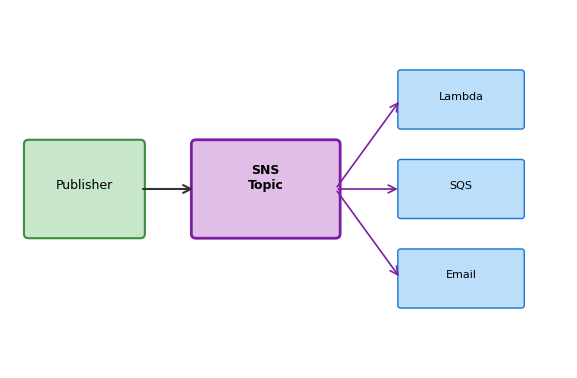
Example: an order-placed event published to an orders topic invokes an inventory Lambda, sends a confirmation email, and enqueues the order for the shipping system. One event, multiple reactions.
SQS vs SNS
| SQS | SNS | |
|---|---|---|
| Model | Queue (one consumer per message) | Pub/sub (many subscribers per message) |
| Delivery | Consumer pulls | SNS pushes to subscribers |
| Persistence | Messages wait in the queue | Delivery attempted immediately |
| Use case | Work distribution | Event notification |
Often used together: SNS publishes to multiple SQS queues, each processed by a different consumer application.
RDS Provides Databases on Managed Instances
RDS runs PostgreSQL, MySQL, or other relational databases on EC2 instances that AWS operates.
What RDS is:
- An EC2 instance running database software
- Instance type from db.t3.micro to db.r5.24xlarge
- Storage from 20 GB to 64 TB
- Standard SQL - same queries, same libraries
import psycopg2

conn = psycopg2.connect(
    host='mydb.abc123.us-east-1.rds.amazonaws.com',
    database='myapp',
    user='admin',
    password='...'
)
# Standard PostgreSQL from here
Constraints to know:
- Single-writer: one primary instance handles writes
- Vertical scaling: more capacity means a bigger instance (requires restart)
- AZ-bound: the instance lives in one AZ (Multi-AZ adds a standby)
- Connection limits: instance size determines max connections
| Instance | Max Connections | Cost/month |
|---|---|---|
| db.t3.micro | ~85 | ~$12 |
| db.t3.medium | ~170 | ~$50 |
| db.r5.large | ~1,700 | ~$175 |
DynamoDB Serves Reads and Writes by Key
DynamoDB provides a managed key-value store - items indexed by primary key. No SQL, no joins, no instance to manage.
Access patterns:
- Get by key: O(1), single-digit milliseconds
- Query by partition: items sharing a partition key
- Scan: reads the entire table (expensive, avoid)
dynamodb = boto3.resource('dynamodb')
table = dynamodb.Table('Users')

# Write: ~5ms
table.put_item(Item={
    'user_id': 'u123',
    'name': 'Alice',
    'email': 'alice@example.com'
})

# Read by key: ~5ms
response = table.get_item(Key={'user_id': 'u123'})
Constraints to know:
- No joins: denormalize or make multiple requests
- No ad-hoc queries: the table design follows the access patterns
- Item size limit: 400 KB per item
- Query requires a partition key: querying arbitrary attributes is inefficient
Pricing (on-demand):
| Operation | Cost |
|---|---|
| Write (1 KB) | $0.625 per million |
| Read (4 KB) | $0.125 per million |
No idle cost: zero requests, zero charges.
RDS and DynamoDB Fit Different Access Patterns
RDS for:
- Complex queries with joins and aggregations
- ACID transactions across multiple tables
- Relational integrity (foreign keys, constraints)
- Ad-hoc queries and reporting
- Schema enforcement
The relational model fits when the queries keep changing.
DynamoDB for:
- Predictable single-digit-millisecond latency
- Very high request rates
- Key-based access patterns only
- Zero cost when idle
- Horizontal scaling without capacity planning
The key-value model fits when the access patterns are fixed in advance.
Costs
One Deployment Runs Several Meters at Once
AWS bills based on resource usage. Different resources meter in different ways:
| Metering Model | How It Works | Examples |
|---|---|---|
| Time-based | Charge per unit time the resource exists/runs | EC2 instances, RDS instances, NAT Gateway |
| Capacity-based | Charge per unit capacity provisioned | EBS volumes, provisioned IOPS |
| Usage-based | Charge per unit actually consumed | S3 storage, S3 requests, Lambda invocations |
| Movement-based | Charge per unit data transferred | Data transfer out, cross-region transfer |
A single deployment involves multiple metering models simultaneously. An EC2 instance incurs time-based charges (compute), capacity-based charges (EBS), and potentially movement-based charges (data transfer).
EC2 Bills by the Second While Running
EC2 instances charge per-second while in the running state (60-second minimum).
| Instance Type | Hourly | Monthly (continuous) |
|---|---|---|
| t3.micro | $0.0104 | $7.59 |
| t3.small | $0.0208 | $15.18 |
| t3.medium | $0.0416 | $30.37 |
| m5.large | $0.096 | $70.08 |
| m5.xlarge | $0.192 | $140.16 |
On-Demand pricing, us-east-1, Linux. Other regions ±10-20%.
Instance state determines billing:
| State | Compute Charge | EBS Charge |
|---|---|---|
| running | Yes | Yes |
| stopped | No | Yes |
| terminated | No | No (volume deleted) |
Stopping an instance stops compute charges. The EBS volume still exists and still bills. Terminating ends all charges (root volume deleted by default).
Provisioned Storage Bills Even When Empty
EBS and S3 use different metering models:
EBS: Capacity-based
Charges for provisioned size, not used space.
| Volume Type | Per GB-month |
|---|---|
| gp3 | $0.08 |
| gp2 | $0.10 |
| io2 | $0.125 + IOPS |
A 100 GB gp3 volume: $8/month
The charge is the same whether the volume holds 1 GB or 100 GB - the fee buys reserved capacity.
S3: Usage-based
Charges for actual storage plus operations.
| Component | Price |
|---|---|
| Storage (Standard) | $0.023/GB-month |
| PUT/POST/LIST | $0.005/1,000 |
| GET/SELECT | $0.0004/1,000 |
100 GB stored: $2.30/month
S3 charges grow with the data actually stored. An empty bucket costs nothing.
Data Transfer Bills by Direction and Distance
Data transfer charges are based on movement, independent of the resources involved:
| Transfer | Price |
|---|---|
| Inbound from internet | Free |
| Outbound to internet | $0.09/GB |
| Between regions | $0.02/GB |
| Between AZs (same region) | $0.01/GB each direction |
| Within same AZ | Free |
| To S3/DynamoDB (same region) | Free |
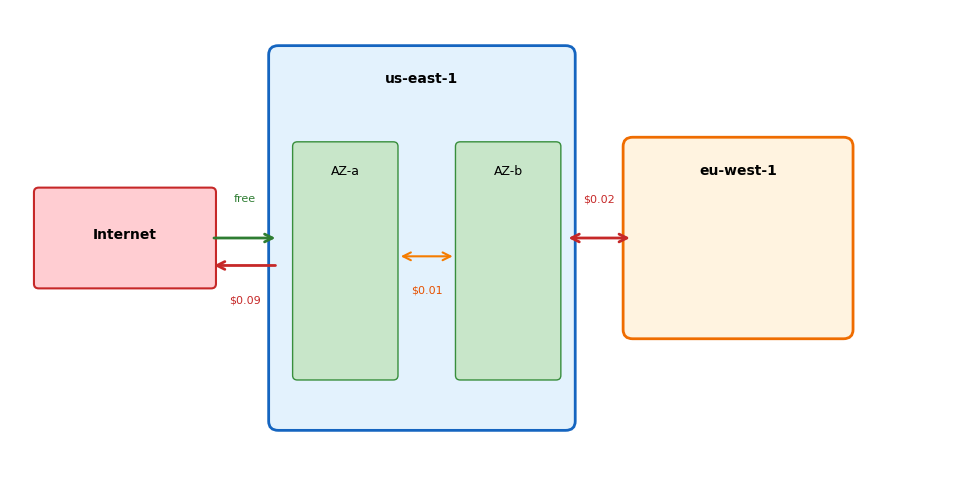
Architectures that move large amounts of data across regions or to the internet accumulate transfer costs.
Signup Credits Burn at Metered Rates
New AWS accounts receive $100 in credits (up to $200 with onboarding activities), NOTE: change from free monthly usage:
- Free plan: no charges possible - the account is restricted when credits run out or after 6 months
- Paid plan: standard pay-as-you-go billing once credits are exhausted
- Always-free monthly allowances continue on both plans (e.g., Lambda: 1M requests/month)
What $100 of credits covers:
| Usage | Rate | Credit Lifetime |
|---|---|---|
| 1 × t3.micro, continuous | $7.59/month | ~13 months |
| 100 GB gp3 volume | $8.00/month | ~12 months |
| NAT Gateway, idle | $32/month | ~3 months |
| 1 × p3.2xlarge | $3.06/hour | ~33 hours |
A GPU instance consumes in a day what a t3.micro consumes in months.
Monitoring Makes Cost Accumulation Visible
The billing model is pay-as-you-go: charges accumulate automatically, and nothing interrupts them.
Visibility mechanisms
- Billing Dashboard - current month charges by service, updated multiple times daily
- Cost Explorer - historical costs, filtered by service/region/tag, with forecasts
- Budgets - configurable thresholds that send alert notifications
Protection measures
- Set billing alerts before launching anything ($10, $25, $50 thresholds)
- Check running instances daily during active work
- Terminate, not stop, instances that are no longer needed - stopped instances still bill for EBS
- Delete buckets and volumes that no longer serve a purpose
ML System Design on AWS
Cloud Training Splits into Networked Components
A laptop runs ML training as a single process. Data, compute, and storage are all local.
Local training
data = pd.read_csv('dataset.csv')      # Local disk
model = train(data)                     # Local CPU/GPU
torch.save(model, 'model.pth')          # Local disk
Everything shares memory, disk, and failure fate. If the process crashes, everything stops together. If the disk fails, data and model are both gone.
One machine, one failure domain.
Distributed training
data = load_from_s3('bucket', 'data.csv')  # Network call
model = train(data)                         # EC2 instance
save_to_s3(model, 'bucket', 'model.pth')   # Network call
Components are networked. S3 can fail while EC2 runs. EC2 can terminate while S3 persists. The network can drop between them.
Data outlives compute. Compute is ephemeral. The network connects - and separates - them.
Each S3 Call Adds Tens of Milliseconds
Every arrow in an architecture diagram is a network hop.
Local operations
| Operation | Time |
|---|---|
| Read 1MB from SSD | 1 ms |
| Load pandas DataFrame | 10 ms |
| PyTorch forward pass | 5 ms |
| Write checkpoint to disk | 2 ms |
Total per batch: ~20 ms. Predictable. Consistent.
With S3 in the loop
| Operation | Time |
|---|---|
| Fetch 1MB from S3 | 20-50 ms |
| Load pandas DataFrame | 10 ms |
| PyTorch forward pass | 5 ms |
| Write checkpoint to S3 | 30-100 ms |
Total per batch: 65-165 ms. Variable. Depends on the network.
Checkpointing every batch adds 3-8× overhead. Checkpointing every 100 batches does not.
Design for latency: batch S3 operations, prefetch data, checkpoint strategically.
Each Component Fails Independently
Distributed systems fail partially.
Independent failure domains
- S3: available (11 nines durability), but individual requests fail transiently
- EC2: the instance can terminate - spot reclamation, hardware failure, a bug
- Network: packets drop, connections time out, DNS fails
- Application code: exceptions, OOM, infinite loops
S3 keeps serving while an EC2 instance is down; EC2 keeps computing while an S3 request fails. The boundaries are the application’s to handle.
Failure scenarios
| Event | Data | Model | Training |
|---|---|---|---|
| EC2 terminates | Safe (S3) | Lost (if not saved) | Lost |
| S3 request fails | Retry works | Retry works | Continues |
| OOM on EC2 | Safe (S3) | Lost (if not saved) | Lost |
| Network partition | Safe (S3) | Stuck | Stuck |
The pattern: S3 is durable, EC2 is ephemeral. Save state to S3 frequently enough that losing EC2 is recoverable.
Keeping State in S3 Makes EC2 Replaceable
S3 is the durable integration point. EC2 is stateless compute.
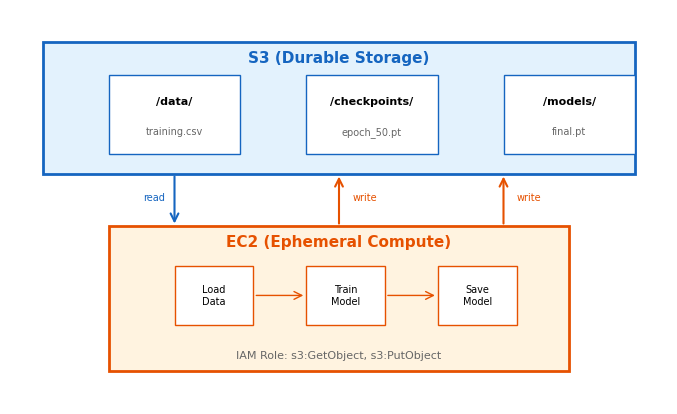
Data flow pattern
- EC2 reads training data from S3
- EC2 processes (trains the model)
- EC2 writes checkpoints and the final model to S3
Why this works
- S3 is durable - data survives EC2 termination
- EC2 is ephemeral - no state lives only on the instance
- If EC2 terminates: launch a new instance, load the last checkpoint, continue
Recovery
No state is lost because state lives in S3, not EC2.
The Instance Role Scopes the Training Job
EC2 instances assume IAM roles. No access keys in code.
- The instance launches with an instance profile; the SDK discovers and refreshes temporary credentials automatically
- The role’s policy bounds the job:
GetObject/PutObjecton the training bucket’s objects,ListBucketon the bucket
import boto3

s3 = boto3.client('s3')  # No credentials specified
s3.download_file('bucket', 'key', 'local')
Checkpoints Bound the Cost of Interruption
Without checkpoints
- Training runs for 10 hours
- The EC2 spot instance is reclaimed at hour 8
- Result: 8 hours of compute wasted, start over
With checkpoints every epoch
- Training runs for 10 hours (100 epochs)
- A checkpoint saves to S3 after each epoch
- EC2 reclaimed at hour 8 (epoch 80)
- A new instance loads the epoch-80 checkpoint
- Result: 20 minutes lost, not 8 hours
Checkpoint frequency trade-off
| Frequency | S3 Writes | Recovery Loss | Overhead |
|---|---|---|---|
| Every batch | 10,000/epoch | Seconds | High (latency) |
| Every epoch | 100 total | Minutes | Low |
| Every 10 epochs | 10 total | ~1 hour | Minimal |
Choose based on:
- Training cost per hour (expensive means checkpoint more)
- S3 write latency tolerance
- Spot interruption frequency (2-minute warning)
For spot instances: handle the interruption signal - the 2-minute warning is enough to save a checkpoint.
Deterministic Keys Make Retries Safe
Operations should be safe to retry. After a network failure, the caller often cannot tell whether the operation succeeded.
The problem
# Upload model to S3
s3.put_object(Bucket='b', Key='model.pt', Body=data)
# Network timeout. Did it succeed?
# Is retrying safe if it did?
For S3 put_object: yes, safe to retry. The same key overwrites with the same content. No harm.
# Append to a log file?
# S3 has no append.
# Each put_object replaces the object -
# which is what makes retries safe.
Design for idempotency
Safe to retry:
- Writing a file to a deterministic path
- Overwriting a checkpoint with a newer version
- Reading data (no side effects)
Not safe to retry (without care):
- Incrementing a counter
- Appending to a log
- Sending a notification
Pattern: use deterministic keys
# Good: deterministic path
key = f"checkpoints/epoch_{epoch:04d}.pt"

# Bad: timestamp creates duplicates on retry
key = f"checkpoints/{datetime.now()}.pt"
Compute Dominates Training Bills
Three things cost money: compute time, storage, and data transfer.
Compute (EC2)
- A running instance bills whether or not it is working; a stopped one still bills for EBS
Design response: terminate when done. Use spot instances for fault-tolerant work. Leave nothing running overnight.
Storage (S3)
- Billed per GB-month; data persists until deleted
Design response: delete intermediate files. Use lifecycle policies for old checkpoints.
Data transfer
- Free into AWS and within an AZ; metered across AZs, across regions, and out to the internet
Design response: keep data and compute in the same region. Avoid repeatedly downloading large datasets from S3 to a local machine.
Example costs for a training job
| Resource | Usage | Cost |
|---|---|---|
| EC2 p3.2xlarge | 8 hours | $24.48 |
| S3 storage | 50 GB/month | $1.15 |
| Data transfer | Within region | $0 |
Compute dominates. Optimize instance usage first.
Unused Resources Bill at Full Price
Resources cost money from the moment they exist, and nothing stops the meter automatically.
Real student mistakes
| Mistake | Cost |
|---|---|
| p3.2xlarge left running over a weekend | $220 |
| Forgotten 500GB S3 bucket | $12/month, indefinitely |
| Auto-scaling launched 20 instances | $50/hour |
| Cross-region replication enabled | $45 transfer |
Safe practices
- Use
t3.microfor development and testing - Use GPU instances only while actually training
- Terminate instances whose purpose is unclear
# Check what's running
aws ec2 describe-instances \
  --query 'Reservations[].Instances[].[InstanceId,State.Name,InstanceType]' \
  --output table
Resume and Cleanup Depend on Key Structure
S3 has no directories; the key scheme carries all the structure. Automation - resuming a run, comparing experiments, deleting old checkpoints - depends on it.
ml-project-{username}/
├── data/
│   ├── raw/                    # Original, immutable
│   │   └── dataset_v1.csv
│   └── processed/              # Transformed, ready for training
│       ├── train.parquet
│       └── test.parquet
├── checkpoints/
│   └── experiment_001/
│       ├── epoch_0010.pt
│       ├── epoch_0020.pt
│       └── epoch_0030.pt
├── models/
│   └── experiment_001/
│       └── final.pt
└── logs/
    └── experiment_001/
        └── training.log
What each convention buys:
- Zero-padded numbers (
epoch_0010notepoch_10) sort correctly, so code can find the latest checkpoint - An experiment ID keeps concurrent runs from overwriting each other
- Separating raw from processed keeps an immutable backup
- Separating checkpoints from models makes checkpoint cleanup safe
Every Failure Mode Needs a Planned Recovery
A training job as cloud operations:
Startup
- The EC2 instance launches with an IAM role
- The SDK discovers credentials via instance metadata
- Download training data from S3
- Download the latest checkpoint (if resuming)
Training loop
- Train for N epochs
- After each epoch: save a checkpoint to S3
- On a spot interruption warning: save immediately, exit gracefully
Completion
- Save the final model to S3
- The instance terminates
- The model persists in S3 for serving
What can fail and what happens
| Failure | Impact | Recovery |
|---|---|---|
| S3 read fails | Training cannot start | Retry with backoff |
| S3 write fails | Checkpoint lost | Retry; if persistent, alert |
| EC2 terminates | Training stops | New instance + last checkpoint |
| OOM | Process crashes | Reduce batch size, restart |
| Code bug | Process crashes | Fix bug, restart from checkpoint |
Every recovery in the table works only because the design provides:
- State in S3, not EC2
- Checkpoints frequent enough to resume from
- Idempotent operations
Implementation Patterns
S3: Reading Data
Two approaches: download to file, or stream into memory.
Download to local file
import boto3

s3 = boto3.client('s3')

# Download to local filesystem
s3.download_file(
    Bucket='my-bucket',
    Key='data/training.csv',
    Filename='/tmp/training.csv'
)

# Then read locally
import pandas as pd
df = pd.read_csv('/tmp/training.csv')
Use when:
- File is large (streaming would hold in memory)
- The file is read multiple times
- Library expects a file path
Stream directly into memory
import boto3
import pandas as pd
from io import BytesIO

s3 = boto3.client('s3')

# Get object returns a streaming body
response = s3.get_object(
    Bucket='my-bucket',
    Key='data/training.csv'
)

# Read directly into pandas
df = pd.read_csv(response['Body'])
Use when:
- File fits comfortably in memory
- Only one read is needed
- Disk I/O is unnecessary
Both approaches use the same IAM permissions: s3:GetObject on the object ARN.
S3: Writing Data
Upload from file or from memory buffer.
Upload from file
import boto3

s3 = boto3.client('s3')

# Upload a local file
s3.upload_file(
    Filename='model.pt',
    Bucket='my-bucket',
    Key='models/experiment_001/final.pt'
)
upload_file switches to multipart upload above 8 MB (the TransferConfig default).
Upload with metadata
s3.upload_file(
    Filename='model.pt',
    Bucket='my-bucket',
    Key='models/final.pt',
    ExtraArgs={
        'Metadata': {
            'accuracy': '0.95',
            'epochs': '100'
        }
    }
)
Upload from memory
import boto3
from io import BytesIO
import torch

s3 = boto3.client('s3')

# Save model to memory buffer
buffer = BytesIO()
torch.save(model.state_dict(), buffer)
buffer.seek(0)  # Rewind to beginning

# Upload buffer contents
s3.put_object(
    Bucket='my-bucket',
    Key='models/final.pt',
    Body=buffer.getvalue()
)
Use when:
- Object is already in memory
- Writing to disk is unnecessary
- Object is small enough to hold in memory
Requires s3:PutObject on the object ARN.
S3: Listing Objects
List operations return metadata, not contents.
List objects with a prefix
import boto3

s3 = boto3.client('s3')

response = s3.list_objects_v2(
    Bucket='my-bucket',
    Prefix='checkpoints/experiment_001/'
)

for obj in response.get('Contents', []):
    print(f"{obj['Key']}: {obj['Size']} bytes")
Output:
checkpoints/experiment_001/epoch_0010.pt: 45678 bytes
checkpoints/experiment_001/epoch_0020.pt: 45702 bytes
checkpoints/experiment_001/epoch_0030.pt: 45689 bytes
Pagination for many objects
list_objects_v2 returns max 1000 objects. For more:
paginator = s3.get_paginator('list_objects_v2')

for page in paginator.paginate(
    Bucket='my-bucket',
    Prefix='data/'
):
    for obj in page.get('Contents', []):
        print(obj['Key'])
Find latest checkpoint
response = s3.list_objects_v2(
    Bucket='my-bucket',
    Prefix='checkpoints/experiment_001/'
)

if response.get('Contents'):
    # Sort by key (works if zero-padded)
    latest = sorted(
        response['Contents'],
        key=lambda x: x['Key']
    )[-1]
    print(f"Latest: {latest['Key']}")
Requires s3:ListBucket on the bucket ARN (not object ARN).
S3: Error Handling
S3 operations can fail. Handle transient errors with retries.
Common errors
from botocore.exceptions import ClientError

try:
    s3.download_file('bucket', 'key', 'local')
except ClientError as e:
    error_code = e.response['Error']['Code']

    if error_code == 'NoSuchKey':
        # Object doesn't exist
        print("File not found in S3")
    elif error_code == 'AccessDenied':
        # Permission issue
        print("Check IAM policy")
    elif error_code == '403':
        # Often bucket vs object ARN issue
        print("Check resource ARN in policy")
    else:
        raise
Retry with backoff
import time
from botocore.exceptions import ClientError

def download_with_retry(bucket, key, local, max_retries=3):
    for attempt in range(max_retries):
        try:
            s3.download_file(bucket, key, local)
            return  # Success
        except ClientError as e:
            error_code = e.response['Error']['Code']

            # Don't retry permanent errors
            if error_code in ['NoSuchKey', 'AccessDenied']:
                raise

            # Retry transient errors
            if attempt < max_retries - 1:
                wait = 2 ** attempt  # 1, 2, 4 seconds
                time.sleep(wait)
            else:
                raise
boto3 has built-in retry logic for some errors; explicit handling sets the policy.
EC2: Instance Metadata (IMDSv2)
Code running on EC2 can query information about itself. IMDSv2 requires a session token.
Get token, then query
import requests

METADATA = 'http://169.254.169.254/latest/meta-data'

# Step 1: Get session token (required for IMDSv2)
token = requests.put(
    'http://169.254.169.254/latest/api/token',
    headers={'X-aws-ec2-metadata-token-ttl-seconds': '300'},
    timeout=1
).text

headers = {'X-aws-ec2-metadata-token': token}

# Step 2: Query with token
instance_id = requests.get(
    f'{METADATA}/instance-id', headers=headers, timeout=1
).text

region = requests.get(
    f'{METADATA}/placement/region', headers=headers, timeout=1
).text

instance_type = requests.get(
    f'{METADATA}/instance-type', headers=headers, timeout=1
).text
Why IMDSv2?
IMDSv1 allowed simple GET requests - vulnerable to SSRF attacks, where malicious input tricks the application into fetching credentials.
IMDSv2 requires:
- PUT request to get token (can’t be triggered via SSRF)
- Token in header for all subsequent requests
- Token expires (TTL set per request, 6 hours maximum)
New instances default to IMDSv2-only. Old code using direct GET requests will fail with 401 Unauthorized.
boto3 handles IMDSv2 automatically when fetching credentials; the token exchange matters only for direct metadata queries.
Metadata endpoint only works from within EC2. Times out elsewhere.
EC2: Spot Interruption Handling
Spot instances can be reclaimed with 2 minutes warning.
Check for interruption notice
import requests

def check_spot_interruption():
    """Returns termination time if spot will be interrupted."""
    try:
        token = requests.put(
            'http://169.254.169.254/latest/api/token',
            headers={'X-aws-ec2-metadata-token-ttl-seconds': '60'},
            timeout=1
        ).text
        response = requests.get(
            'http://169.254.169.254/latest/meta-data/'
            'spot/instance-action',
            headers={'X-aws-ec2-metadata-token': token},
            timeout=1
        )
        if response.status_code == 200:
            data = response.json()
            return data.get('time')  # Termination time
    except requests.exceptions.RequestException:
        pass
    return None
Returns None normally. Returns timestamp when termination is imminent.
Graceful training loop
def train_with_interruption_handling(model, data):
    for epoch in range(num_epochs):
        # Check before each epoch
        if check_spot_interruption():
            print("Spot interruption! Saving checkpoint...")
            save_checkpoint(model, epoch)
            return "interrupted"

        # Train one epoch
        train_epoch(model, data)

        # Regular checkpoint
        if epoch % checkpoint_frequency == 0:
            save_checkpoint(model, epoch)

    return "completed"
The 2-minute warning is enough time to save a checkpoint.
boto3 Searches for Credentials in Order
The first match wins.
Search order
-
Explicit in code (never do this)
boto3.client('s3',
    aws_access_key_id='AKIA...',
    aws_secret_access_key='...')
-
Environment variables
AWS_ACCESS_KEY_ID=AKIA...
AWS_SECRET_ACCESS_KEY=...
-
Credentials file (
~/.aws/credentials)[default] aws_access_key_id = AKIA... aws_secret_access_key = ...
-
Config file (
~/.aws/config) -
Instance metadata (EC2 role)
-
Container credentials (ECS/EKS)
Best practice by environment
| Environment | Credential Source |
|---|---|
| Local dev | ~/.aws/credentials file |
| EC2 instance | Instance profile (IAM role) |
| Lambda | Execution role (automatic) |
| CI/CD | Environment variables |
Never in code. Keys in code get committed to git, leaked, compromised.
Verify the active identity
import boto3

sts = boto3.client('sts')
identity = sts.get_caller_identity()

print(f"Account: {identity['Account']}")
print(f"ARN: {identity['Arn']}")
# Shows whether a user or role is active
Common Permission Errors
Permission errors follow patterns.
“Access Denied” on S3
botocore.exceptions.ClientError:
An error occurred (AccessDenied) when calling
the GetObject operation: Access Denied
Checklist:
- Does the IAM policy grant the action? (
s3:GetObject) - Does the resource ARN match? (bucket vs object)
- Is there a bucket policy denying access?
- Is the object in the right bucket/path?
The bucket vs object ARN trap
{
  "Action": "s3:GetObject",
  "Resource": "arn:aws:s3:::my-bucket"
}
Wrong. GetObject needs object ARN:
{
  "Resource": "arn:aws:s3:::my-bucket/*"
}
“Access Denied” on ListBucket
An error occurred (AccessDenied) when calling
the ListObjectsV2 operation: Access Denied
ListBucket needs bucket ARN:
{
  "Action": "s3:ListBucket",
  "Resource": "arn:aws:s3:::my-bucket"
}
Not object ARN:
{
  "Resource": "arn:aws:s3:::my-bucket/*"
}
Complete policy for read/write
{
  "Statement": [
    {
      "Action": ["s3:GetObject", "s3:PutObject"],
      "Resource": "arn:aws:s3:::bucket/*"
    },
    {
      "Action": "s3:ListBucket",
      "Resource": "arn:aws:s3:::bucket"
    }
  ]
}
Debugging: “Works Locally, Fails on EC2”
Different environment, different credentials, different permissions.
Check the active identity
import boto3

sts = boto3.client('sts')
print(sts.get_caller_identity())
Locally: the IAM user. On EC2: the instance role.
Different identities have different permissions.
Check what region
session = boto3.session.Session()
print(f"Region: {session.region_name}")
S3 buckets are regional. EC2 and bucket must agree; a mismatch adds transfer costs and latency.
Common causes
| Symptom | Likely Cause |
|---|---|
| Access Denied | Role missing permission |
| No Credentials | Instance has no role attached |
| Bucket not found | Wrong region configured |
| Timeout | Security group blocks outbound |
Verify instance role
# From the EC2 instance (IMDSv2: token first)
TOKEN=$(curl -s -X PUT http://169.254.169.254/latest/api/token \
  -H "X-aws-ec2-metadata-token-ttl-seconds: 60")
curl -s -H "X-aws-ec2-metadata-token: $TOKEN" \
  http://169.254.169.254/latest/meta-data/iam/security-credentials/

# Should return role name, e.g.:
# EC2-S3-Access-Role
An empty response means no role is attached.
Debugging: Timeouts and Network Issues
Network problems manifest as hangs or timeouts.
S3 operations hang
Possible causes:
-
Security group blocks outbound traffic
- EC2 needs outbound HTTPS (443) to reach S3
- Check security group outbound rules
-
No internet gateway (private subnet)
- Private subnets need NAT gateway or VPC endpoint for S3
- Public subnets need internet gateway
-
DNS resolution failing
- Test:
nslookup s3.amazonaws.com
- Test:
Quick network test
# Can we reach S3?
curl -I https://s3.us-east-1.amazonaws.com

# Can we resolve DNS?
nslookup s3.amazonaws.com
Set timeouts explicitly
from botocore.config import Config

config = Config(
    connect_timeout=5,
    read_timeout=30,
    retries={'max_attempts': 3}
)

s3 = boto3.client('s3', config=config)
Without explicit timeouts, operations can hang indefinitely.
VPC endpoint for S3
If in a private subnet without NAT:
VPC Endpoint (Gateway type) for S3
├── No NAT gateway needed
├── No internet gateway needed
├── Traffic stays in AWS network
└── Often faster and cheaper
Debugging: Out of Memory
EC2 instances have finite memory. Training can exhaust it.
Monitor memory usage
import psutil

def log_memory():
    mem = psutil.virtual_memory()
    print(f"Memory: {mem.used / 1e9:.1f}GB / "
          f"{mem.total / 1e9:.1f}GB "
          f"({mem.percent}%)")

# Call periodically during training
for epoch in range(num_epochs):
    log_memory()
    train_epoch(model, data)
From command line
# Current memory
free -h

# Watch continuously
watch -n 1 free -h

# Or use htop for interactive view
htop
Common causes
| Cause | Solution |
|---|---|
| Batch size too large | Reduce batch size |
| Loading full dataset | Use data loader with batching |
| Accumulating history | Clear gradients; store loss scalars, not tensors |
| Memory leak | Check for growing lists/dicts |
Reduce memory usage
# Store scalars, not tensors
losses = []
for batch in data:
    loss = train_step(batch)
    losses.append(loss.item())  # .item() not loss

# Clear GPU memory
torch.cuda.empty_cache()

# Use gradient checkpointing for large models
model.gradient_checkpointing_enable()
If still OOM: use a larger instance type, or redesign to process in smaller chunks.
Complete Example: Training Script
Putting the patterns together.
import io
import time

import boto3
import pandas as pd
import torch
from botocore.exceptions import ClientError

def load_checkpoint(s3, bucket, prefix):
    """Load latest checkpoint if exists."""
    try:
        response = s3.list_objects_v2(Bucket=bucket, Prefix=prefix)
        if not response.get('Contents'):
            return None, 0

        latest_key = sorted(response['Contents'], key=lambda x: x['Key'])[-1]['Key']

        obj = s3.get_object(Bucket=bucket, Key=latest_key)
        checkpoint = torch.load(io.BytesIO(obj['Body'].read()))
        epoch = checkpoint['epoch']
        print(f"Resumed from {latest_key} (epoch {epoch})")
        return checkpoint, epoch + 1  # Saved epoch is complete; resume at the next
    except ClientError as e:
        if e.response['Error']['Code'] == 'AccessDenied':
            raise  # Permission error, not a missing checkpoint
        return None, 0

def save_checkpoint(s3, bucket, model, epoch):
    """Save checkpoint to S3."""
    checkpoint = {'epoch': epoch, 'model_state': model.state_dict()}
    buffer = io.BytesIO()
    torch.save(checkpoint, buffer)
    buffer.seek(0)

    key = f"checkpoints/epoch_{epoch:04d}.pt"
    s3.put_object(Bucket=bucket, Key=key, Body=buffer.getvalue())
    print(f"Saved checkpoint: {key}")

def train():
    s3 = boto3.client('s3')
    bucket = 'my-training-bucket'

    # Load data
    obj = s3.get_object(Bucket=bucket, Key='data/train.csv')
    data = pd.read_csv(obj['Body'])

    # Initialize or resume
    model = MyModel()
    checkpoint, start_epoch = load_checkpoint(s3, bucket, 'checkpoints/')
    if checkpoint:
        model.load_state_dict(checkpoint['model_state'])

    # Training loop
    for epoch in range(start_epoch, 100):
        train_epoch(model, data)

        if epoch % 10 == 0:
            save_checkpoint(s3, bucket, model, epoch)

    # Save final model
    buffer = io.BytesIO()
    torch.save(model.state_dict(), buffer)
    s3.put_object(Bucket=bucket, Key='models/final.pt', Body=buffer.getvalue())

if __name__ == '__main__':
    train()
Complete Example: Inference Server
Loading model from S3, serving predictions.
from flask import Flask, request, jsonify
import boto3
import torch
from io import BytesIO

app = Flask(__name__)
model = None

def load_model():
    """Load model from S3 once at startup."""
    s3 = boto3.client('s3')

    obj = s3.get_object(
        Bucket='my-bucket',
        Key='models/final.pt'
    )

    buffer = BytesIO(obj['Body'].read())
    model = MyModel()
    model.load_state_dict(torch.load(buffer, map_location='cpu'))
    model.eval()
    return model

@app.route('/health')
def health():
    return jsonify({'status': 'healthy', 'model_loaded': model is not None})

@app.route('/predict', methods=['POST'])
def predict():
    if model is None:
        return jsonify({'error': 'Model not loaded'}), 503

    try:
        data = request.json
        features = torch.tensor(data['features'])

        with torch.no_grad():
            output = model(features)

        return jsonify({'prediction': output.tolist()})

    except KeyError as e:
        return jsonify({'error': f'Missing field: {e}'}), 400
    except Exception as e:
        return jsonify({'error': str(e)}), 500

# Load model at startup
model = load_model()

if __name__ == '__main__':
    app.run(host='0.0.0.0', port=8080)